EasyManua.ls Logo

suprema FaceStation - Connecting Input Devices; Wiegand Interface

suprema FaceStation
62 pages
Print Icon
To Next Page IconTo Next Page
To Previous Page IconTo Previous Page
Loading...
Connections
23
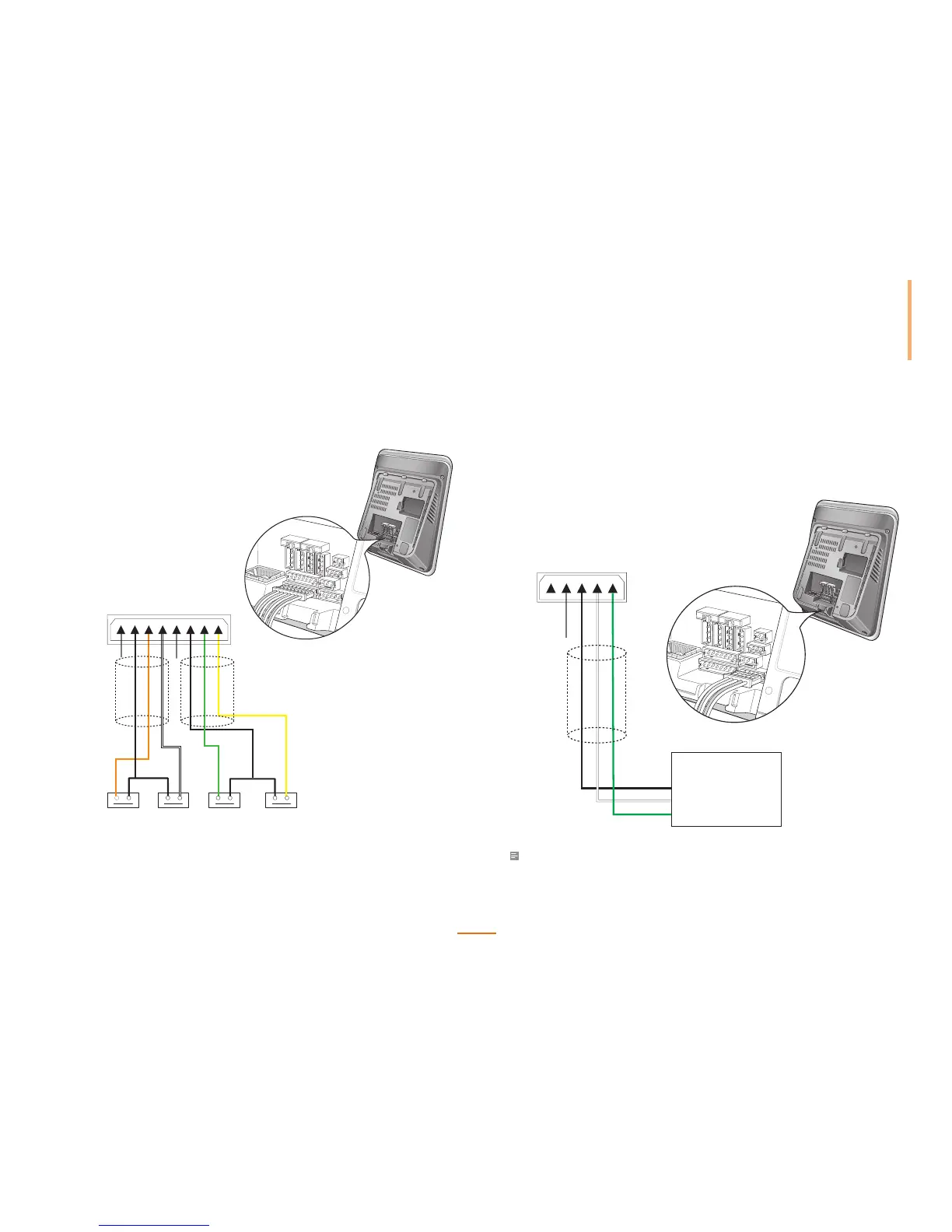
Input Connection
PIN8: Shield GND (Gray)
PIN7: Switch GND (Black)
PIN6: Switch Input3 (Orange)
PIN5: Switch Input2 (White)
PIN4: Shield GND (Gray)
PIN3: Switch GND (Black)
PIN2: Switch Input1 (Green)
PIN1: Switch Input0 (Yellow)
Switch
Input 3
Switch
Input 2
Switch
Input 1
Switch
Input 0
Cable Shield
(Optional)
8 7 6 5 4 3 2 1
Cable Shield
(Optional)
Wiegand Connections
Connecting a Wiegand Input
PIN3: Wiegand GND (Black)
Card Reader
GND
Wiegand Output.Data1
Wiegand Output.Data0
PIN2: Wiegand DATA1 (White)
PIN1: Wiegand DATA0 (Green)
3 2 1
Cable Shield
(Optional)
Note
The Wiegand port can be set as either input or output via the BioStar software.

Table of Contents

Other manuals for suprema FaceStation

Related product manuals