Installation
DIGIgarde PLUS User Guide
Last Change Copyright
©
2012 TDSi
13 May, 2016 Page 17
Fail
FailFail
Fail-
--
-Op
OpOp
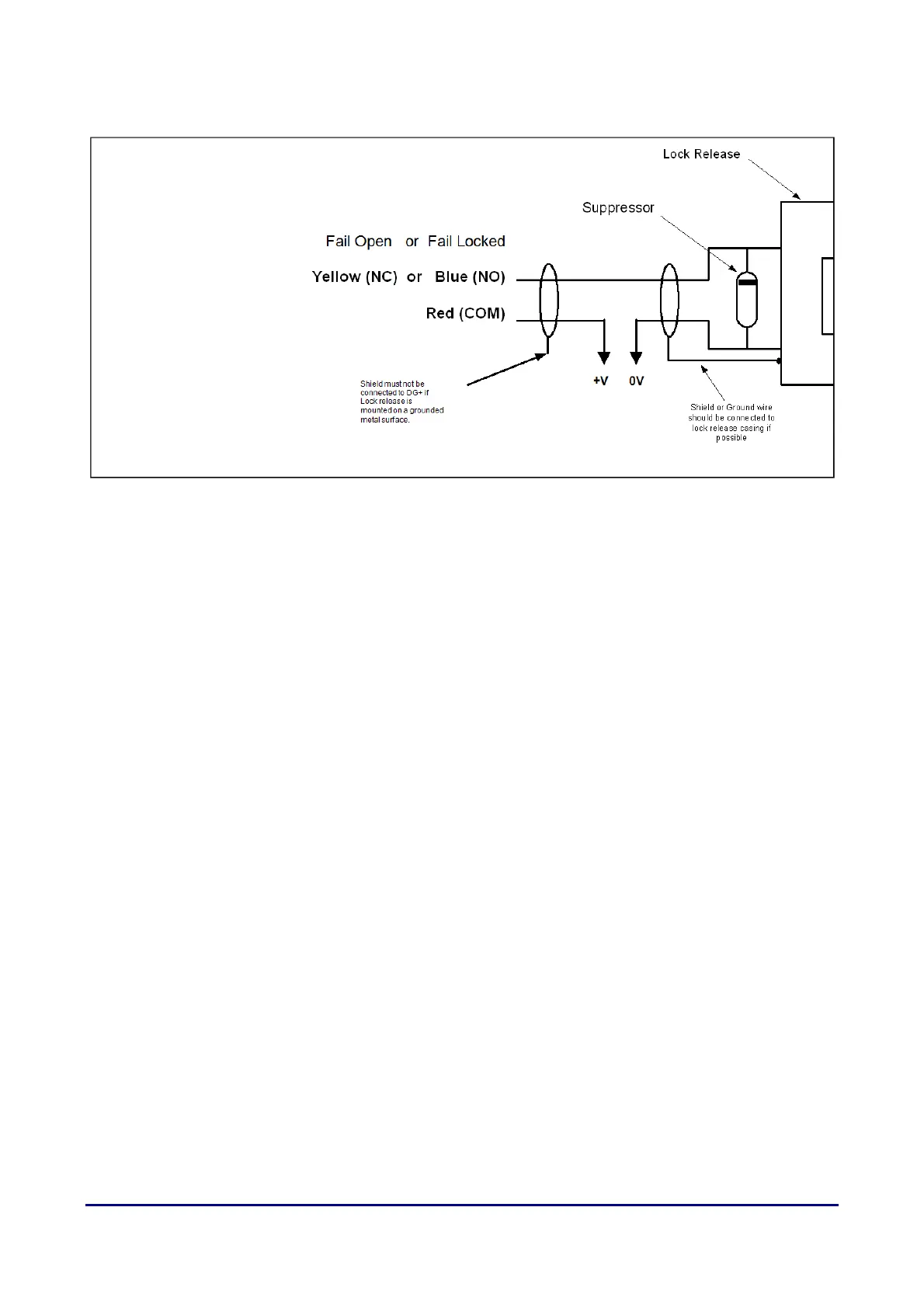
Open or Fail
en or Failen or Fail
en or Fail-
--
-Locked Connection
Locked ConnectionLocked Connection
Locked Connection
Figure 9 Fail-Open or Fail-Locked door connections
In a Fail-Open (or Fail-Safe) connection, the door is opened in the event of a power
failure. In a Fail-Locked connection, the door is locked in the event of a power
failure.
Door Sensor Connection
Door Sensor ConnectionDoor Sensor Connection
Door Sensor Connection
Connect the door sensor to the White (SENSOR) and Black (GND) wires in the
Lock bundle.
Most door sensors have contacts that are closed circuit when the door is closed.
Please contact TDSi if you have sensors that are open circuit when the door is
closed.
Egress button
Egress buttonEgress button
Egress button
Connect the Egress button to the Grey wire (BUTTON) and the Black (GND) wire
in the LOCK bundle. This will activate the lock relay and open its associated door.



 To Next Page