5. RAM CLEAR, DATA CLEAR, STATUS CLEAR
EO3-11106
5.2 DATA Clear
5- 2
5.2 DATA Clear
CAUTION!
This clear operation deletes all sales data of any operation sequence stored in the memory of the
ECR.
Performing the DATA Clear operation will clear only the sales data accumulated in the memory of the ECR
(report memory), however, the programmed data will not be cleared. By this operation, all sales data including
non-resettable totals and counters, Reset Report Counts, and Receipt Consecutive No. are cleared.
1. Unplug the ECR to turn OFF.
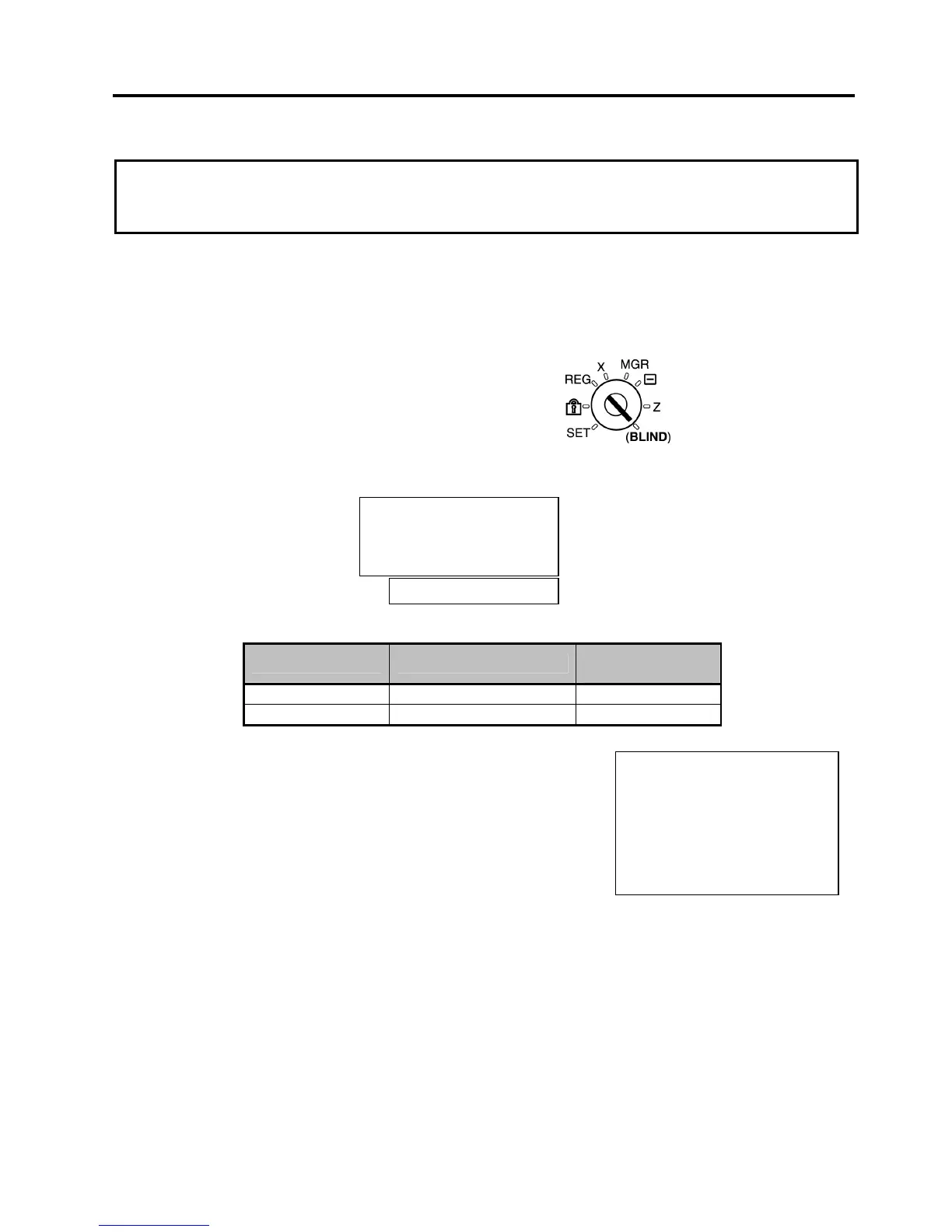
2. Use the S key to turn the Mode Lock to “BLIND” position.
3. Plug in the ECR to turn ON, causing the following message is displayed.
4. Depress the following Numeric key.
Numeric Key Destination Code
Zero-suppress
Form
[1] IT . - - 0
[3] QP 0 . 0 0
5. Depress the [AT/TL] key.
6. A DATA Clear receipt is issued.
NOTES: 1. When the DATA clear operation is performed, the condition “after all sales data reset” is obtained,
just as “Status Clear”. Therefore, no Reset Report should be taken for starting any programming
operation.
2. None of PLU table, stock status, and stock memory are cleared.
31-10-2005 MON #0
DATA-C
0001 13:44TM
Please push [AT/TL]
or please perform a
RAM-C / DATA-C
0


 To Next Page
 Loading...







