o Assign 1.keypad to A partition, 2.keypad to B partition 31 01: 1, 31 02: 2
o Close S.P.T and Arm/Disarm from Foreign Keypad feature(if enabled) 10 01 1 , 4 not selected
o Assign Siren partition to A 11 01 address:1
o Adjust Siren Cutting time 11 02 =time
o Select PGM1 type as Siren 13 01 = 6
o Select PGM1 partitions as B 13 02= 2
o Enter user phone numbers 06 01-06 address
(When the phone numbers are entered, dialer actives automatically 2
nd
option at address 50 01)
o Select phone numbers of A Partition 50 17
o Select phone numbers of B Partition 50 18
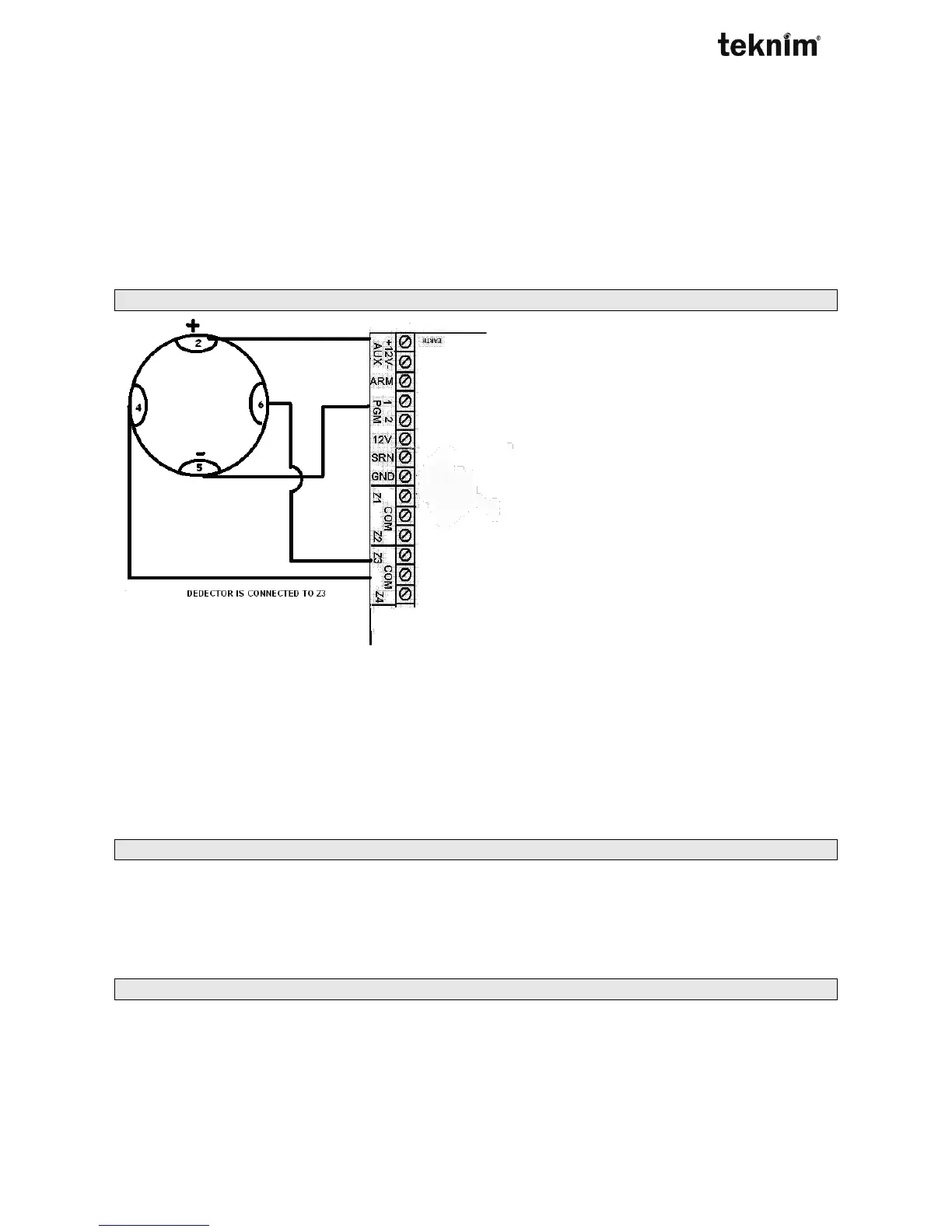
7.4. CONNECTING FIRE DETECTOR
Do following steps to connect fire detector to VAP404 Panel ;
o Connect contact outputs of fire detector to zone and connect power(+) to AUX(+) and power(-) to PGM1
o It is not recommended to connect more than 2 to the PGM.
o PGM1 output must be defaulted. 10 02 = 2 is not selected (NO)
o Select PGM1 type as supply fire detector 13 01 = 5
o Assign detector reset time in seconds 13 02 = time
o Select type of zone connected to fire detector contacts 22 03= 6
Note: User can cancel fire alarm by pressing [0 (long)] or by entering user code.
7.5. CONNECTTING FIRE SIREN
Do following steps to connect fire siren to PGM1 output ;
o Connect siren to PGM1
o Select PGM1output type (NC/NO) 10 02 =2
o Select PGM1 as fire siren 13 01 = 4
7.6. AUTOMATIC ARM PARTITIONS on NO ACTIVITY
Do following steps;
o Select partitions that will be armed 12 07= partitions
o Set No activity time 12 08= time



 To Next Page