RECEIVER BATTERIES
Change Receiver Batteries
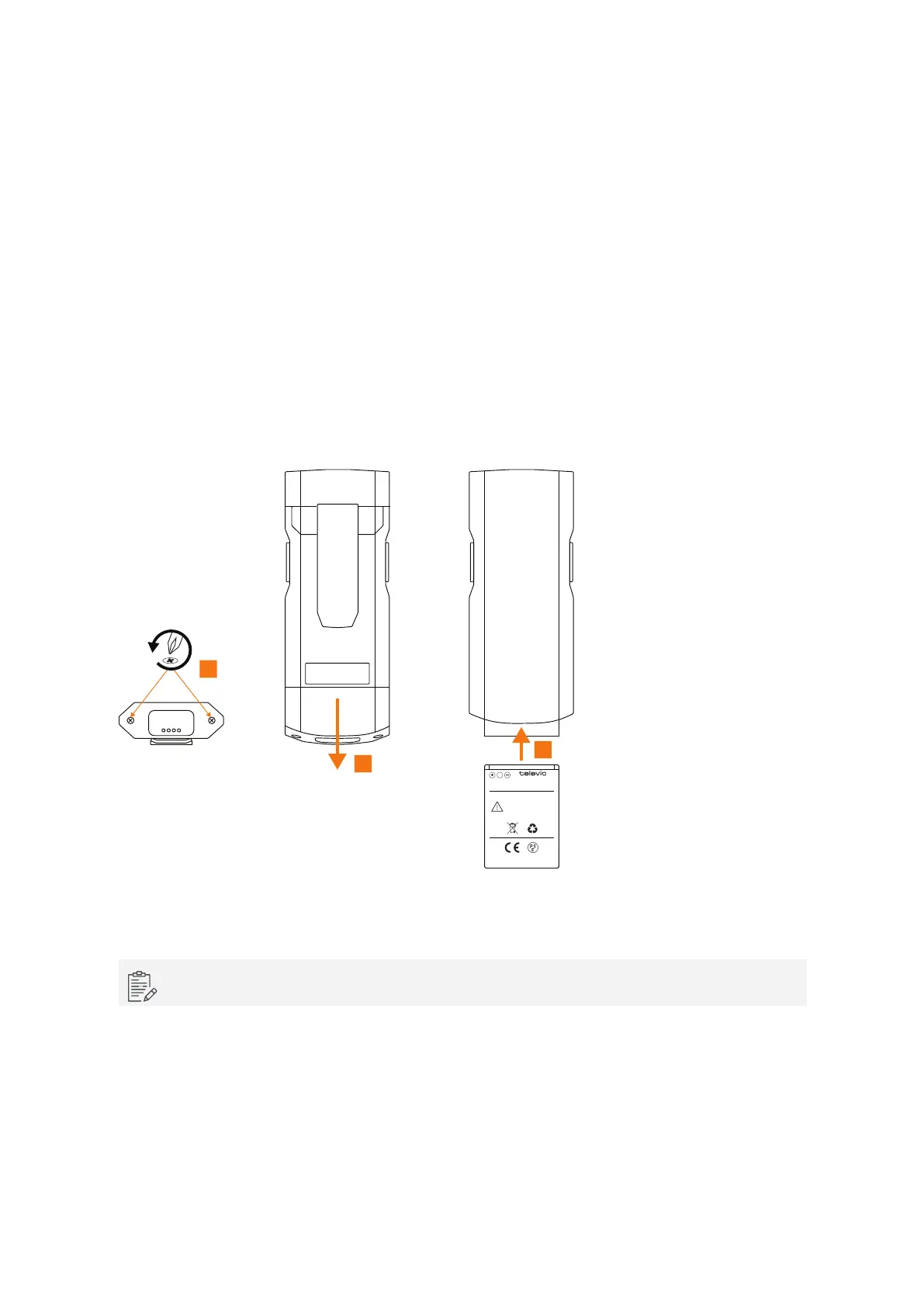
To change the battery of the receiver follow the procedure described below:
1. Loosen the screws from the bottom of the receiver using a TX6 screwdriver.
2. Remove the bottom part of the receiver.
3. Hold the receiver upright to remove the battery from the receiver.
4. Insert the new battery with the text and the front of the receiver facing the same way.
5. Reattach the bottom of the receiver and tighten the screws.
conference
CAUTION:
DO NOT INCINERATE,
DISASSEMBLE, SHORT,
HEAT ABOVE 60°C/140°F,
USE DESIGNATED
CHARGER ONLY
Li -ion Re charge abl e B att ery
1
2
4
Figure 1-27 How to change the battery of the Lingua IR receiver
If you insert the batteries incorrect, you will not be able to reattach the bottom of the receiver.
RECEIV ER BATTERIES 55



 To Next Page