SET UP DANTE™
Prepare The System For Dante™ Configuration
If your setup requires more than 11 languages see the procedure described in "Set up Dante™
routing with more than 11 languages" on page59
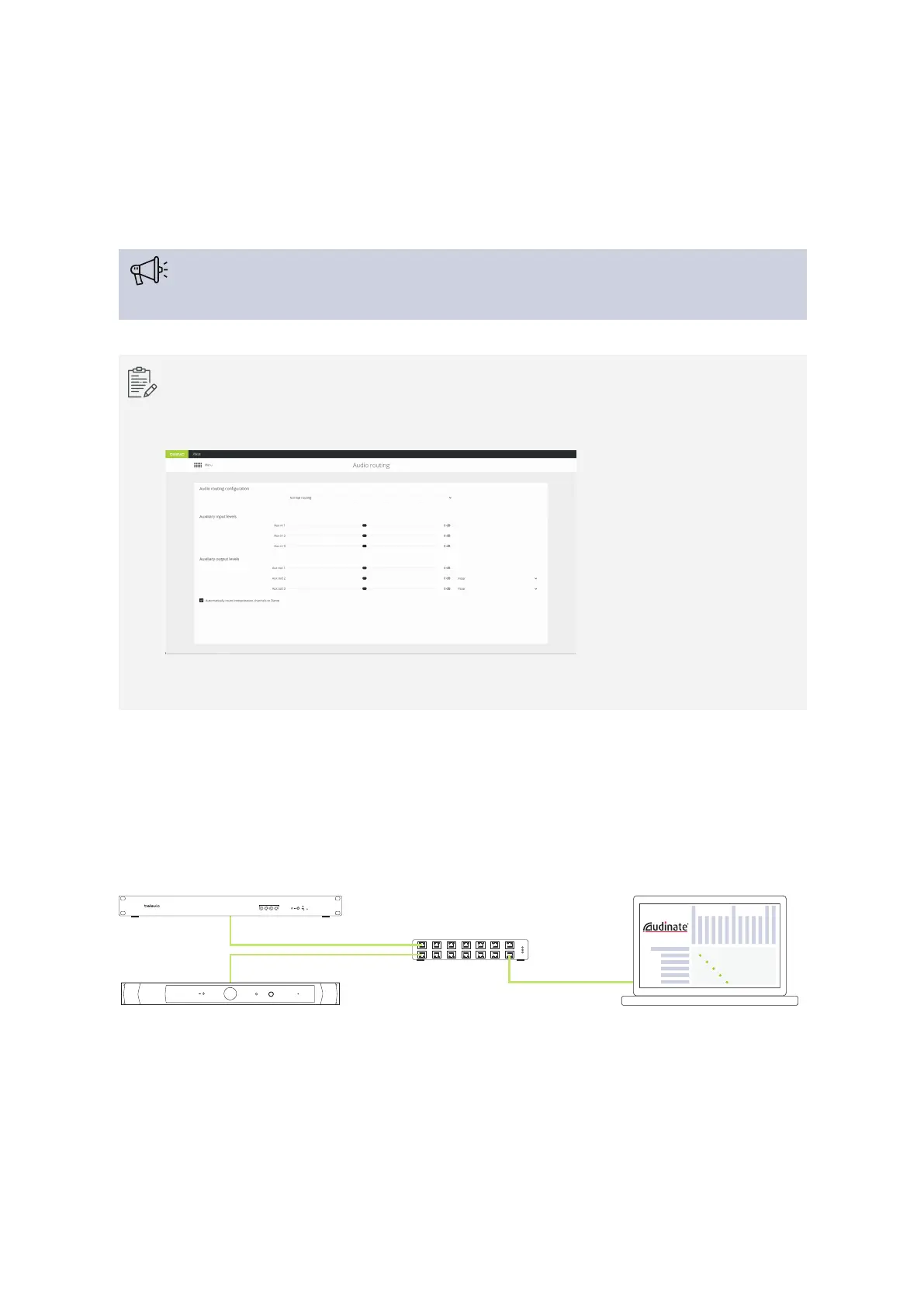
If you use the Plixus network with Core functionality, you need to activate the option
Automatically route interpretation channels to Dante in the Plixus Core web server. With
this option all interpretation channels will automatically be assigned to a Dante™ channel.
Note that this option is only available when your setup has 11 languages or less.
When you connect the Lingua IR transmitter to another conference system with Dante™, you need to
configure some settings before you can use the system. To configure these settings you have to connect all
devices to same network. Use a network switch to connect the central unit of the conference system, the
Lingua IR transmitter and the computer running the Dante™ controller (you can download this from the
Audinate website).
Netwotk Switch
Central unit
Lingua IR Transmitter Dante™ Controller
televic
REC
Primary Dante™ port
Primary Dante™ port
Figure 1-28 All Dante™ devices need to be connected before you can configure the Dante™ routing
SET UP DANTE™ 57


 To Next Page