CONNECT TO CONFERENCE SYSTEM WITH DANTE
It is possible to connect with conference system from other manufacturers that provide a Dante™ on their
system. Simply connect the conference system to the Lingua IR transmitter using an LAN cable together
with the Dante™ connections on the devices. Configure the Dante™ routing as described in "Set up
Dante™" on page57
CONNECT TO CONFERENCE SYSTEM WITHOUT DANTE
When you have an analog conference system you can still connect it to the Lingua IR system: for this you
need an analog IN to Dante™ converter. Connect the analog systems to the break-in converter and then
connect Dante™ to the Lingua IR system.
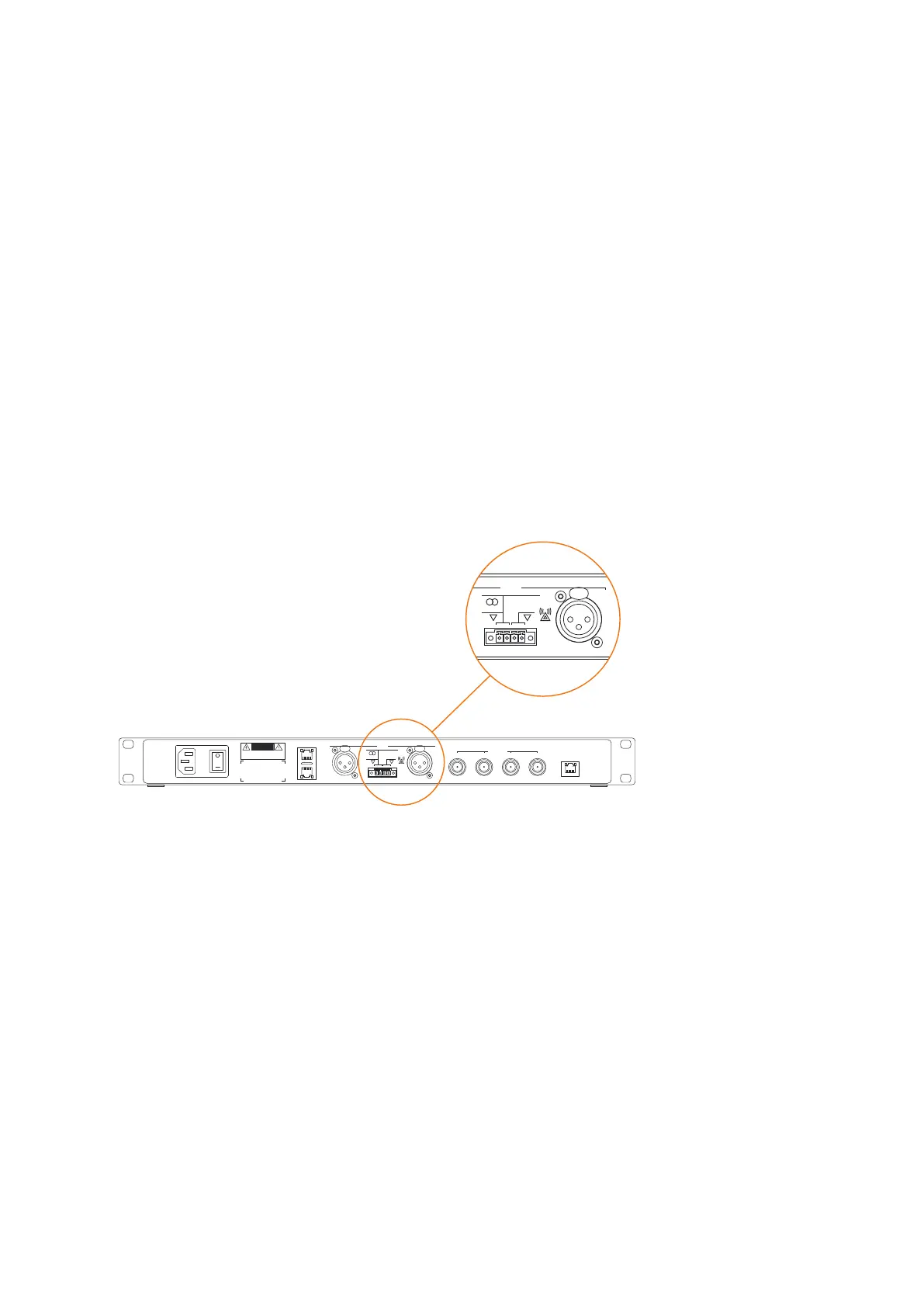
Connect To An Emergency Signal
To connect the transmitter to an emergency signal system, connect a switch (normally open) to the
emergency switch connector (AUX Right). When the switch closes then the emergency signal from the AUX
R input will override all other audio input on all channels.
DANGER
! "!
™
DANGER
!" !
Figure 1-25 Where to connect the emergency signal system
Connect To An Audio Installation
When you want to connect an external audio system to the Lingua IR system to for example play music until
the meeting starts. Connect the audio system to the AUX IN L and make sure to close the left switch of the
connector.
COUPL E LING UA IR CO MPO NENTS 53



 To Next Page