Make sure your computer does not have a fixed IP address. A Dante-enabled device
connected to a network will automatically setup its own network configuration, including its IP
address.
If the network has a DHCP server, which may be the case for installed networks, it will receive its
IP configuration using the standard DHCP protocol.
On a network without a DHCP server, which may be the case for temporary or smaller networks,
the Dante-enabled device will automatically assign itself an address using link local protocols, in
the same way PCs and printers often do.
Configure Dante™ Routing
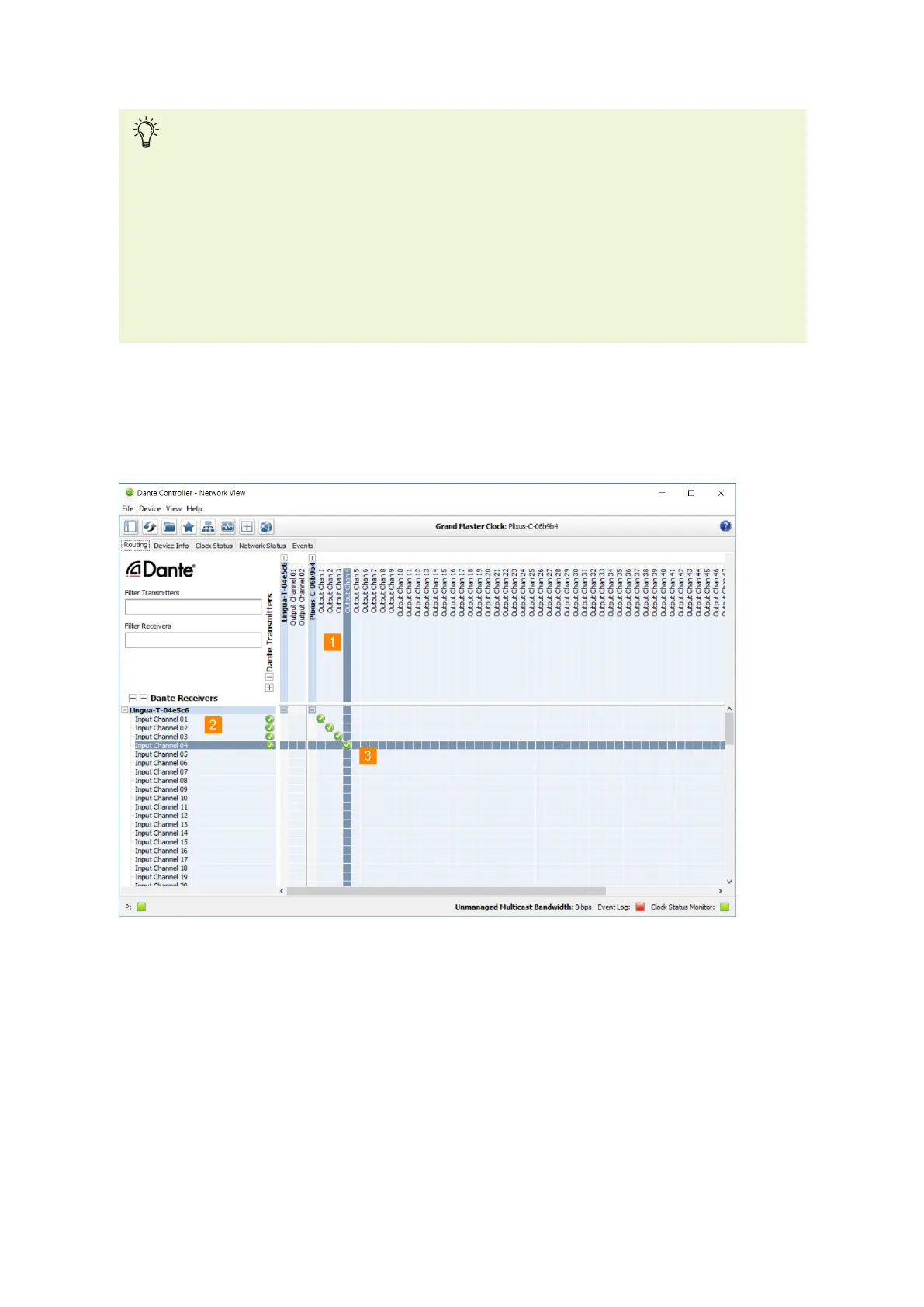
Once the Dante™ devices are connected, you need to route the Dante™ channels from your input system
to the Dante™ channels of the transmitter.
Figure 1-29 How to route the output from the conference system to the input of the Lingua IR transmitter
The Routing tab of the controller shows all Dante™ devices with their inputs and outputs. The top part
shows the outputs. Here you can find the output from your conference system (1). The bottom part on
the left hold all inputs together with the Dante channels of the transmitter (40 channels) (2).
SET UP DANTE™ 58



 To Next Page