3-26
Chapter 3
INSTALLATION AND SETTING PROCEDURES (HARDWARE)
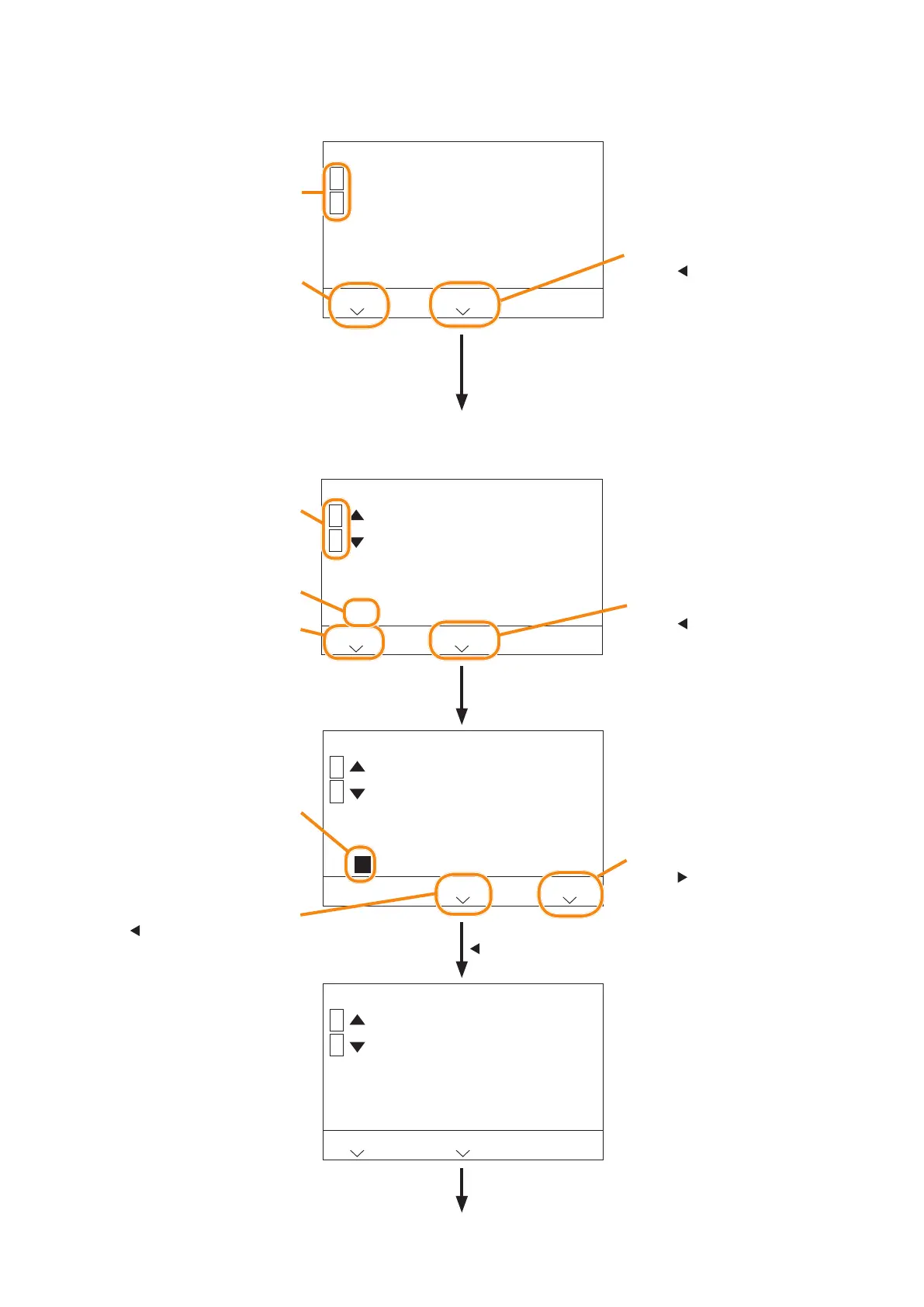
6.3.4. Basic operation on the menu screen
• On the Menu item selection screen, operate as described below.
1 Operation setting
LCD setting
Advanced setting
BACK
1
2
HOME
Press the numeric key of the
item number to select.
Represents a screen transition
by the AUX key operation.
Pressing the key when the
indication "BACK" is displayed
returns to the previous screen.
Represents a screen transition
by the key operation.
Pressing the key when the
indication "HOME" is displayed
returns to the selection screen
for the rst menu item.
Repeat the numeric
key operation to
select.
To the selection screen of the setting contents
• On the Setting contents selection screen, operate as described below.
1-1-1 Contrast setting
[ 6 ]
BACK
1
2
HOME
1-1-1 Contrast setting
[ 5 ]
BACK
1
2
HOME
1-1-1 Contrast setting
[ 6 ]
1
2
CANCEL
SET
Represents a screen transition
by the key operation.
Pressing the key when the
indication "HOME" is displayed
returns to the selection screen
for the rst menu item.
Represents a screen transition
by the
key operation.
Pressing the key when
the indication "CANCEL"
is displayed returns to the
original value without changing
the setting contents.
Represents a screen transition
by the AUX key operation.
Pressing the key when the
indication "BACK" is displayed
returns to the previous screen.
The value selected with the
numeric key is displayed.
Not updated yet in this state.
Represents a screen transition
by the
key operation.
Pressing the key when the
indication "SET" is displayed
updates the setting contents to
the currently displayed value.
Press the numeric key of this
number to select the setting
contents.
Displays the currently set value.
Select with the
numeric key.
Conrm by the
key operation.
Returns to the home screen by
repeating the AUX key operation.
To the selection screen for the rst menu item



 To Next Page