Cable and Antenna Connections
17
P/N: 1011907-01
System Setup
Step 4: Connect Dual Antennas (HD2)
1. Mount both antennas on a rigid platform. The recommended antenna orientation is parallel to the direction
of travel; however, you can use any azimuth.
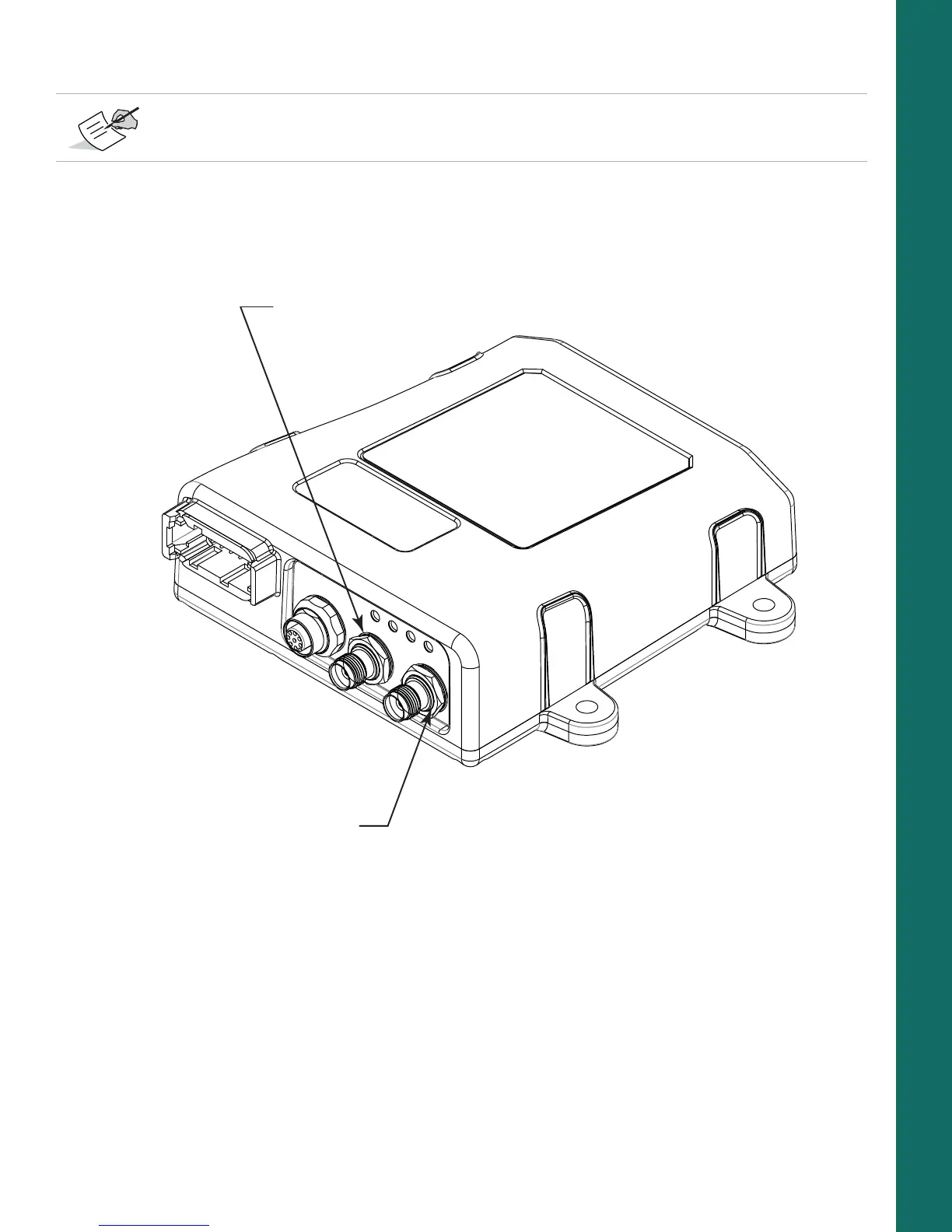
2. Connect the primary antenna cable to the rear antenna and to the primary antenna connector (Figure 15)
of the MR-2.
Figure 15: Antenna Connectors
3. Connect the secondary antenna cable to the front antenna and the secondary antenna connector of the
MR-2.
4. Enable HD2 moving base corrections at the primary antenna, and HD2 heading determination at the
secondary antenna. See the
B125 Integrator’s Guide
for more information.
Step 5: Connect to a PPS Signal
1. Connect the PPS connector on the cable harness to a PPS input port of a suitable instrument.
2. Configure the PPS output with GRIL commands. To do this, see the
B125 Integrator’s Guide
.
HD2 Heading Determination (OCTO) OAF options must be enabled, in addition to a minimum of GPS
L1/L2 signal tracking.
Primary Antenna
Secondary Antenna



 To Next Page