4: INSTALLATION
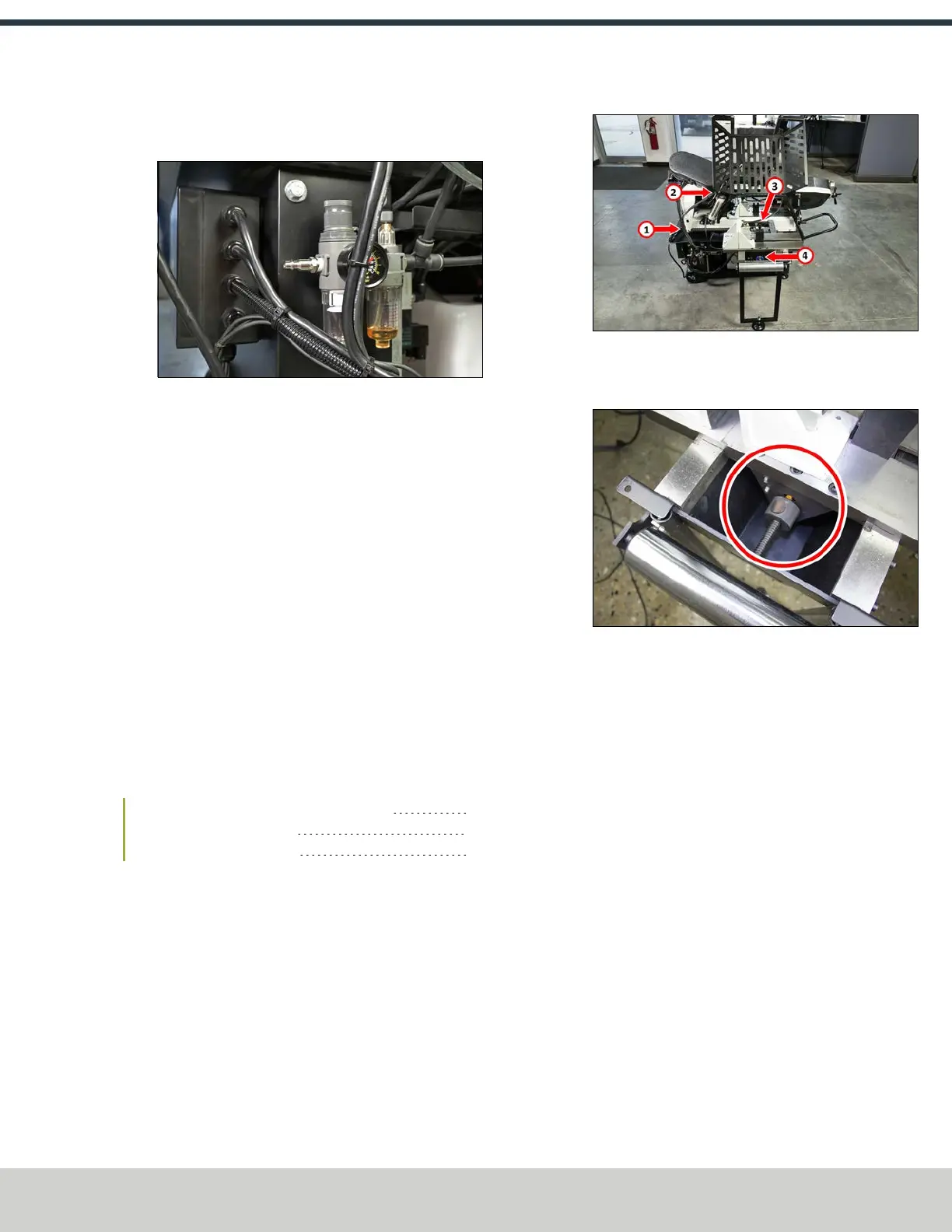
2. Install the provided fitting to the input port on the FRL
with an adjustable wrench.
Figure 4-18: Provided air fitting installed on the FRL.
3. Connect the air line from your site to the input port on
the FRLFilter-Regulator-Lubricator.
Air Requirements
l
Air Pressure Between 90 psi and 120 psi (620 kPa to
825 kPa).
If the air supply is more than 120 psi (825 kPa), you must
use a regulator.
l
Dry Air We recommend using a compressed air dryer,
desiccator, or filter between the air compressor and the
machine.
l
Lubricated Air You must lubricate the air with air tool
oil.
4.5 VERIFY THE INSTALLATION
After setting up the machine you must verify the instillation.
Complete the following steps in the order listed:
4.5.1 Verify the Proximity Sensor Installation 25
4.5.2 Power On the Machine 25
4.5.3 Power Off the Machine 26
4.5.1 Verify the Proximity Sensor Installation
To properly validate the installation of your machine, you must
verify that the proximity sensors are correctly installed.
To verify the proximity sensor installation:
1. Find the four proximity sensors on the machine as shown
in the following image.
Figure 4-19: Proximity sensors on the bandsaw.
2. Inspect each proximity sensor to verify that there's a
0.55 mm to 0.75 mm gap.
Figure 4-20: Proximity sensor.
3. You've successfully verified the proximity sensor
installation. Now, you must verify the machine's
electronics. Go to "Power On the Machine" (below).
4.5.2 Power On the Machine
To properly validate the installation of your machine, you must
understand how to power on and off the machine and use the
controls.
To power on the machine:
1. Connect the machine's mains power cable to the verified
electrical service.
2. Find the Main Disconnect switch, and then turn it to ON.
Mains power is now connected to the machine.
3. Rotate the Emergency Stop button on the operator panel
one-quarter turn clockwise to release it.
4. Verify that the lights on the control panel come on.
5. You've successfully verified that you can power on your
machine. Now, you must verify that you can power off
the machine. Go to "Power Off the Machine" (on the
next page).
©Tormach® 2024
Specifications subject to change without notice.
Page 25 UM10825: AF50+ Autofeed Bandsaw Operator's Manual (Version
0324A)
For the most recent version, see tormach.com/support


 To Next Page