E6582175
A-12
1
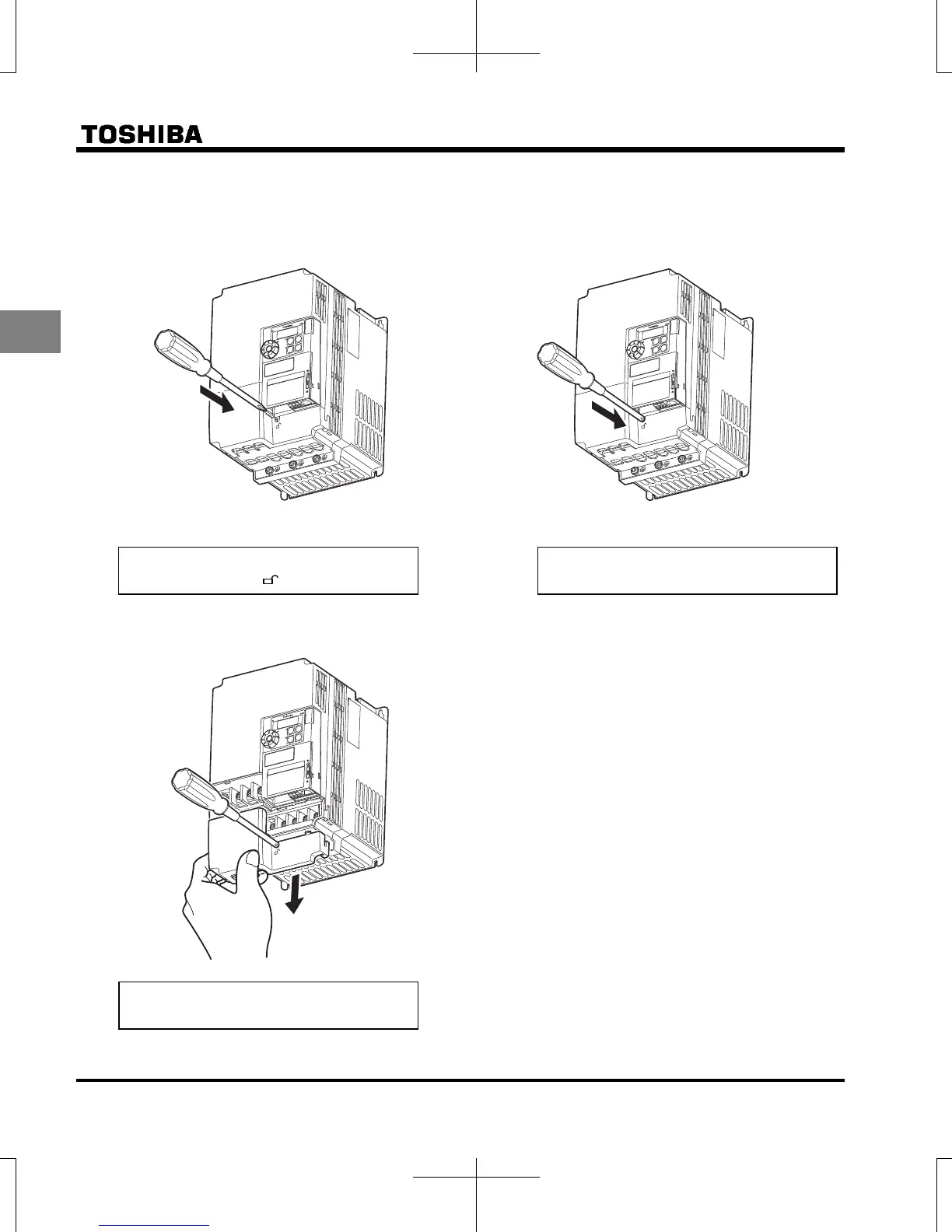
(6) Removing the power terminal cover (VFS15-2055PM-W1 to 2150PM-W1, VFS15-4055PL-W1 to 4150PL-W1)
● After wiring is complete, be sure to restore the
terminal cover to its original position.
1)
2)
3)
Insert a screwdriver or other thin object into the
hole indicated with the
mark.
Press in on the screwdriver.
While pressing on the screwdriver, slide the
terminal cover downward to remove it.
E
AS
Y
R
F
S
S
1
S
2
M
O
D
E
RUN
R
U
N
S
T
A
T
U
S
P
R
G
M
O
N
S
T
O
P
%
Hz
EASY
R
F
S
S
1
S
2
M
O
D
E
RUN
R
U
N
S
T
A
T
U
S
P
R
G
M
O
N
S
T
O
P
%
Hz
E
A
S
Y
R
F
S
S
1
S
2
M
O
D
E
R
U
N
R
U
N
S
T
A
T
U
S
P
R
G
M
O
N
S
TO
P
%
H
z


 To Next Page
 Loading...












