TPT Wirebonder www.tpt.de Page 19 of 53 September 2016
18. Loop Profile Samples
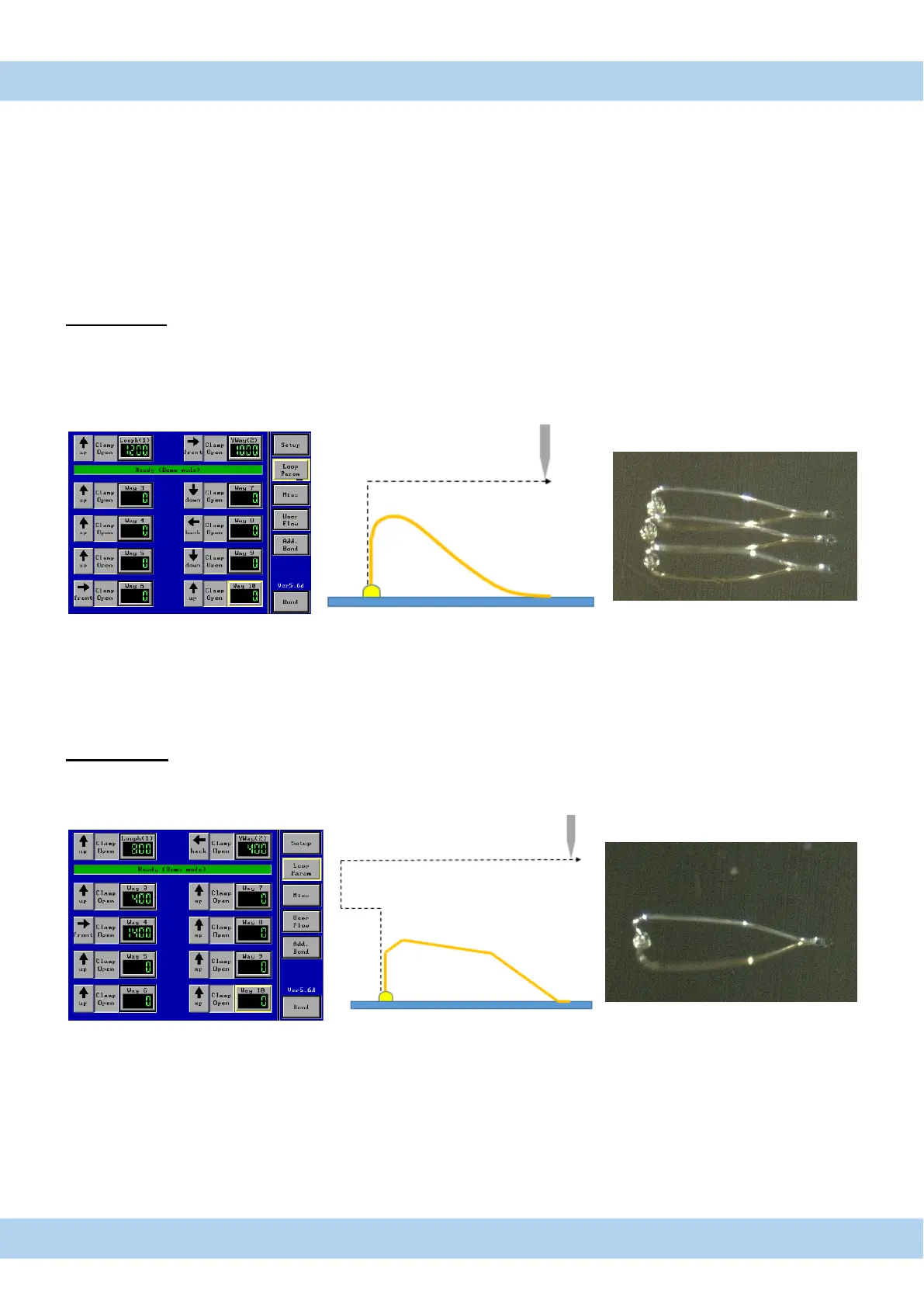
Different applications require different loop shapes. To perform the desired loop, it is necessary to fill in suitable
values in the Advanced Settings - Loop Parameter Menu. Different shapes lead to different characteristics of the
bond, for example increasing its stability. We will now provide you different Loop Shapes from basic settings to a
more complex program of a bond. Therefore, this manual displays the path of the capillary, the necessary settings
to perform that path and the Loop Shape as the output of the programming.
1. Basic Loop
By programming the capillary movement upwards and to the front, the operator will perform a Basic Loop.
Increasing the value of way 2 will lead to a longer loop. Be aware that this may also cause an increasing amount of
tension between the ball and the wire because the angle between those has also been changed. Aside from the
tension, the longer the loop will be the more stability will be lost. The height of the loop can be adjusted by altering
the value of way 1.
Reverse Loop
In addition to the Basic Loop, the capillary moves backwards before it reaches its desired height. The loop gets a
more stable shape, provided by the new set of angles of the wire. With this shape it is possible to realize longer
loops without losing its stability.



 To Next Page