Instruments
53
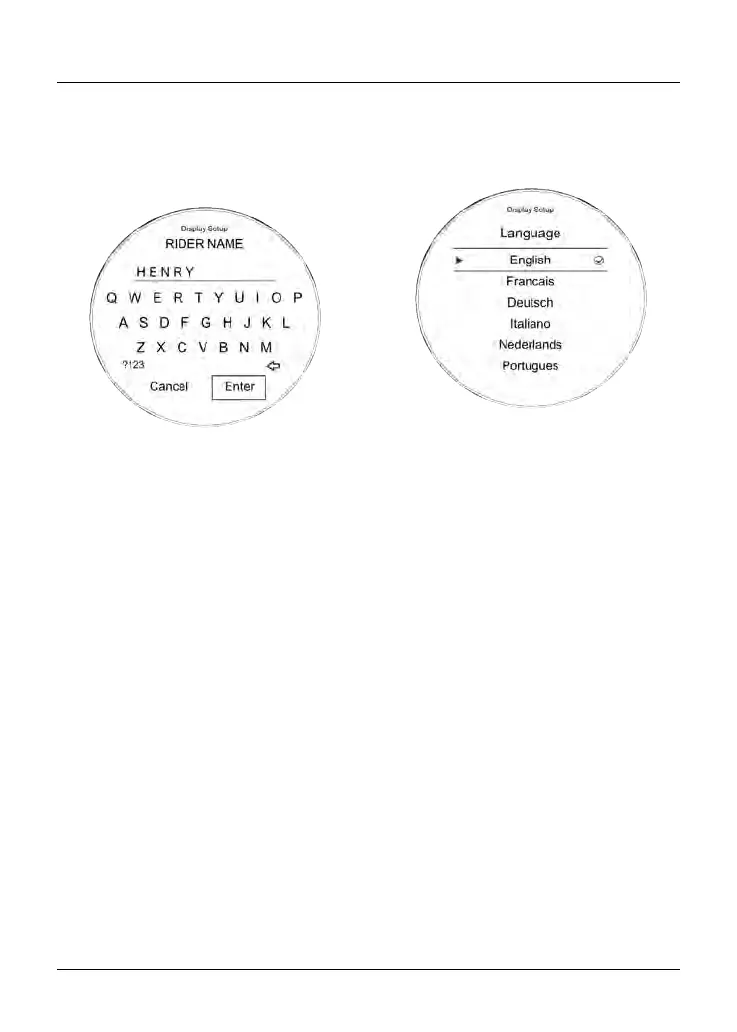
Display Setup - Rider Name
This menu allows the rider name to
be entered in to the instrument panel
system and shown in the welcome/start
up display screen.
To enter a rider's name:
•
From the Display Setup menu, push
the joystick down to select Rider
Name and press the joystick center
to confirm.
•
Using the joystick, navigate the
keyboard and select the first letter
of the rider's name. Press the
joystick button to confirm. The letter
appears at the top of the keyboard.
•
Repeat the procedure until the
whole rider name has been selected.
There is a character limit of 13
characters.
•
Selecting ?123 shows a new
keyboard of symbols and numbers
to select from.
•
Once the rider's name has been
completed, select Enter and click on
the joystick button to confirm.
•
The rider's name will now appear on
the welcome screen the next time
the instruments are started.
Display Setup - Language
There are several different languages
that can be selected to be shown in the
instrument display screen.
To select a different language:
• From the Display Setup menu,
push the joystick down to select
Language and press the joystick
center to confirm.
•
Push the joystick down/up until the
required language is selected.
The following options are available:
–
English
– French
– German
– Italian
– Dutch
– Portuguese
– Spanish
– Swedish.
• Press the joystick center to select/
deselect the required language.










 To Next Page