UniPOS Fire Extinguishing Control Panel FS5200Е
Instruction Manual Page 24
Revision 7/06.12 of 63
In Fire Condition Stage II and expired evacuation time the fire extinguishing control panel
activates the extinguishing devices and the LED indicator (Fire Stage II) illuminates in red
continuous light.
The indicator (Manual Mode) or the indicator (Manual-Automatic Mode) illuminates in
yellow light depending on the selected mode of operation.
The local sounder produces continuous signal. If the sound signaling is suppressed by button
(Alarm), the LED indicator of the button illuminates in continuous red light.
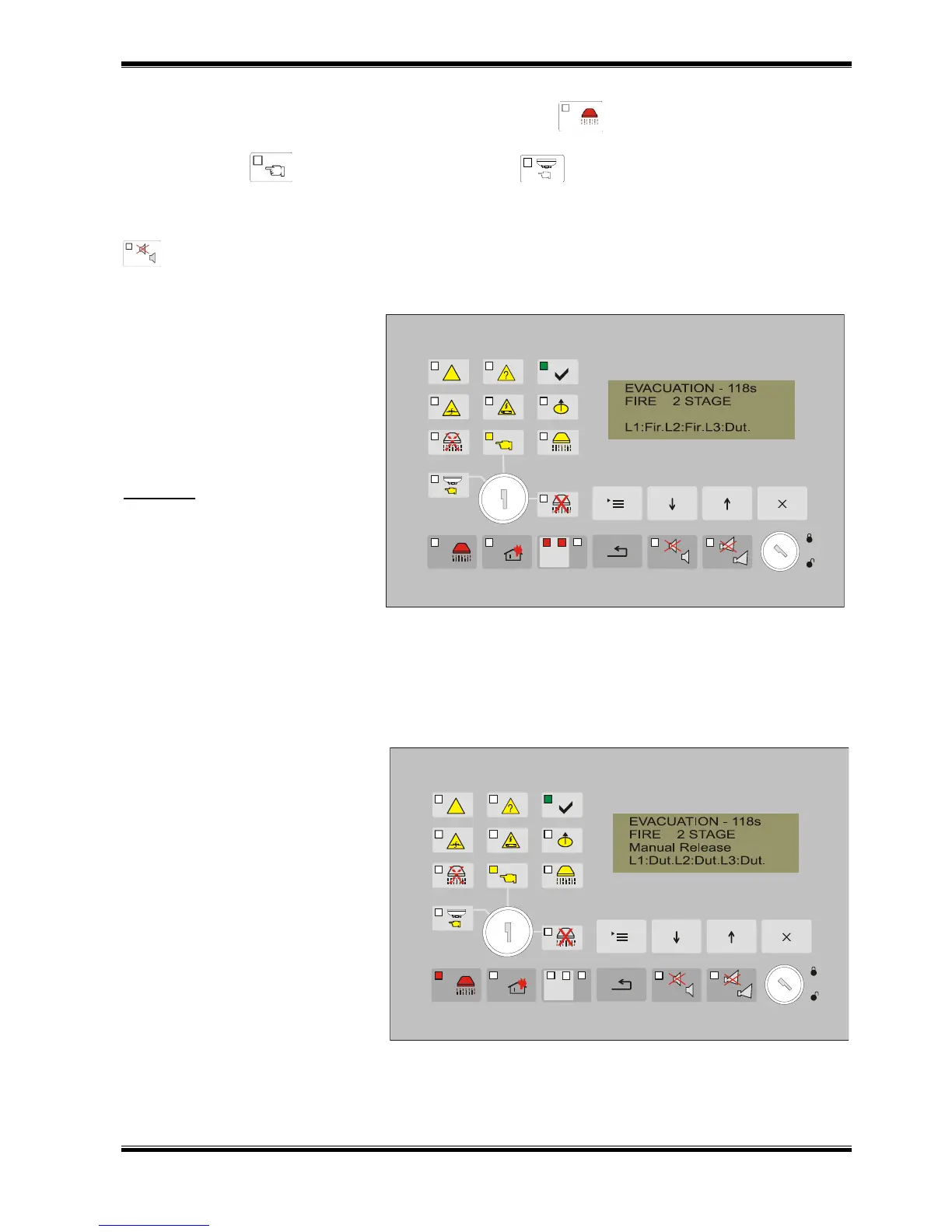
8.2.2. Text messages during the evacuation step and fire along both lines.
The display shows:
The message EVACUATION
and the remaining time for the
activation of the extinguishing
devices
message FIRE STAGE 2 and
information for the current status
of the lines:
Example: Fire condition along line
1 and line 2. The fire extinguishing
control panel is in evacuation
phase. The indicator for Fire
condition Stage II illuminates in
flashing red light. The individual
indicators for line 1 and line 2 are
illuminated too.
Text message for the phase of fire alarm, the remaining time for activation of the extinguishing
devices and the current status of the lines is visualized on the display. The local sounder produces
continuous signal. Potential free relays Rele 2St and Rele Fire are activated. Voltage 28V DC is
supplied to the sounder output S2.
8.2.3. Text messages during the evacuation step and manual button activation.
The display shows:
The message EVACUATION
and the remaining time for the
activation of the extinguishing
devices
message FIRE STAGE 2
Message showing manual
activation
and information for the current
status of the lines
8.2.4. Text messages when the extinguishing device is activated.



 To Next Page