Advanced Digital Video Platform Hybrid-DVR User’s Guide
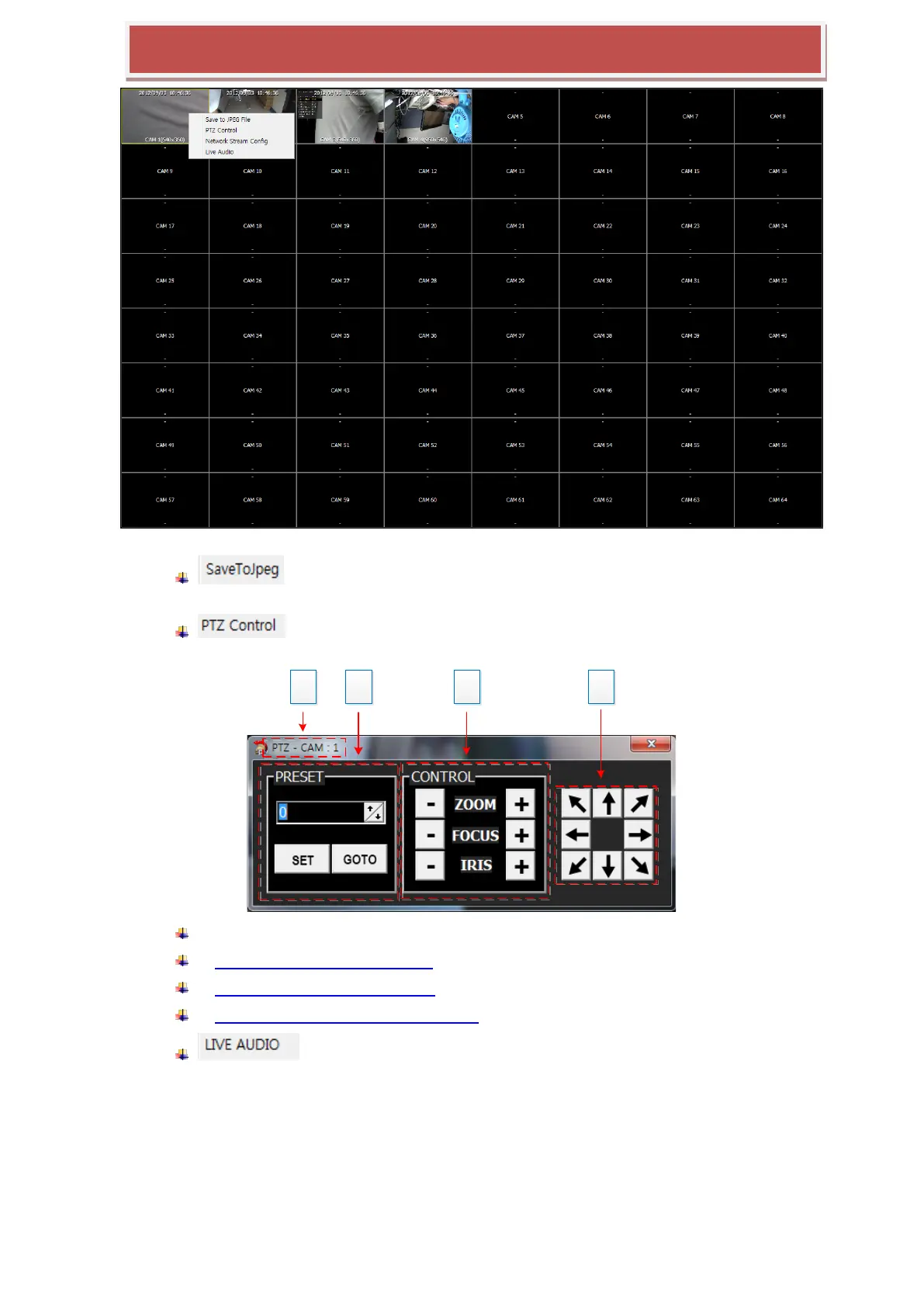
: Save the current video of the selected channel with the yellow border
into the PC as a JPEG file.
: Open the PTZ control panel, which controls the PTZ camera of the
selected channel.
1: Camera Channel number which is currently selected.
2: PRESET OPERATION OF PTZ
3: ZOOM/FOCUS/IRIS CONTROL
4: DIRECTION CONTROL (PAN & TILT)
: You can hear the audio from the selected camera.
7.4.5.5 HYBRID-DVR List
The „HYBRID-DVR List‟ shows the HYBRID-DVRs registered using the „CONNECTION MANAGER‟. On the
HYBRID-DVR List panel, you can connect/disconnect the HYBRID-DVR, execute the Player for the remote
searching and playback, and see the status information of HYBRID-DVR.



 To Next Page