Vacuum Packaging Machine VC999 K7
Operation
2008-11-26 Art.-No. 592.016 Page 47/121
9.5 Step 0
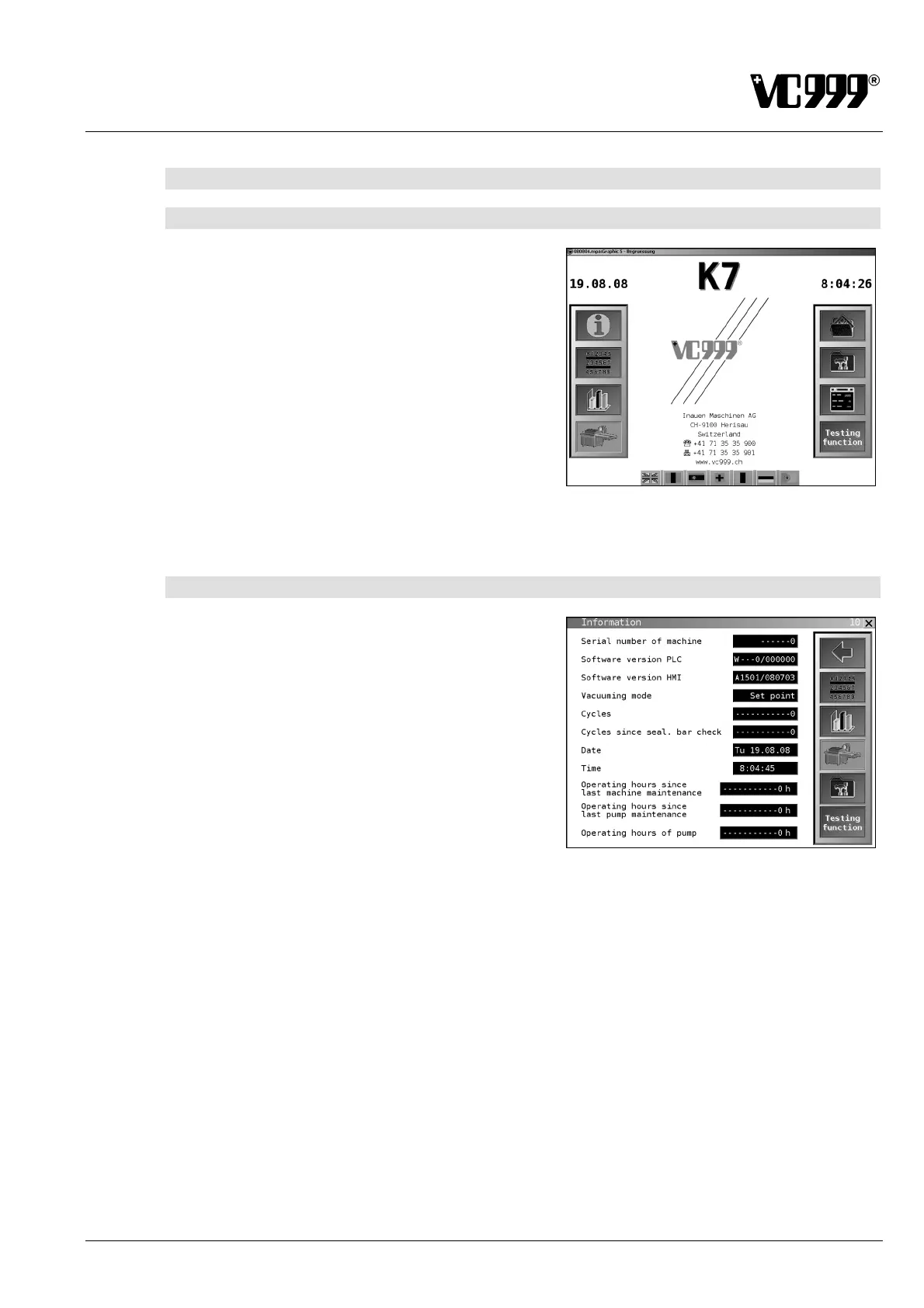
9.5.1 Mask 00: Start-up
This mask appears after switching on the machine if the
machine is in the initial position.
If the machine is not in the initial position, an alarm mes-
sage appears.
Dialog language
Press the country flag at the bottom of the screen to set
the desired dialog language.
Fig. 9/9
9.5.2 Mask 10: Information
This mask contains machine-specific information and the
currently set vacuuming mode.
It also displays information which is required when con-
tacting the VC999 Customer Service Department.
Date / Time
The date and time can be changed in step 2.
Fig. 9/10
Procedure:
• Unlock step 2. The procedure is described in section "Operating display" under "Unlocking steps".
• Press the input field after "Date" or "Time".
• Enter the "Date" or "Time" via the displayed keypad.
• Lock step 2 after changing the time or date. The procedure is described in section 9.4 " Operating
display" under "Locking steps".



 To Next Page