Vacuum Packaging Machine VC999 K7
Operation
Page 42/121 Art.-No. 592.016 2008-11-26
9.4 Operating display
Operation and programming of the machine are mainly done through the interactive display.
Masks
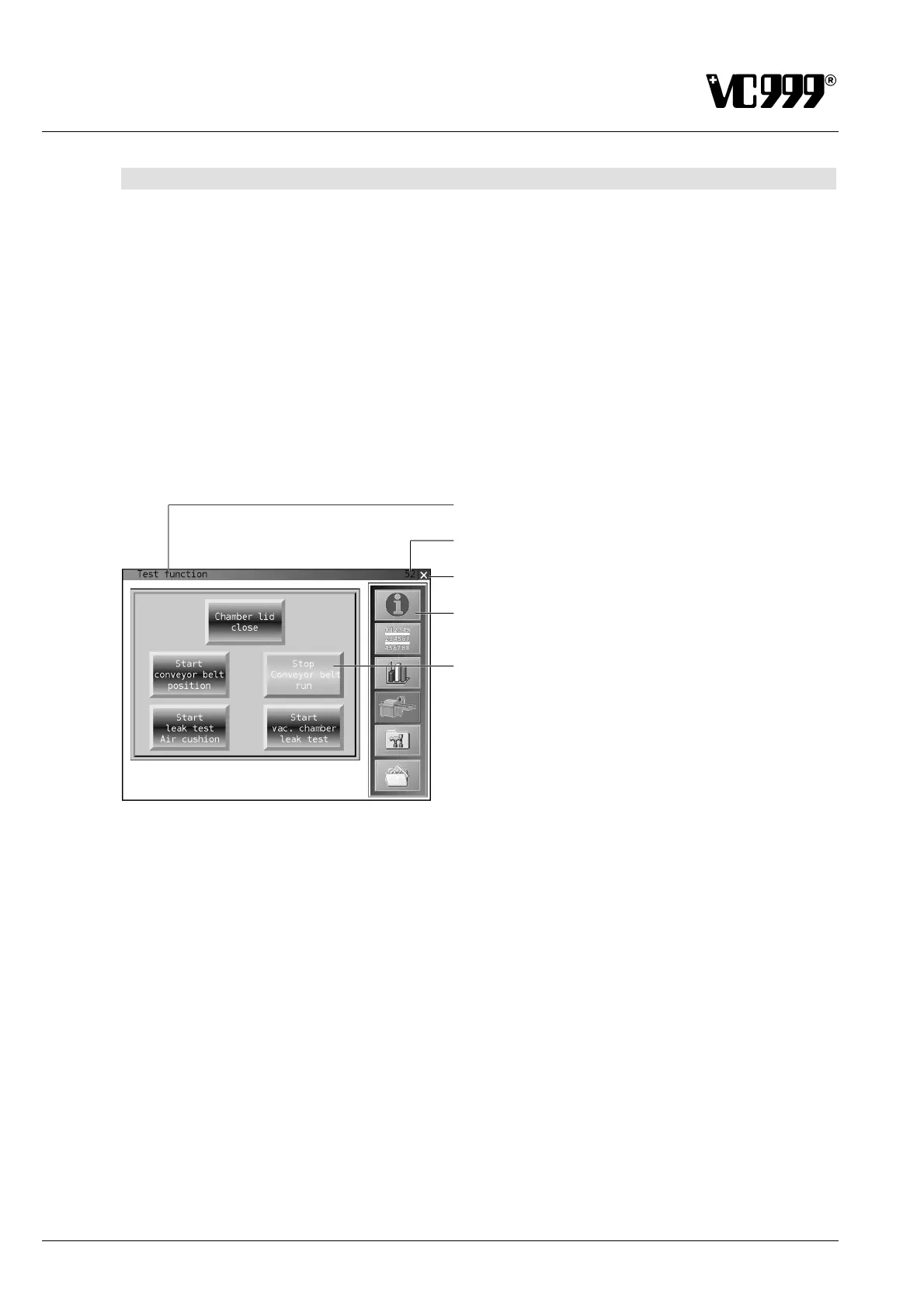
The individual displays are called masks. Each mask displays a number at the top right-hand corner.
This number is part of the mask designation.
Press the cross at the top right-hand corner to return to the start-up mask 00.
The menu for operator guidance is located on the left, right or on both sides of the masks. All the sym-
bols and their functions are explained below.
Function buttons are fields which when pressed either start or stop the function displayed on the button
or switch the function on or off. These functions are explained in the individual mask descriptions.
Fig. 9/6
Mask designation
Mask number
Return to the start-up mask 00
Menu
Function button
To provide a better overview, the mask designations within a text are in italics: Mask 10: Information.
Entry fields
Entry fields demand the entry of data. When an entry field is tipped, a keyboard appears through which
you can enter the required data.
Buttons
Buttons are boxes in the display which switch the relevant function on or off when they are activated.
Key designations are printed in bold in the following description of the masks.



 To Next Page