SmartCabinet2-E Series Computer Room Solution Product User Manual
Chapter 3 Operation Settings 67
(2)Click the Delete button, a confirmation dialog box will pop up, click the OK button, the User Security
Verification dialog box will pop up, enter the current user's login password, and click the OK button to delete
the selected user.
Notices
The admin user cannot be deleted.
⚫ Modify users
(1)Select the user to be modified in the user list;
(2)Modify user information;
(3)Click the Modify button, the User Security Verification dialog box will pop up, enter the current user's login
password, click OK button to make the modified user information take effect.
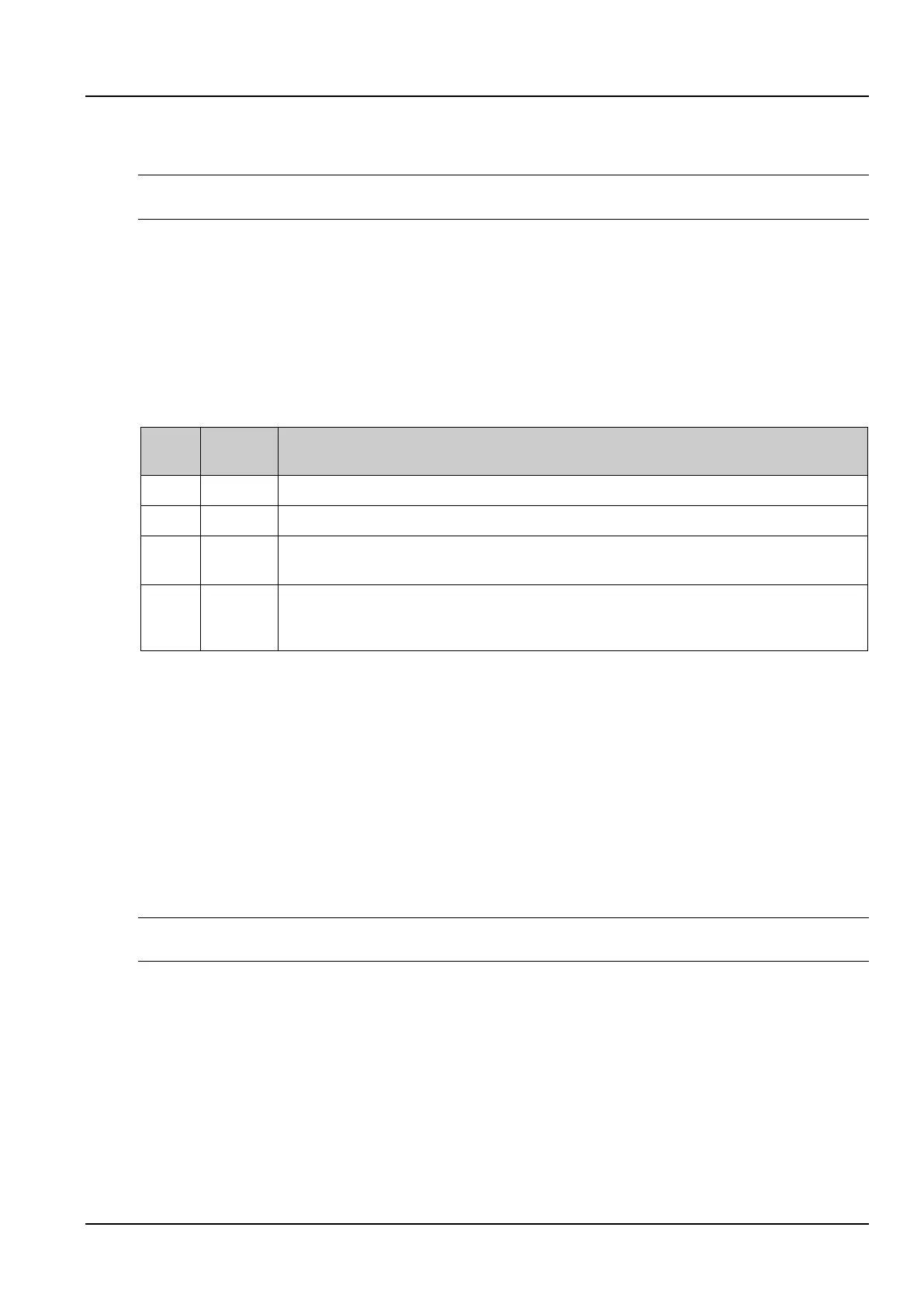
Users logging in to the intelligent monitoring system can be divided into four user groups, each with different security
levels and user authorities. For details, see the Table 3-3.
Table 3-3 User security level
All users can view device information
Operator can send control commands to intelligent devices
The engineer has the following authorities: Send control commands to the intelligent device; Browse,
control, modify parameters; Download files; Modify user’s own information
The administrator has all the authorities: Send control commands to the intelligent device; browse, control,
modify parameters; upload and download files; modify, add, delete user information; air conditioner
teamwork control parameter settings; system firmware upgrade
In the page shown in the Figure 3-94, select the current user, you can perform SMS/phone test and Email test.
Prior to using this test function, you need to configure the SMS module and the mail server for the current user. For
details, see 3.2.4 c) Alarm Notification Configuration in 5. Alarm Management.
⚫ SMS/telephone alarm notification test
Enter the Phone number and click the SMS/phone Test button to test if the current user's phone number is
connected. If the user receives a test message and a phone call, the test is successful. Otherwise, the test fails.
Please check if the current user's phone number is correct and the SMS MODEM connection is correct.
⚫ Email alarm notification test
Enter the Email address and click the Email Test button to test if the current user's email address is correct. If you
receive a test email, the test is successful, otherwise the test fails. Please check if the above information is entered
correctly.
Notices
When adding or modifying users, you must enter a phone number or email address, otherwise the settings cannot be completed.
d) Date/Time Setting
The clock can be calibrated by clicking the Date/Time Setting submenu under the System Options menu. As shown
in the Figure 3-97, the intelligent monitoring system can automatically obtain time from the time server. Enter the IP
addresses of the Primary and secondary servers in turn, enter the Interval to Calibrate System Time, select the
Time zone, and the Calibrating protocol, then click the Set button to make the settings take effect.



 To Next Page