Visionix EyeRefract User Guide
37
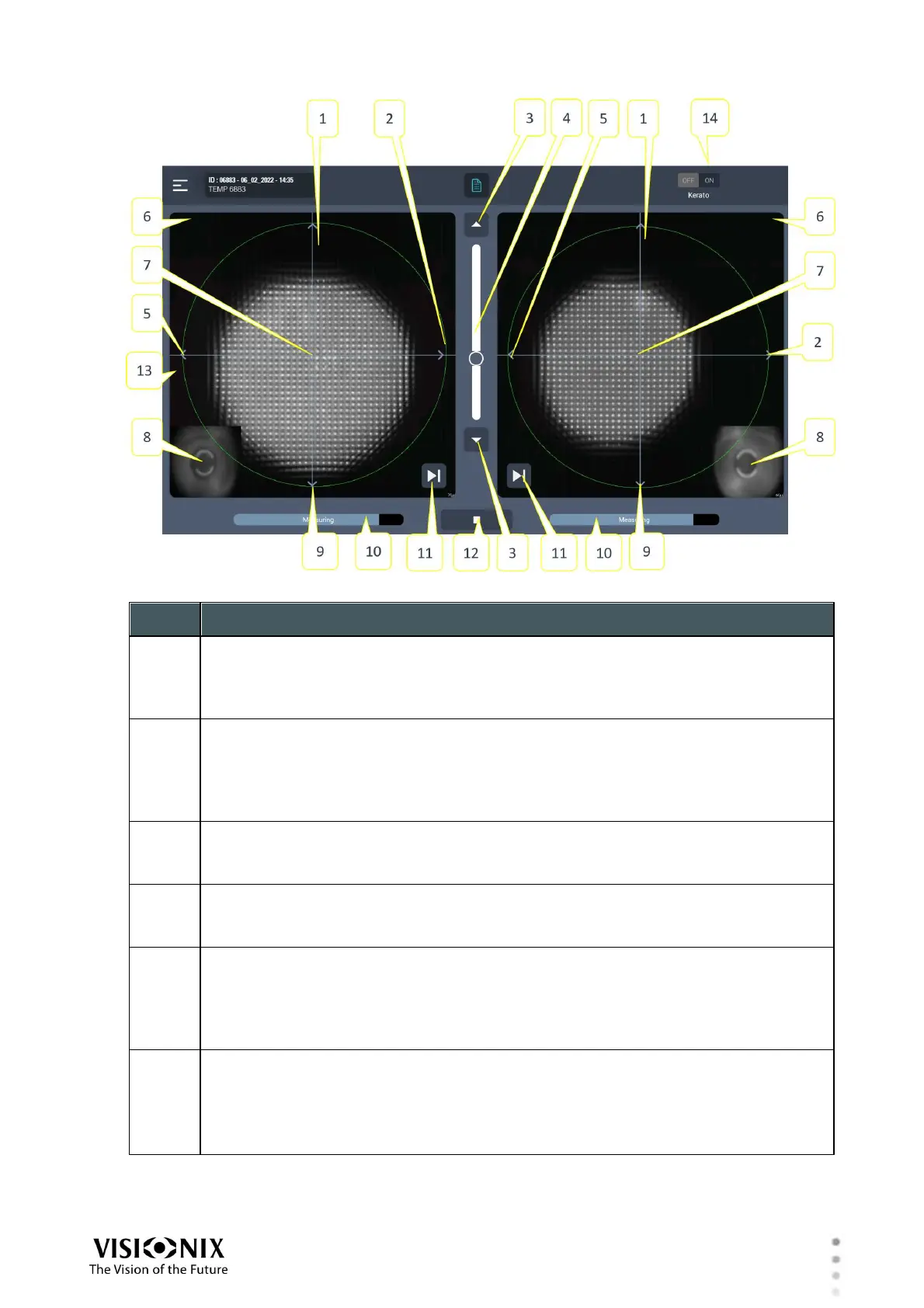
Overview of the Software
Up arrow
Raises the head on this side so that it aligns better with the patient's eyes
Tap the arrow to move the head up one step, or press and hold to move the head
continuously until you release the button.
Left arrow
Moves the head on this side to the left so that it aligns better with the patient's
eyes
Tap the arrow to move the head left one step, or press and hold to move the
head continuously until you release the button.
Chin Rest arrows
Tap the up or down arrows to raise or lower the chin rest, or press and hold
them to move it continuously until you release the button.
Chin Rest Slider
Slide up or down to raise or lower the chin rest, for fine tuning you can use the
arrows #3
Right arrow
Moves the head on this side to the right so that it aligns better with the patient's
eyes
Tap the arrow to move the head right one step, or press and hold to move the
head continuously until you release the button.
Eye labels
L: The patient's left eye
R: The patient's right eye
When the measurement of one of the eyes is deactivated, the other controls are
not available for that eye, and the eye is not visible in the camera panes (#7).



 To Next Page