66
Visionix EyeRefract User Guide
66
Overview of the Software
To open the Exam File screen:
From either the Refraction screen or the Measure screen, in the heading area, tap the
Open Exam File ( ) button.
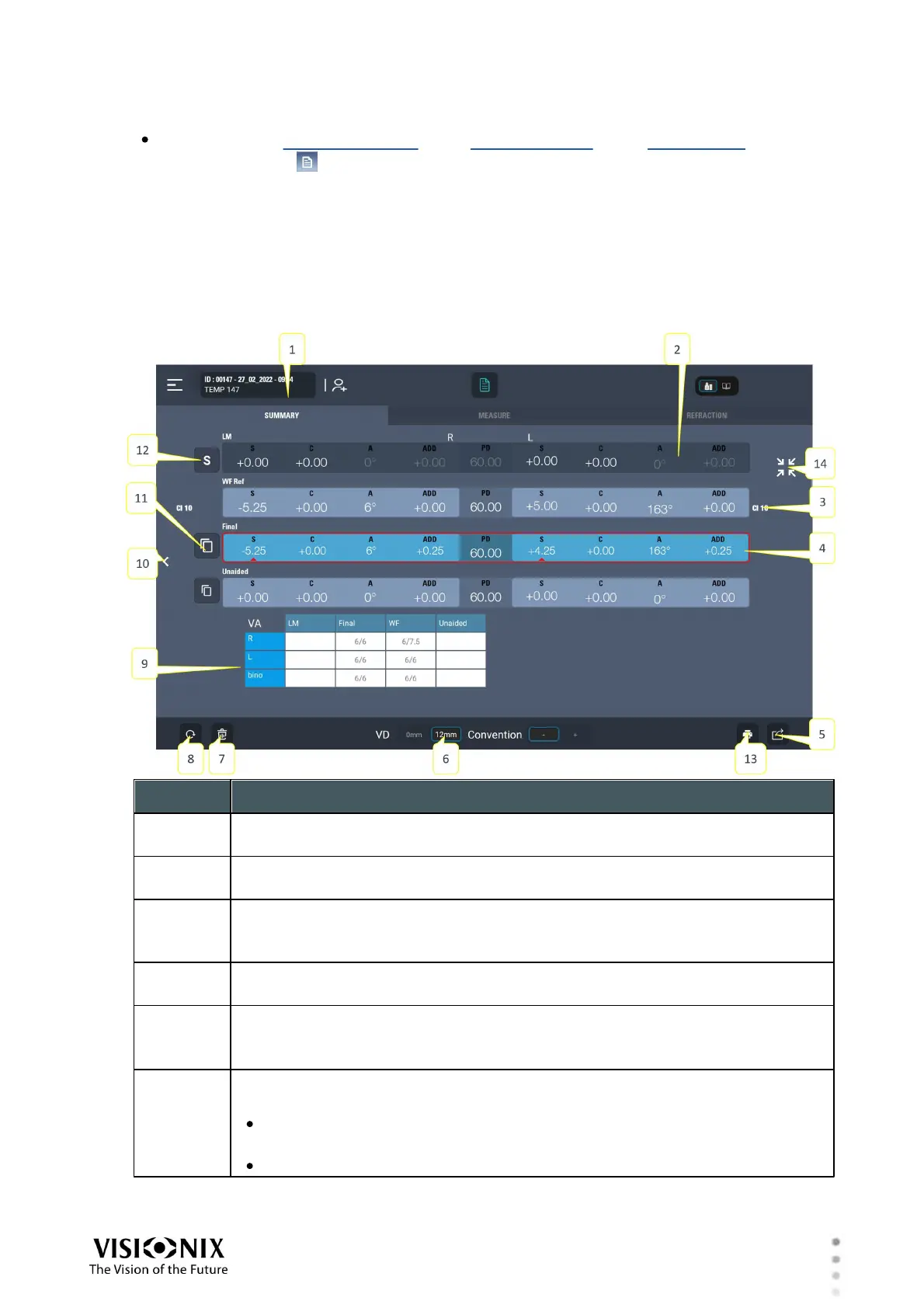
Overview of the Exam File Screen
The main part of the Exam File screen displays a row for each refraction data-set currently
available. If visual acuity data was saved during the refraction, it appears below the data sets.
Various controls are located around the data-sets, as explained below.
Data-set name
The name of the data-set in the row immediately below it
Unavailable data-set
Data sets that are not available appear blacked out.
Confidence Index
A measure of the reliability of the wavefront test results. Range: 1-10. 6 and
above indicate a reliable test.
Selected data-set
The currently selected data-set is highlighted in blue.
Export button
Tap to open the Export dialog box, from which you can print or export the
selected data set.
VD
The vertex distance:
12mm for eye glasses (or 13mm or 15mm, depending on the value
selected in the Settings)
0mm for contact lenses (not currently supported)



 To Next Page