VIVOTEK - A Leading Provider of Multimedia Communication Solutions
116 - User's Manual
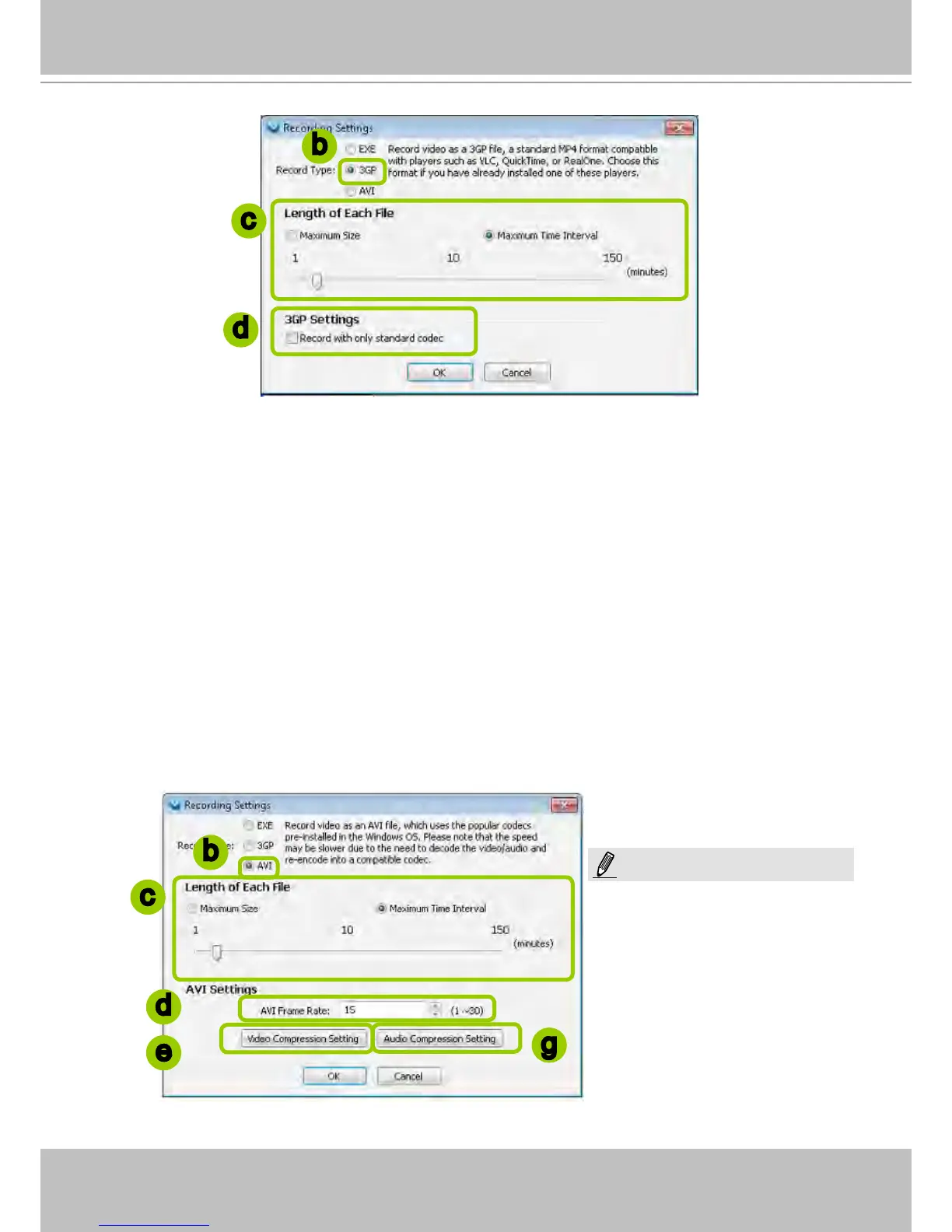
d. If you check "Record with only standard codec", the video from old models (VIVOTEK 6000-series
products) using H.263 codec will not be recorded.
f. Click OK to enable the settings.
Type 3: Record to AVI
Record video as an AVI le, which uses the popular codecs pre-installed in the Windows OS. Please
note that the speed may be slower due to the need of decoding the video/audio and re-encoding both
into a compatible codec.
Please follow the steps below to congure AVI record settings:
a. Click Conguration > Client Settings > Recording Settings on the menu bar to open the Recording
Settings window.
b. Select AVI as the Record Type.
c. Select the Length of each le-- Maximum Size (1~2000MB) or Maximum Time Interval (1~150 min).
b
c
d
b
c
d
e
g
Due to the AVI file has a limitation on
the maximum file size of 2G bytes, if
the setting “time length” generates data
larger than 2G bytes, several files will
be created.
NOTE:



 To Next Page