VIVOTEK - A Leading Provider of Multimedia Communication Solutions
22 - User's Manual
Camera Control Panel
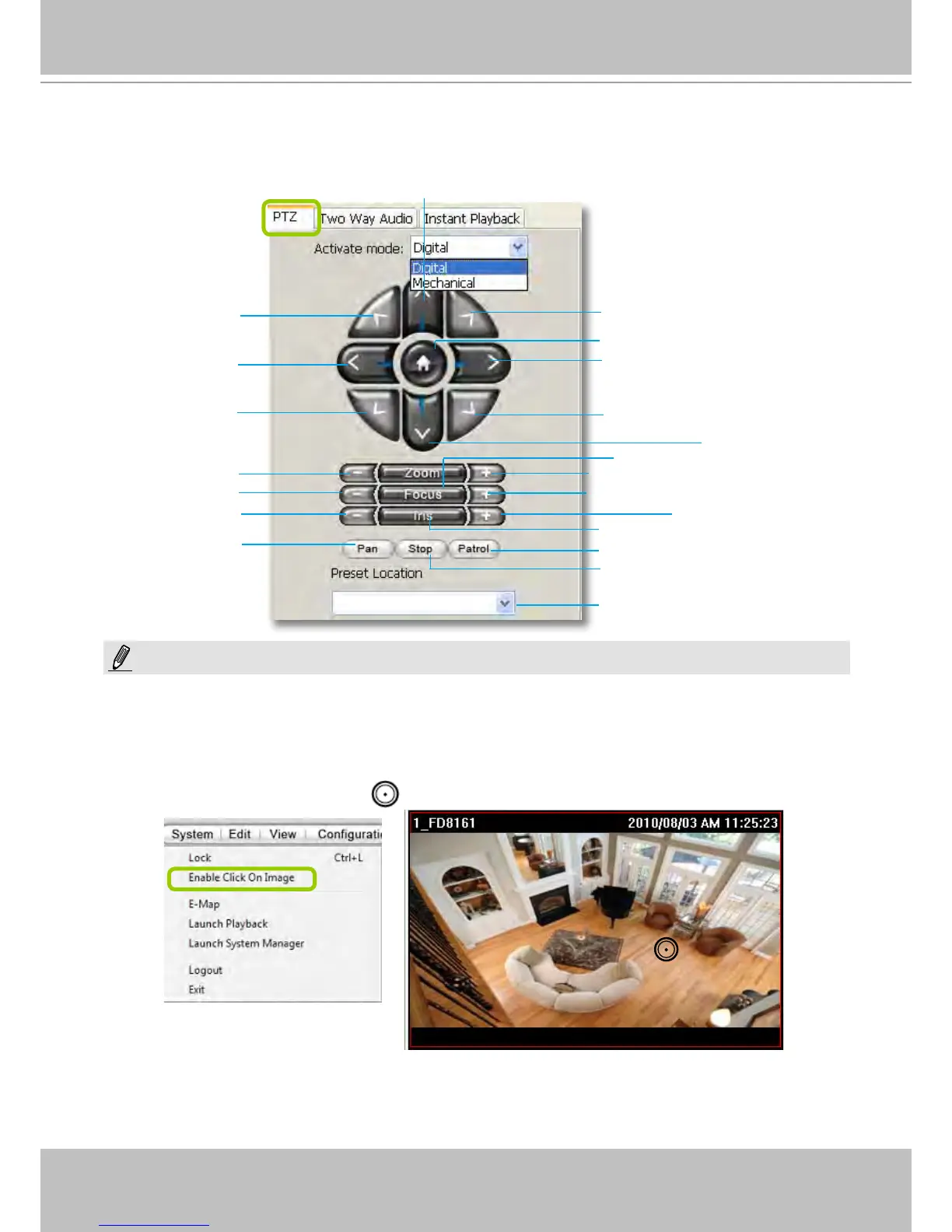
Pan/Tilt/Zoom (PTZ) Control Panel
There are two types of PTZ control: Digital (E-PTZ for megapixel cameras) and Mechanical (PTZ cameras or
fixed cameras with camera control via RS-485). If the connected cameras support PTZ/E-PTZ function, the
PTZ option(s) will appear on the drop-down list. For detailed camera control settings, please refer to the user's
manual of VIVOTEK network camera .
Click System > Enable Click On Image to use the mouse for the control of the PTZ and e-PTZ functions in the
video cells for linked cameras. An icon
will appear in the video cell as shown below.
You can control the PTZ function through joystick as well. For more information regarding to the joystick
conguration, please refer to instructions on page 127.
T
op left
Left
Bottom left
Focus near
Close
Start to auto pan
Zoom out
Up
Return to home position
Bottom right
Right
Top right
Down
Focus far
Zoom in
Open
Start to auto patrol
Stop auto panning/patrolling
Drop-down list of preset positions
Auto focus
Auto iris
NOTE:



 To Next Page