VIVOTEK - A Leading Provider of Multimedia Communication Solutions
User's Manual - 85
Repeat Frequency: Daily Setting
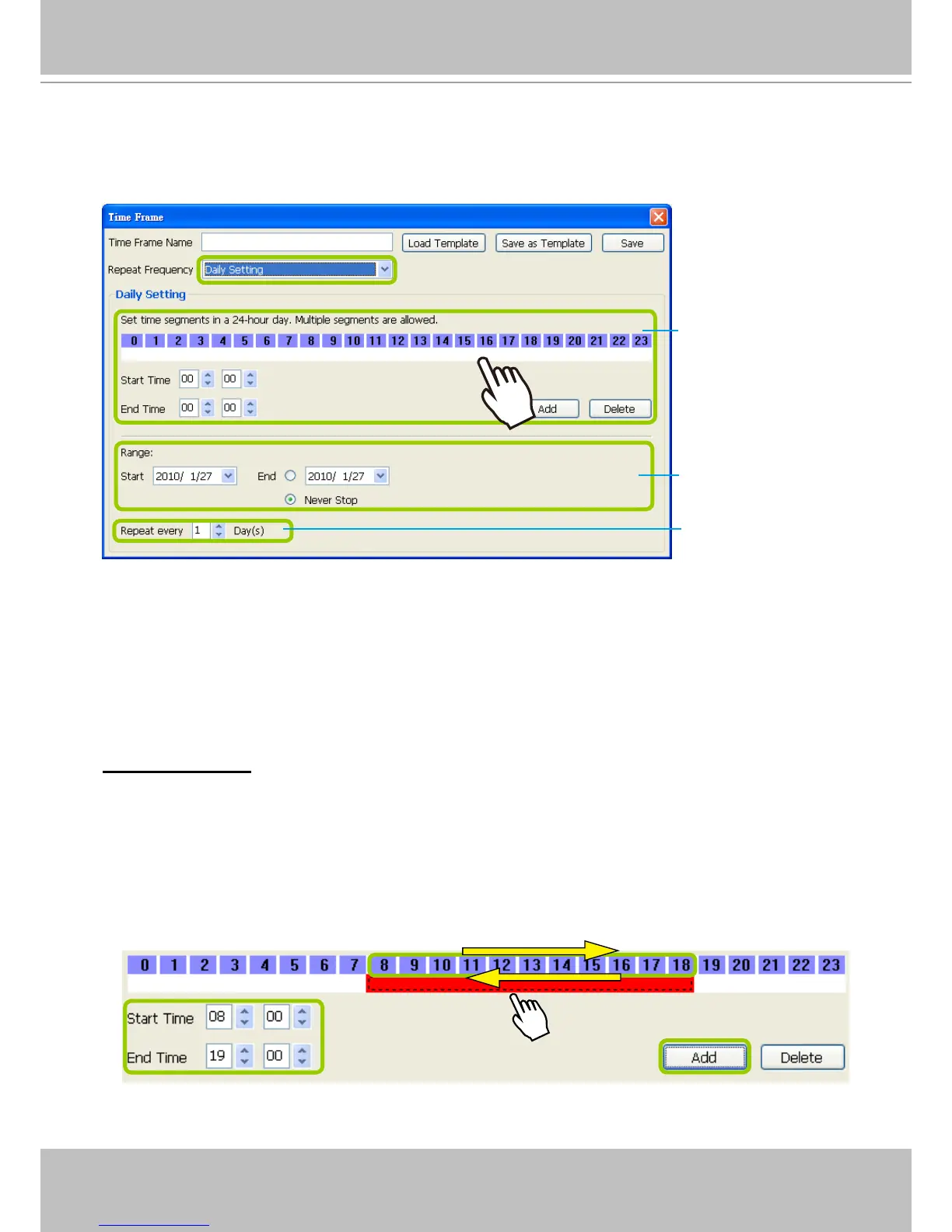
To set up daily repeat frequency, please congure the following items: Daily time segments, applicable
period of time, and repeat time interval.
Set up daily time segments
You can specify several time segments within a day. The numbers 0~23 on the hourly timeline control
bar (the purple rectangles) represent the 24 hours in a day.
There are two ways to define time segments: one is to use the computer mouse to manipulate the
timeline control bars; the other is to fill in the precise start and end time values in the corresponding
elds.
Add time segments: Choose either step 1 or step 2 to set up
1. Use the mouse to drag the timeline bars:
a. Left-click the daily timeline control bar (the purple rectangles) and drag the mouse.
b. The corresponding time segment will also appear in the Start Time and End Time elds. Click Add,
then the red timeline bars representing new time segments will appear as shown below. You can
drag multiple time segments within a day.
In the following illustration, the yellow arrows show the dragging direction of the mouse. You can
drag from left to right or the opposite.
Daily time segments
*You can drag the daily
timeline bar for more
than one time segment
per day.
Applicable period of
time
Repeat time interval
Daily timeline control bar



 To Next Page