VIVOTEK - A Leading Provider of Multimedia Communication Solutions
User's Manual - 21
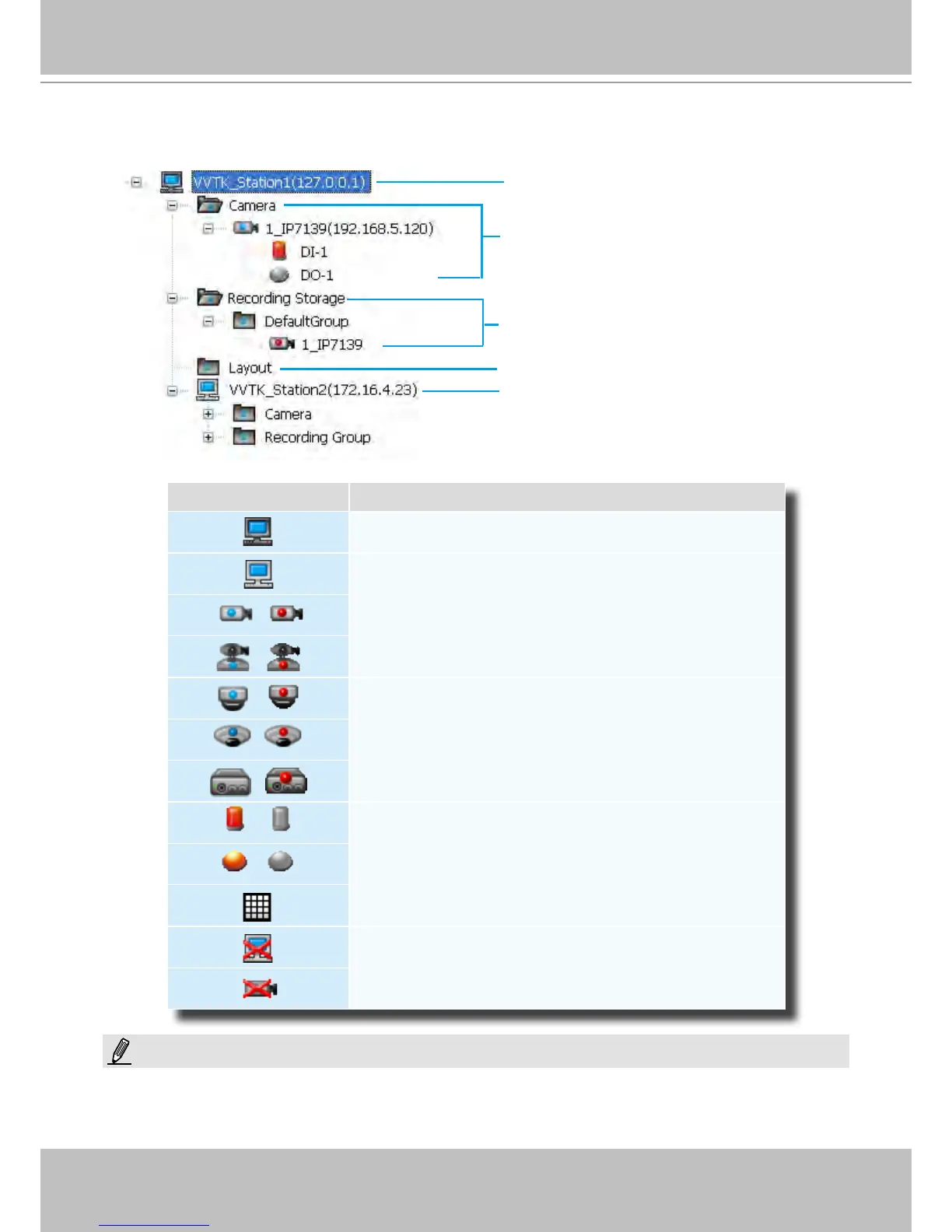
Hierarchical Management Tree
Root Station Name (IP address)
Connected devices listed under the root station
Camera name (IP Address)
Connected devices that have been assigned to
the default recording storage
Layout list
Icon Description
A station (The host that’s installed with VAST Server)
A station (The host that’s installed with ST7501 Server)
/
VIVOTEK xed network camera
Red dot signies that the camera is recording.
/
VIVOTEK PTZ network camera
Red dot signies that the camera is recording.
/
VIVOTEK dome network camera
Red dot signies that the camera is recording.
/
VIVOTEK sheye network camera
Red dot indicates that the camera is recording.
/
VIVOTEK video server
Red dot signies that the video server is recording.
/
Digital input on / off
/
Digital output on / off
A layout of the live monitoring window
A station that’s not able to be connected currently.
A device that’s not able to be connected currently.
Sub-station Name (IP address)
NOTE:
A Logical Tree will be available with the LiveClient console separately installed on a remote PC. The Live Client
instance will be available in the Software CD that comes with the NVR system (rev. 1.7.x). That particular edition
allows the NVR and cameras under it to be listed with other VAST server congurations.



 To Next Page