VIVOTEK - A Leading Provider of Multimedia Communication Solutions
172 - User's Manual
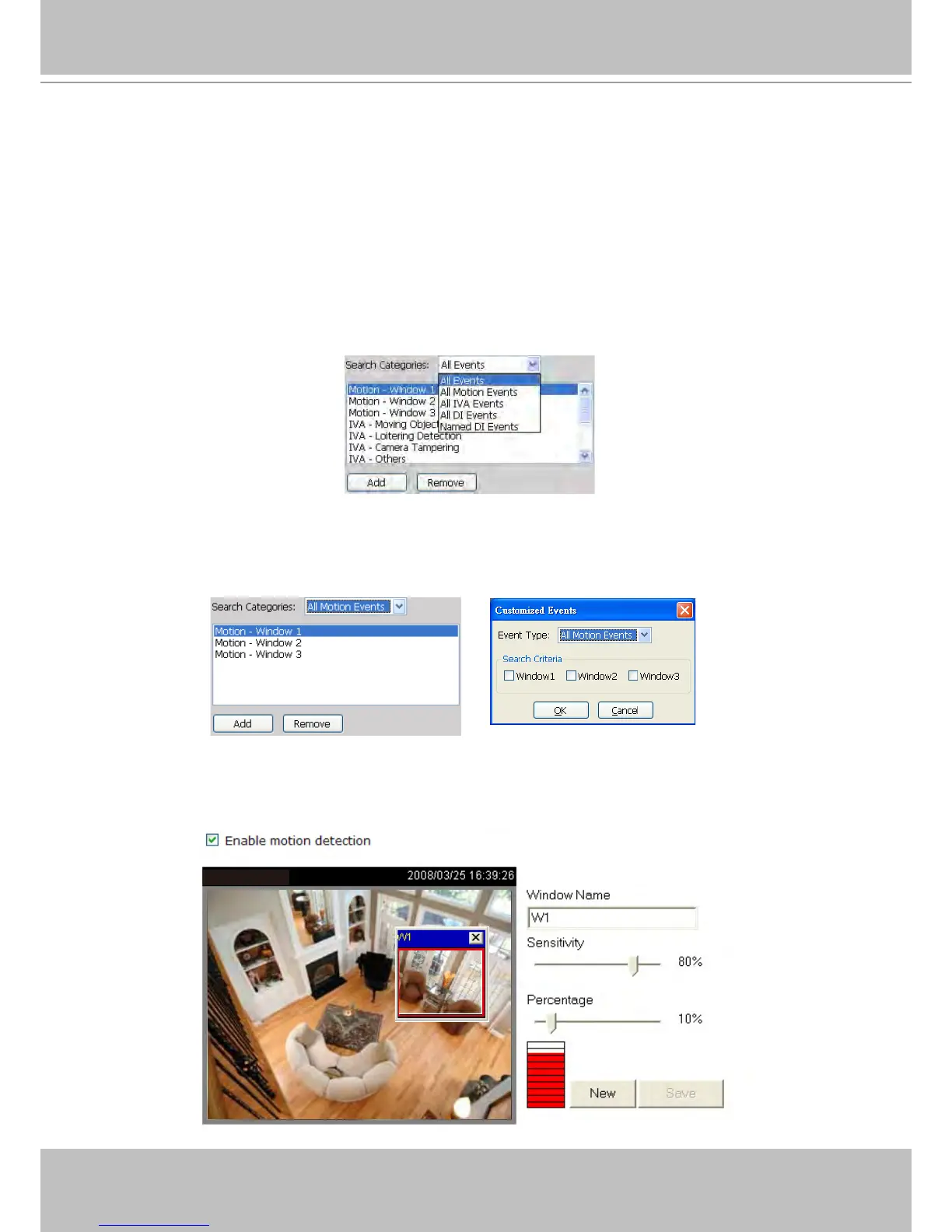
Select Event Category
The following introduces the event search categories: All Events, All Motion Events, All IVA
events, All DI Events, Named DI Events, PIR, Tampering, and Tamperature. You can also
add or remove customized events from the list.
Event Category- All Events
If you select the All Events category, all of the events including motion detection, digital input, and
intelligent video analysis, PIR, tamper detection, and tamperature alarm will be listed in the search
results. You can click Add or Remove to change the search criteria options.
Event Category- All Motion Events
If you select the All Motion Events category, all detected motion events will be included in the search.
You can click Add or Remove to change the search criteria options.
The parameters of the motion detection windows, such as motion percentage and the time of occurrence
are also recorded in the database of the server. If you wish to change the parameters of the motion
detection windows such as the position, size, detection sensibility, and motion percentage, please link to
the camera's Conguration page to modify the values.
Video(TCP-AV)



 To Next Page