VIVOTEK - A Leading Provider of Multimedia Communication Solutions
User's Manual - 51
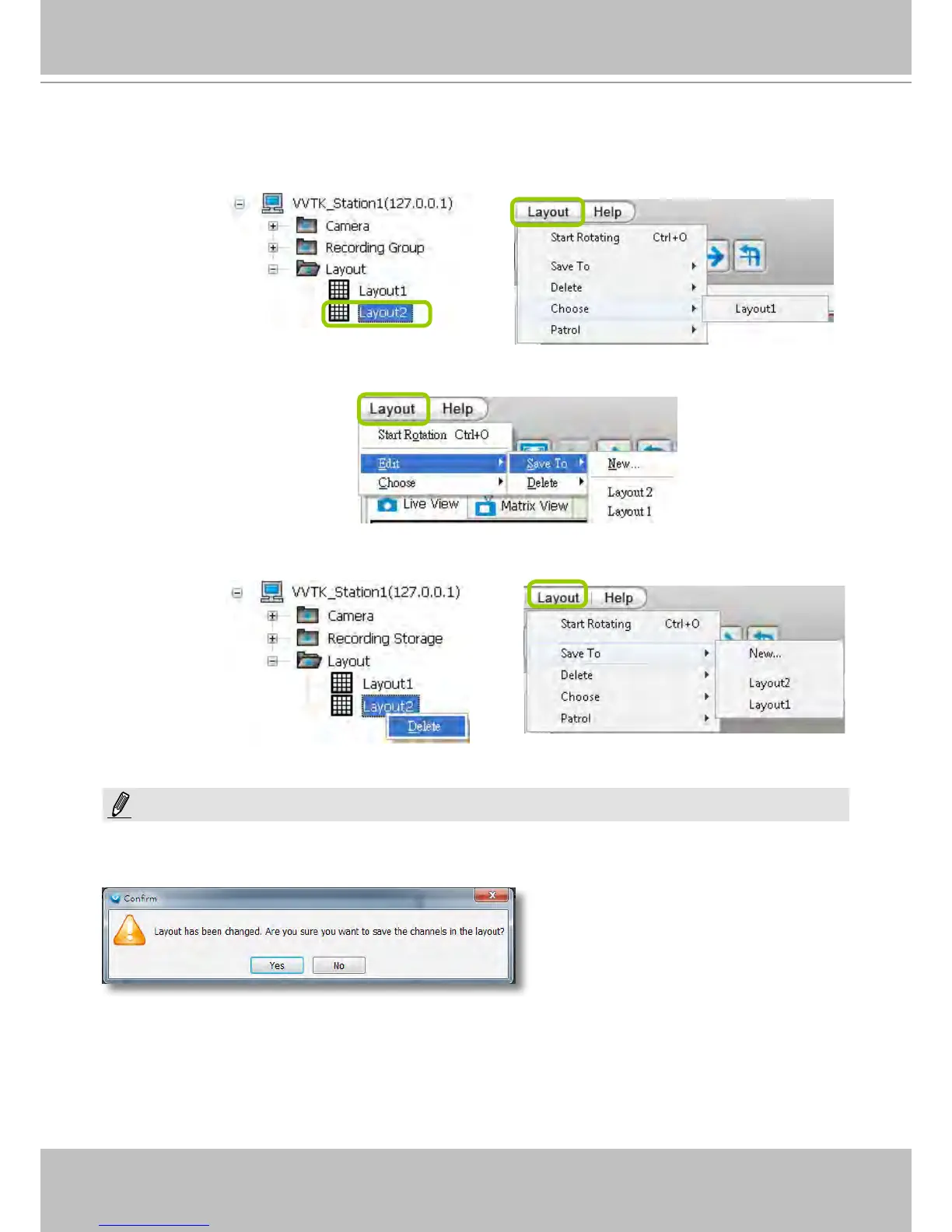
d. Back to the monitoring window, the new layout will be displayed under the hierarchical device tree as
shown below. You can save up to 10 layouts.
e. To change to another layout, double-click the layout options on the hierarchical management tree, or
click Layout > Choose on the menu bar to select a desired layout.
If you want to edit an existing layout, arrange a layout mode and drag devices to the desired video
cells, then click Layout > Edit > Save to > New to save as a new layout or an existing layout to
replace with the new one.
If you want to delete an existing layout, right-click the layout item on the hierarchical management
tree or click Layout > Edit > Delete on the menu bar to delete it.
Whenever you close the LiveClient or Playback programs and changes in screen layout have been
made, you will be prompted to save your current conguration.
NOTE:



 To Next Page