VIVOTEK - A Leading Provider of Multimedia Communication Solutions
64 - User's Manual
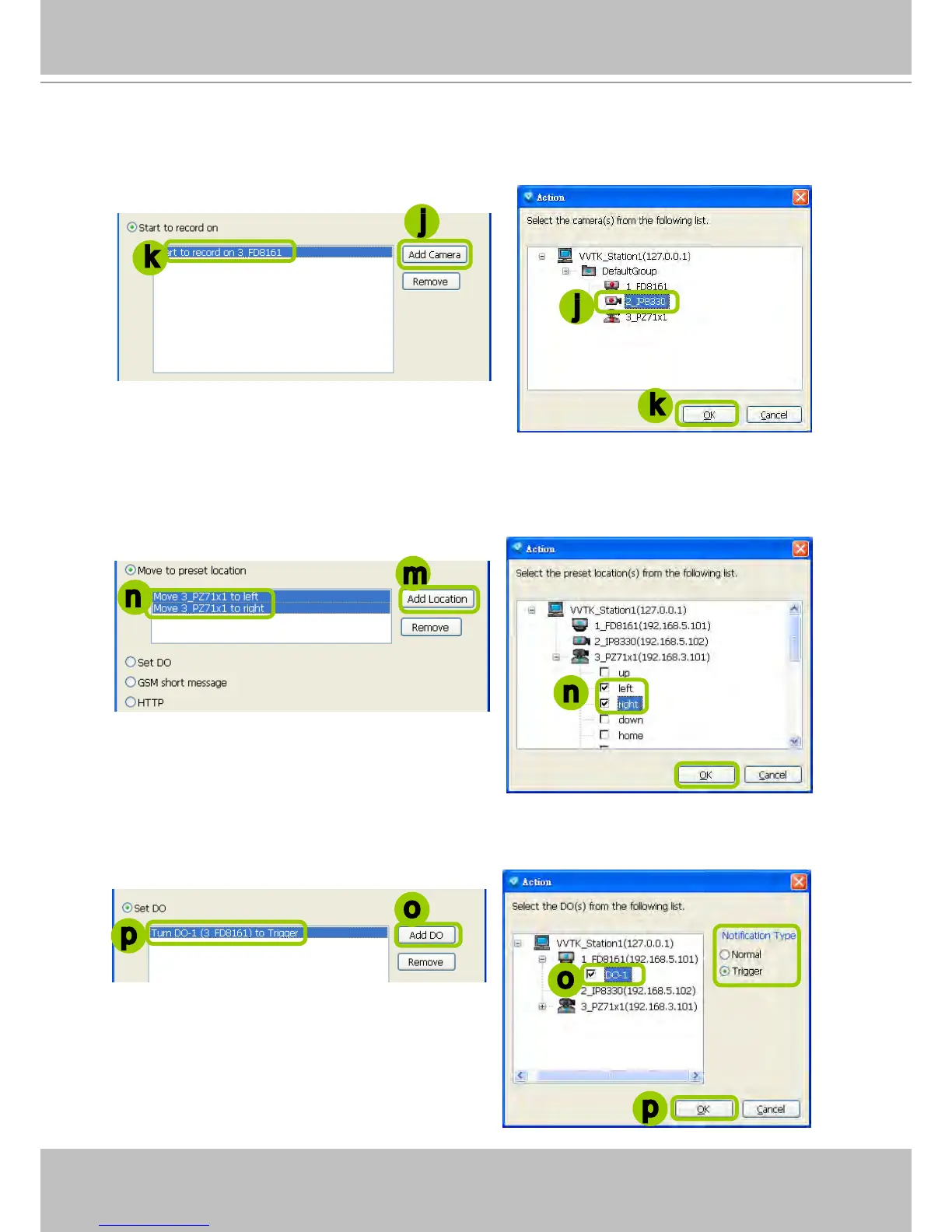
Start to record on: The sever will start to record video from selected camera(s) when an event is
triggered.
j. Click Add Camera to select the target camera(s).
k. The selected camera(s) will be listed on the left window below. When completed, click OK on the
bottom to enable the setting.
Move to preset location: The target camera(s) will move the shooting area to the preset location(s)
when an event is triggered.
l. To enable this function, please set preset locations on the camera conguration page rst.
m. Click Add Location to select preset location(s).
n. The selected preset location(s) will be listed on the left window below. When completed, click OK at
the bottom to enable the setting.
Set DO: Select this option to turn on external digital output device(s) when an event is triggered. For
more information about how to set DI/DO settings on the target camera, please refer to page 60.
o. Click Add DO to select DO decive(s) and select a DO status (Normal or Trigger).
p. The selected DO device(s) will be listed on the left window below. When completed, click OK to
enable the setting.
j
j
k
m
n
n
o
o
p
k
p



 To Next Page