Page 52 of 148 300004969171/B
3 Hold the Select(+) key down to rotate the image continuously.
4 To rotate the image in a counterclockwise direction, select the bottom box with the
red and blue rotational arrows and follow the same steps as above.
Setting Gain
Gain refers to the intensity of the ultrasound echoes. As Gain is increased, the echoes
become more intense and the image becomes brighter.
To change the Gain:
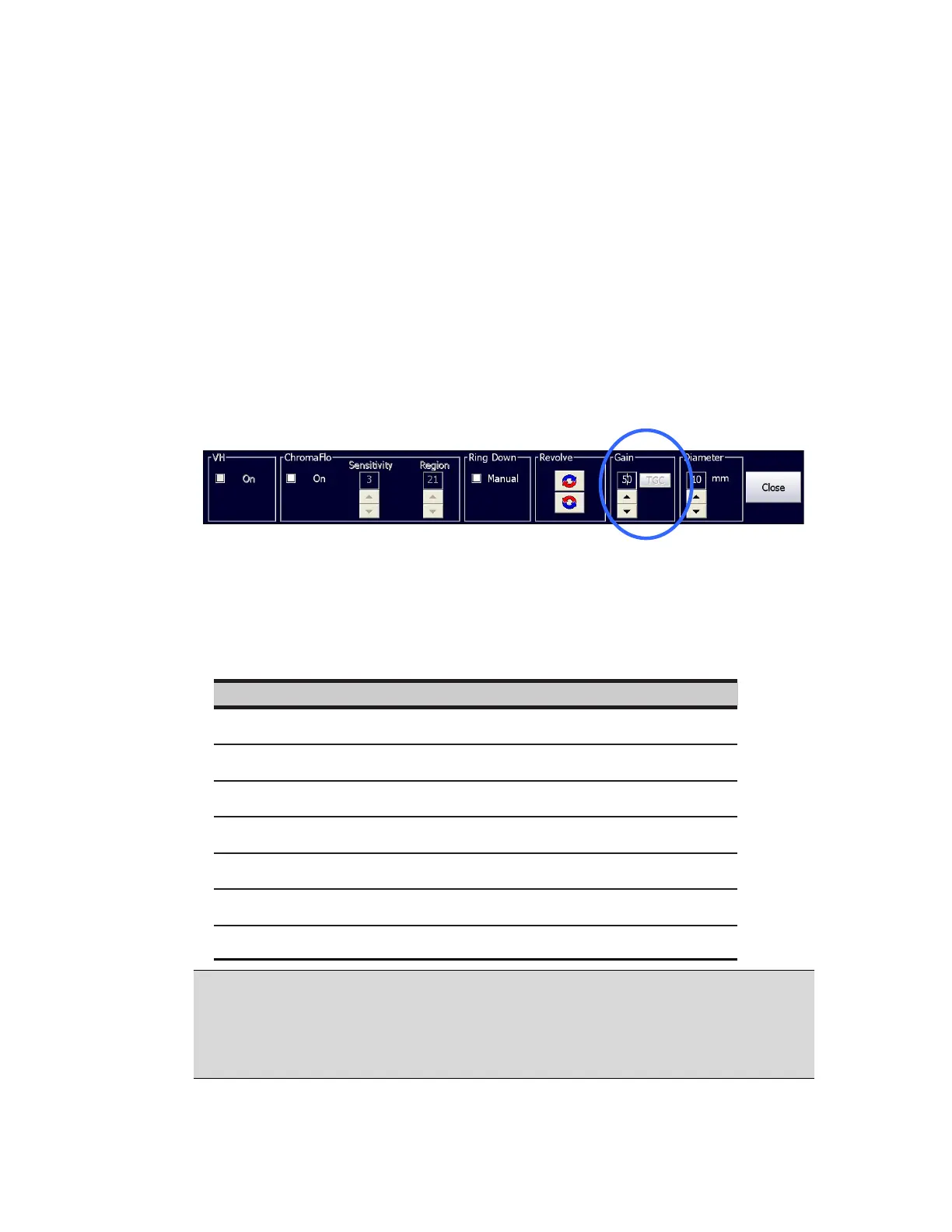
1 Open the Adjust Image dialog box.
Figure 22: Adjust Image Dialog Box - Gain
2 In the Gain box, use the up and down arrows to increase or decrease the Gain
setting. The ultrasound image will become brighter or darker according to the
setting.
Eagle Eye Gold 1-68 50
Visions PV .014P 1-68 52
NOTE: The Gain adjustment only applies to the Grayscale collected on the IVUS home
tab. The Gain value for Grayscale collected for VH analysis tab is fixed at 50 and cannot
be adjusted manually. Gain values that are adjusted for a particular catheter type do not
return to default settings at the next occassion when the same catheter type is connected
to the system.


 To Next Page