VR Technology Limited
Triple Po2 monitor – Option (VRx)
A triple PO2 cell monitor for a rebreather can be directly connected to the connector
on the VRx. This option, when enabled makes the following screens and options
available:
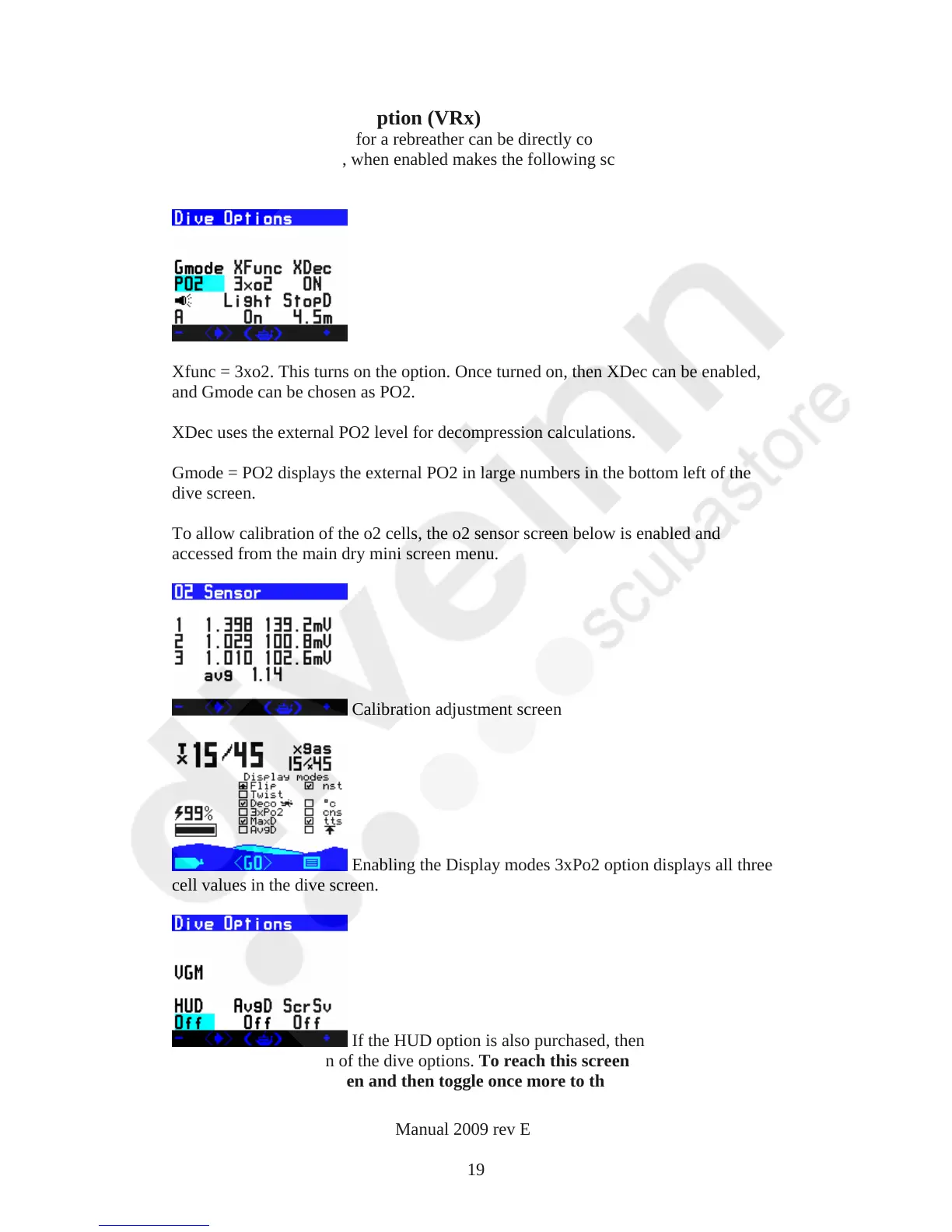
Xfunc = 3xo2. This turns on the option. Once turned on, then XDec can be enabled,
and Gmode can be chosen as PO2.
XDec uses the external PO2 level for decompression calculations.
Gmode = PO2 displays the external PO2 in large numbers in the bottom left of the
dive screen.
To allow calibration of the o2 cells, the o2 sensor screen below is enabled and
accessed from the main dry mini screen menu.
Calibration adjustment screen
Enabling the Display modes 3xPo2 option displays all three
cell values in the dive screen.
If the HUD option is also purchased, then it can be turned on
from the second screen of the dive options. To reach this screen toggle to the last
options on the Dvo screen and then toggle once more to this second screen.
VR Dive Computer Operations Manual 2009 rev E 28/01/2009
19



 To Next Page