VR Technology Limited
A long push of both switches will save NX 99 as your diluent
Save it as the calibration gas (CAL) by a further long push on both switches
CAL GAS will appear on the screen
Then a short push on the right-hand switch will confirm and a further short push on
the right-hand switch will take you back to the Home Screen.
Remember, AFTER calibrating, to set the diluent setting back to the actual dive
diluent!
Then in the Home Screen, scroll through the Mini Screens to the SENSOR screen and
GO TO the screen with a short push of both switches.
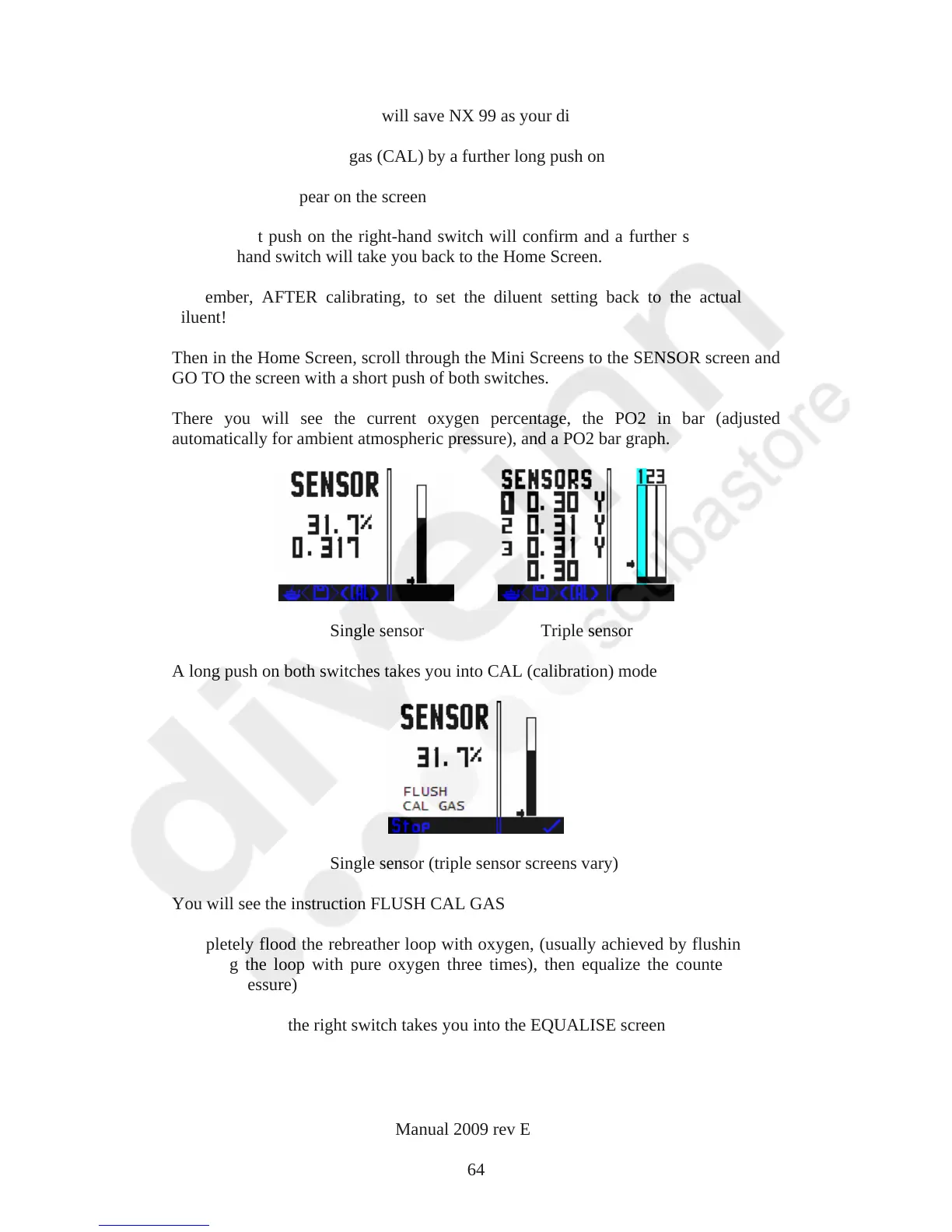
There you will see the current oxygen percentage, the PO2 in bar (adjusted
automatically for ambient atmospheric pressure), and a PO2 bar graph.
Single sensor Triple sensor
A long push on both switches takes you into CAL (calibration) mode
Single sensor (triple sensor screens vary)
You will see the instruction FLUSH CAL GAS
Completely flood the rebreather loop with oxygen, (usually achieved by flushing and
emptying the loop with pure oxygen three times), then equalize the counterlung to
ambient pressure)
A short push on the right switch takes you into the EQUALISE screen
VR Dive Computer Operations Manual 2009 rev E 28/01/2009
64



 To Next Page