LTC Repair Electrical Troubleshooting
wc_tx000429gb.fm 129
7.33 Checking Rotor Diodes
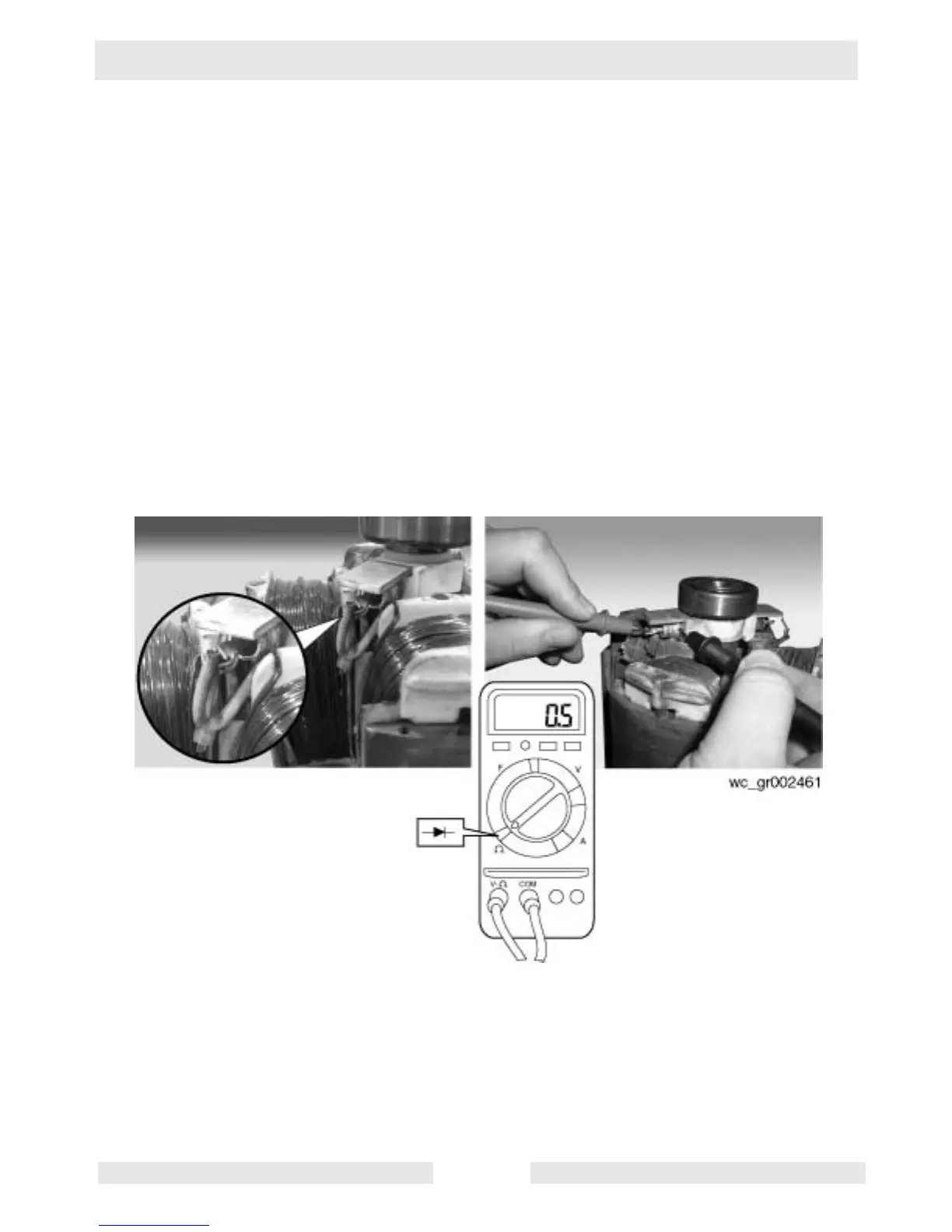
See Graphic: wc_gr002461
There are two diodes on the rotor assembly. The engine/generator
assembly must be removed and the stator must be separated from the
rotor to check the function of the diodes. When checking, be sure to
check both diodes.
7.33.1 Unsolder the two wires from the terminal end of each diode.
7.33.2 Using the diode setting on the multimeter, measure the voltage across
the diode terminal and the base of the diode. Reverse the leads of the
meter and measure the voltage again. One of the readings should be
between 0.4–0.5V. With the meter leads reversed, the other reading
should be OL or a very large reading (for example, 2.0 MV).
7.33.3 If your readings do not match those listed here, replace both diodes.
Unscrew the diode to remove.



 To Next Page