Making Screw Terminal Connections with External Devices 45
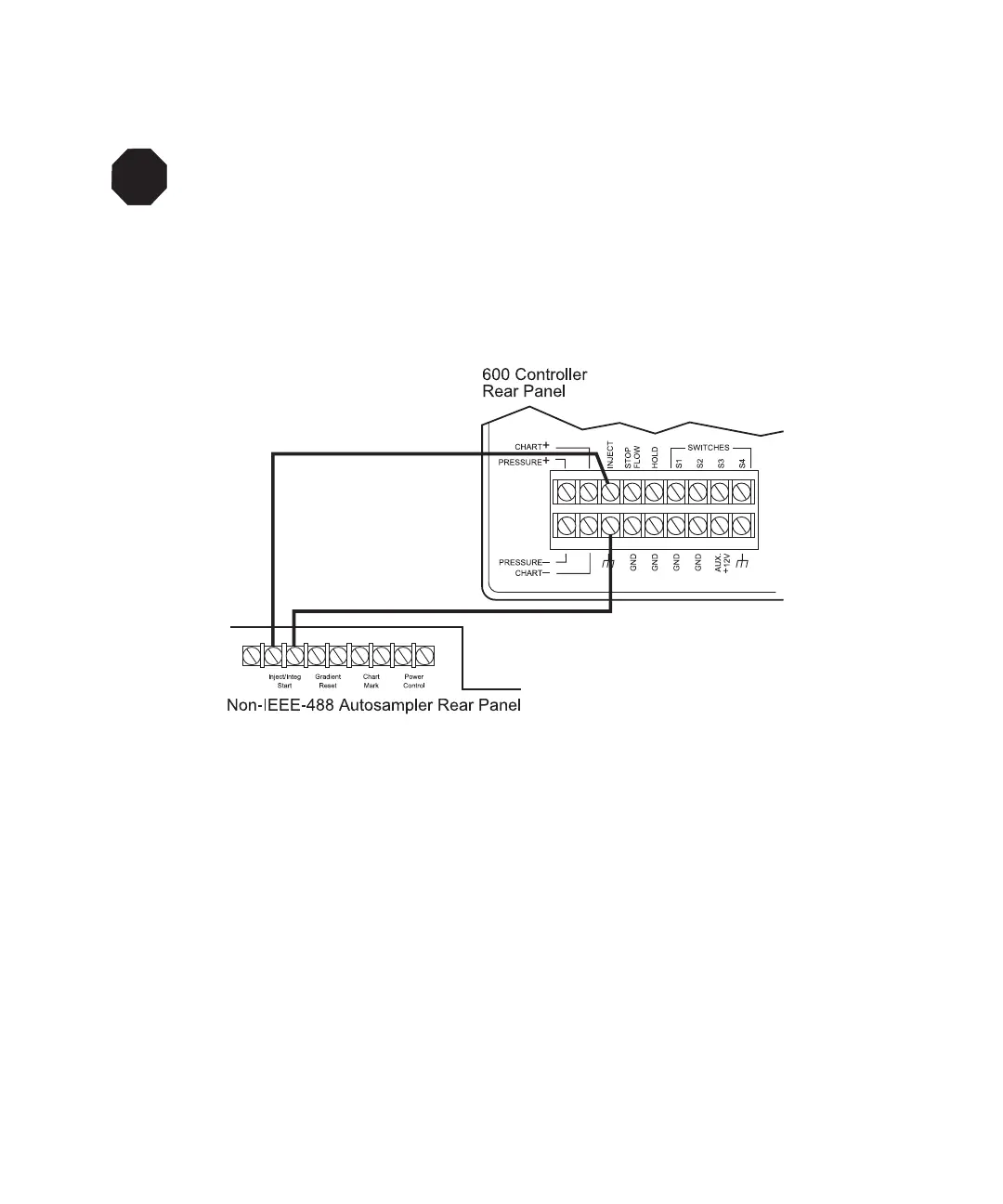
Figure 3-8 illustrates connecting a non-IEEE-488 autosampler to the Inject terminal.
Figure 3-8 Connecting a Non-IEEE-488 Autosampler to the Inject Terminal
Triggering Multiple Devices
To trigger multiple instruments, connect the trigger cable between the inject start input on
each device using one of the following:
• To connect the instruments in parallel, use the same port from the autosampler to
attach trigger cables from the autosampler to each device. Ensure polarities are
consistent and voltages from the various devices are compatible.
• If your autosampler has more than one inject start port, use a separate port to start
each device. This eliminates the possibility of closing the inject start circuit.
• To connect the instruments in series, use the port from the autosampler to the inject
start port on the first device; then jump the inject start port from the first device to
the second device, and so on (stacking the devices).
STOP
Attention: Be careful to maintain trigger cable polarity between devices in order not to
close the inject start circuit. If you cross the trigger cables, some devices may not receive
the inject start signal.
When the injector starts the run, some devices may become active but others may not,
causing the PowerLine Controller to remain in the Inject wait state. Also, if you cross the
trigger cables, some devices may start when the instruments are set up, before the inject
start signal.



 To Next Page