Making Screw Terminal Connections with External Devices 53
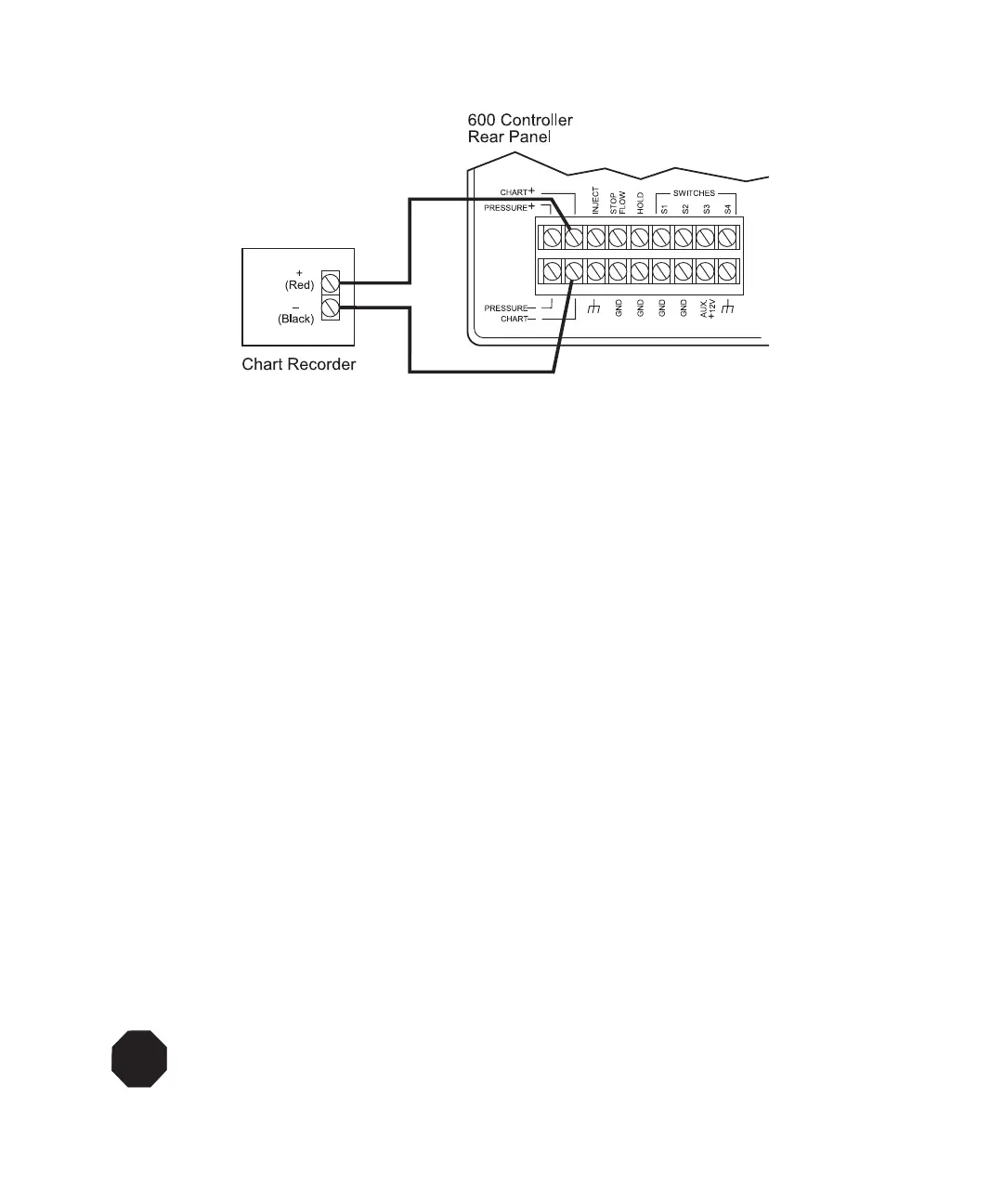
Figure 3-14 Connecting the Chart Recorder to the 600 Controller Chart Terminals
3.5.6 Connecting an External Device
Background
When your system includes an external TTL-level or contact closure device, you can use
switches S1 through S4 on the 600 controller to control external devices. External devices
can include:
• Automated switching valves
• Fraction collectors
The four external event switches (S1 through S4) control external devices requiring a
time-activated contact closure, TTL-level signal, or open collector signal. Each output
signal is also capable of driving solenoid valves and other power devices requiring up to
1 A control external devices.
S4 is a dedicated output to an external device to indicate a stop flow condition. S4 defaults
to the Off position when a stop flow condition or critical fault occurs. Connect S4 to a
device (such as an autosampler) that must be shut off when an error, such as a
high-pressure shutdown or critical fault, occurs.
Note: Certain external devices (such as automated switching valves) require an auxiliary
+12 V power source. Refer to “Connecting External Devices to Aux +12 V Power” on
page 54 for connection information.
STOP
Attention: If you accidentally short 12 Volts to ground, the auxiliary 12 V fuse will blow.



 To Next Page