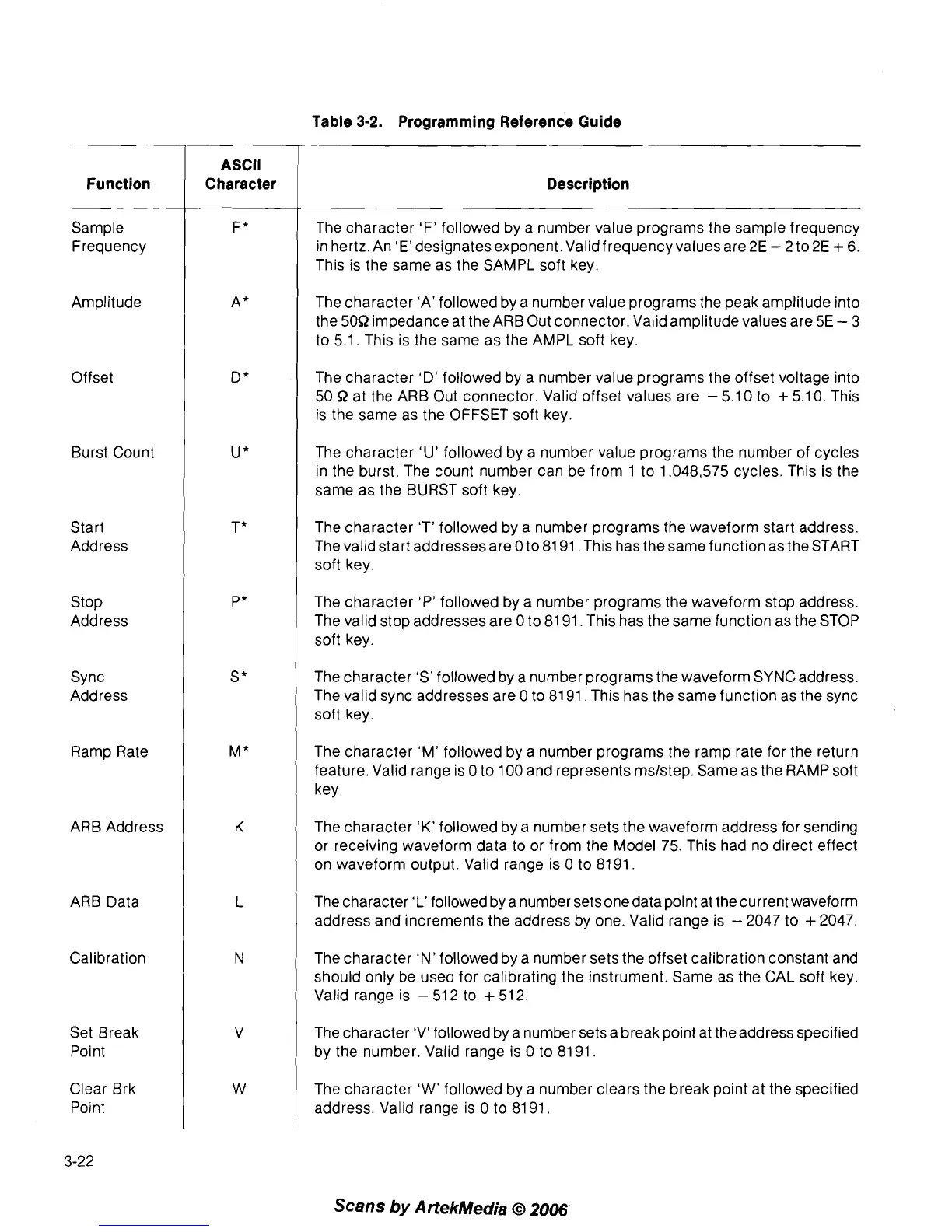
Function
Sample
Frequency
Amplitude
Offset
Burst Count
Start
Address
Stop
Address
Sync
Address
Ramp Rate
ARB Address
ARB Data
Calibration
Set Break
Point
Clear Brk
Point
ASCII
Character
Table
3-2.
Programming Reference Guide
Description
The character 'F' followed by a number value programs the sample frequency
in hertz. An 'E'designatesexponent. Validfrequencyvalues are
2E
-
2
to 2E
+
6.
This is the same as the SAMPL soft key.
The character 'A' followed by a number value programs the peak amplitude into
the
50R
impedance at the ARB Out connector. Valid amplitude values are
5E
-
3
to
5.1.
This is the same as the AMPL soft key.
The character
'D'
followed by a number value programs the offset voltage into
50 R
at the ARB Out connector. Valid offset values are
-
5.10
to
+
5.10.
This
is the same as the OFFSET soft key.
The character 'U' followed by a number value programs the number of cycles
in the burst. The count number can be from
1
to
1,048,575
cycles. This is the
same as the BURST soft key.
The character 'T' followed by a number programs the waveform start address.
The valid start addresses are
0
to
81 91.
This has the same function as the START
soft key.
The character 'P' followed by a number programs the waveform stop address.
The valid stop addresses are
0
to
81 91.
This has the same function as the STOP
soft key.
The character 'S' followed by a number programs the waveform SYNC address.
The valid sync addresses are
0
to
81 91.
This has the same function as the sync
soft key.
The character 'M' followed by a number programs the ramp rate for the return
feature. Valid range is
0
to
100
and represents mslstep. Same as the RAMP soft
key.
The character
'K'
followed by a number sets the waveform address for sending
or receiving waveform data to or from the Model
75.
This had no direct effect
on waveform output. Valid range is
0
to
8191.
The character 'L' followed by a number sets onedata point at the current waveform
address and increments the address by one. Valid range is
-
2047
to
+
2047.
The character 'N' followed by a number sets the offset calibration constant and
should only be used for calibrating the instrument. Same as the CAL soft key.
Valid range is
-
51
2
to
+
51
2.
The character 'V' followed by a number sets a break point at the address specified
by the number. Valid range is
0
to
8191.
The character
'W'
followed by a number clears the break point at the specified
address. Valid range is
0
to
81 91.
Scans
by
ArtekMedia
O
2006



 To Next Page