Table 3-2. Programming Reference Guide (Continued)
I
Scans
by
ArtekMedia
O
2006
Function
Terminator
Select
Function
Mode
Trigger
Slope
ASCll
Character
XV
C
B
Q*
Description
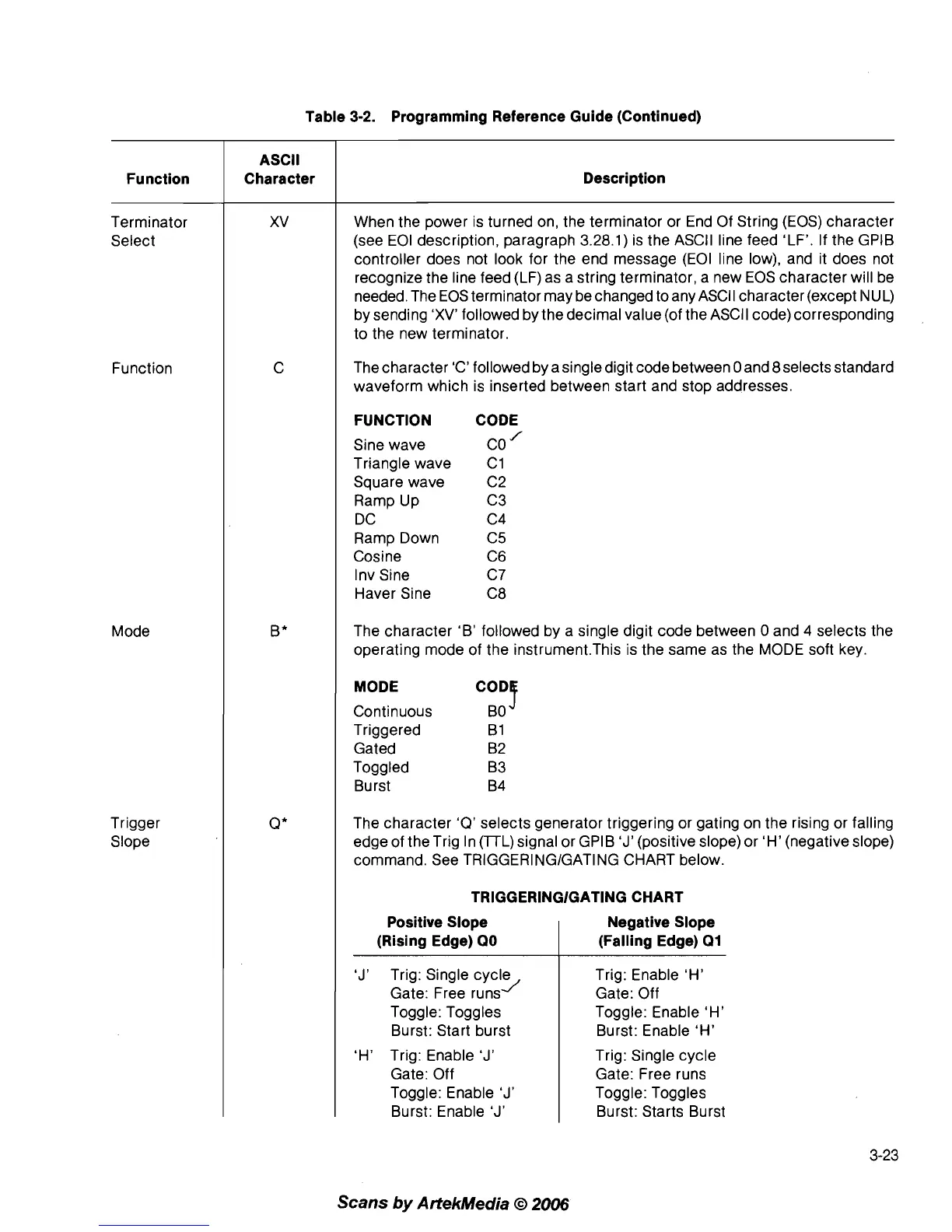
When the power is turned on, the terminator or End Of String (EOS) character
(see EOI description, paragraph 3.28.1) is the
ASCII line feed 'LF'. If the GPlB
controller does not look for the end message (EOI line low), and it does not
recognize the line feed (LF) as a string terminator, a new EOS character will be
needed. The EOS terminator may be changed to any ASCII character (except
IVUL)
by sending 'XV' followed by the decimal value (of the ASCII code) corresponding
to the new terminator.
The character 'C' followed by a single digit code between
0 and 8selects standard
waveform which is inserted between start and stop addresses.
FUNCTION CODE
Sine wave
co
Triangle wave C1
Square wave C2
Ramp Up C3
DC C4
Ramp Down
C5
Cosine C6
Inv Sine C7
Haver Sine C8
The character 'B' followed by a single digit code between
0 and 4 selects the
operating mode of the
instrument.This is the same as the MODE soft key.
MODE
Continuous
,ODT
BO
Triggered B1
Gated B2
Toggled B3
Burst B4
The character
'Q'
selects generator triggering or gating on the rising or falling
edge of the Trig In
(TL) signal or GPIB
'J'
(positive slope) or 'H' (negative slope)
command. See
TRlGGERlNGlGATlNG CHART below.
TRlGGERlNGlGATlNG CHART
Positive Slope
(Rising Edge)
QO
'J'
Trig: Single cycle
J
Gate: Free runs
Toggle: Toggles
Burst: Start burst
'H' Trig: Enable
'J'
Gate: Off
Toggle: Enable
'J'
Burst: Enable
'J'
Negative Slope
(Falling Edge)
Q1
Trig: Enable 'H'
Gate: Off
Toggle: Enable 'H'
Burst: Enable 'H'
Trig: Single cycle
Gate: Free runs
Toggle: Toggles
Burst: Starts Burst



 To Next Page