1
/
4
-DIN,
1
/
8
-DIN &
1
/
16
- DIN Controllers & Indicators - Product Manual
Page 48 P6100, P8100 & P4100 Model Group 59305, Issue 5 – March 2005
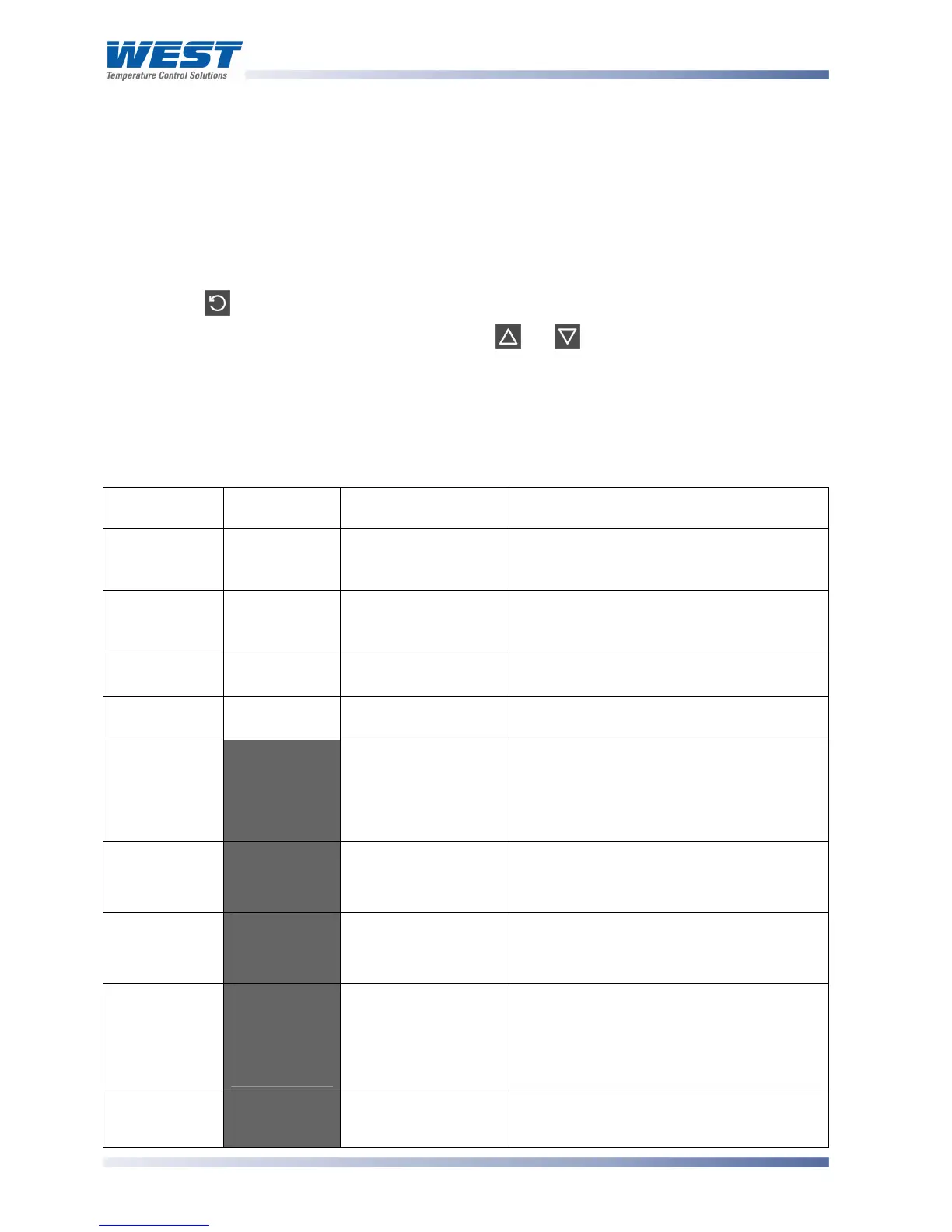
P6100, P8100 & P4100 Controllers – Extended Operator Mode
Using the PC configuration software, it is possible to extend the Operator Mode displays
available by adding parameters from Setup Mode. When an extended Operator Mode is
configured the additional parameters are available after the standard operator displays.
Navigating in Operator Mode
Press to move between displays.
When a display value can be adjusted, use or to change its value.
Note:
The operator can freely view the parameters in this mode, but alteration depends on the
settings in the Configuration and Set Up Modes. All parameters in Display strategy 6 are
read only, and can only be adjusted via Setup mode.
Table 13. P6100, P8100 & P4100 Operator Mode Displays
Upper
Display
Lower
Display
When Visible Description
PV Value
Active SP
Value
Display strategy 1
and 2.
(Initial Screen)
Process Variable and target value of
currently selected Setpoint.
Local SP is adjustable in Strategy 2
PV Value
Actual SP
Value
Display strategy 3
and 6
(Initial Screen)
Process Variable and actual value of
selected Setpoint (e.g. ramping SP value).
Read only
PV Value
Blank
Display strategy 4.
(Initial Screen)
Shows Process Variable.
Read only
Actual SP
Value
Blank
Display strategy 5.
(Initial Screen)
Shows target value of currently selected
Setpoint. Read only
SP Value
:-'
Display strategy 1, 3,
4, 5 and 6 if Digital
Input is not
D<:O in
config mode and
RSP is not fitted
Target value of Setpoint.
Adjustable except in Strategy 6
SP1 Value
:-2
or
B:-2'
If Digital Input is set
for dual SP (
D<:O in
config mode).
Target value of Setpoint 1.
B:-2 means
SP1 is selected as the active Setpoint.
Adjustable except in Strategy 6
SP2 Value
:-3'
or
B:-3'
If Digital Input is set
for dual SP (
D<:O in
config mode).
Target value of Setpoint 2.
B:-3 means
SP2 is selected as the active Setpoint.
Adjustable except in Strategy 6
Local Setpoint
Value
+:-
B+:-'
or
*+:-'
If Remote Setpoint
Input is fitted and
Digital Input is not
D<:O in config
mode
Target value of Local Setpoint.
B+:-
means the local setpoint is selected as the
active SP (if the digital input has been
overridden, the
_* character is lit instead).
Adjustable except in Strategy 6
Remote
Setpoint
9:-'
B9:-'
If Remote Setpoint
Input is fitted and
Digital Input is not
Target value of Remote Setpoint. B9:-
means the remote setpoint is selected as



 To Next Page