33
To configure a sub menu:
→ press the light blue number field
→ enter value / the number of the motor line / change factory settings etc. The setting which can be entered depends of the
type of the sub menu.
→ accept on
A menu can consist of more screen plays. To get to the next screen: → press
14.1 Motor lines – motor groups – smoke zones
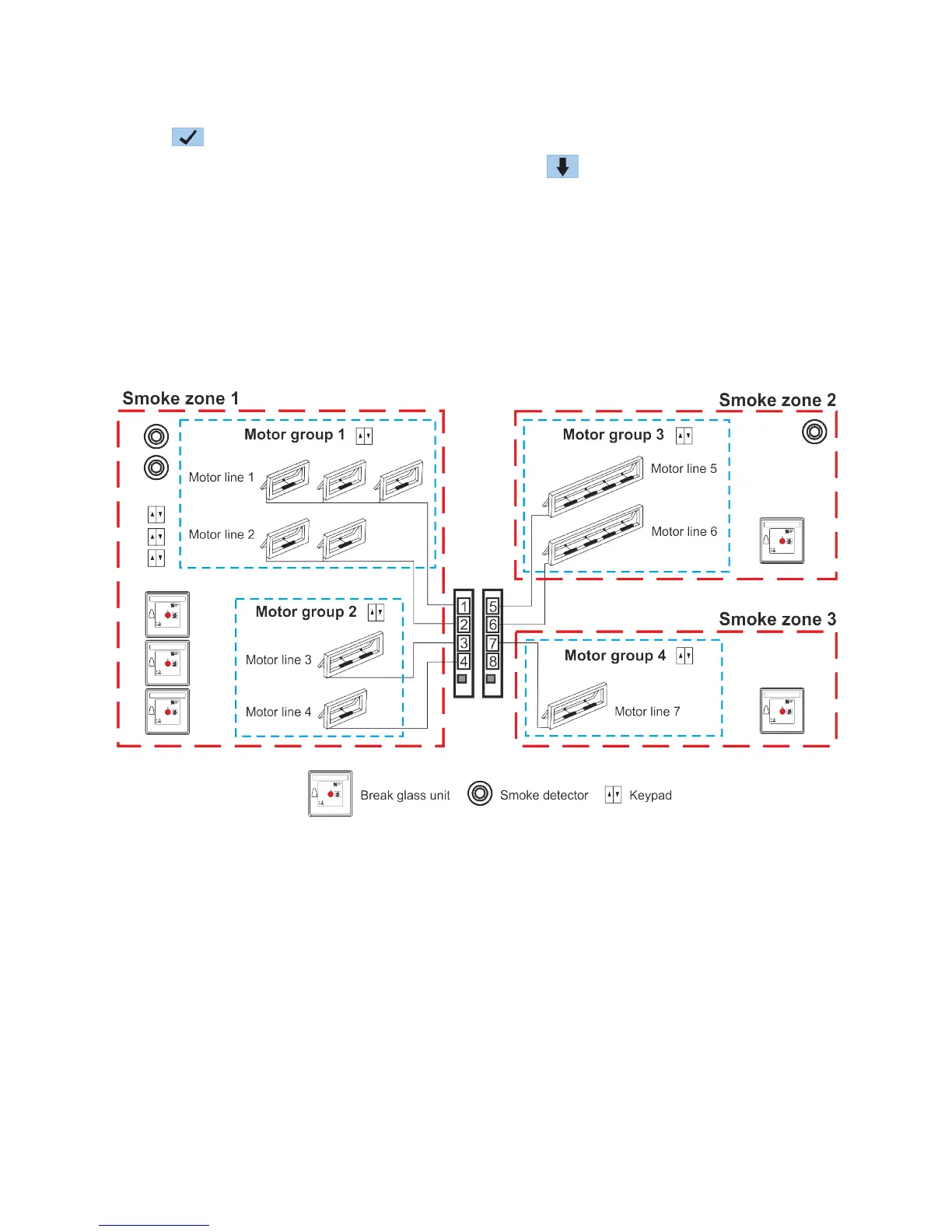
All the components are to be assigned to groups and zones:
- motor lines are to be assigned to motor groups
- motor groups can be assigned to smoke zones
- break glass units and smoke detectors are to be assigned to smoke zones
- keypads are to be assigned to one or more motor groups
14.1.1 Examples with motor lines / motor groups / smoke zones
- 7 motor lines: one or more motors connected to the lines
- 4 motor groups: the motors in the motor group are operated simultaneously on the keypad
- 3 smoke zones: the motors in the smoke zone are operated simultaneously on the break glass unit



 To Next Page