56
18.1.1 Blown fuse – 20A fast
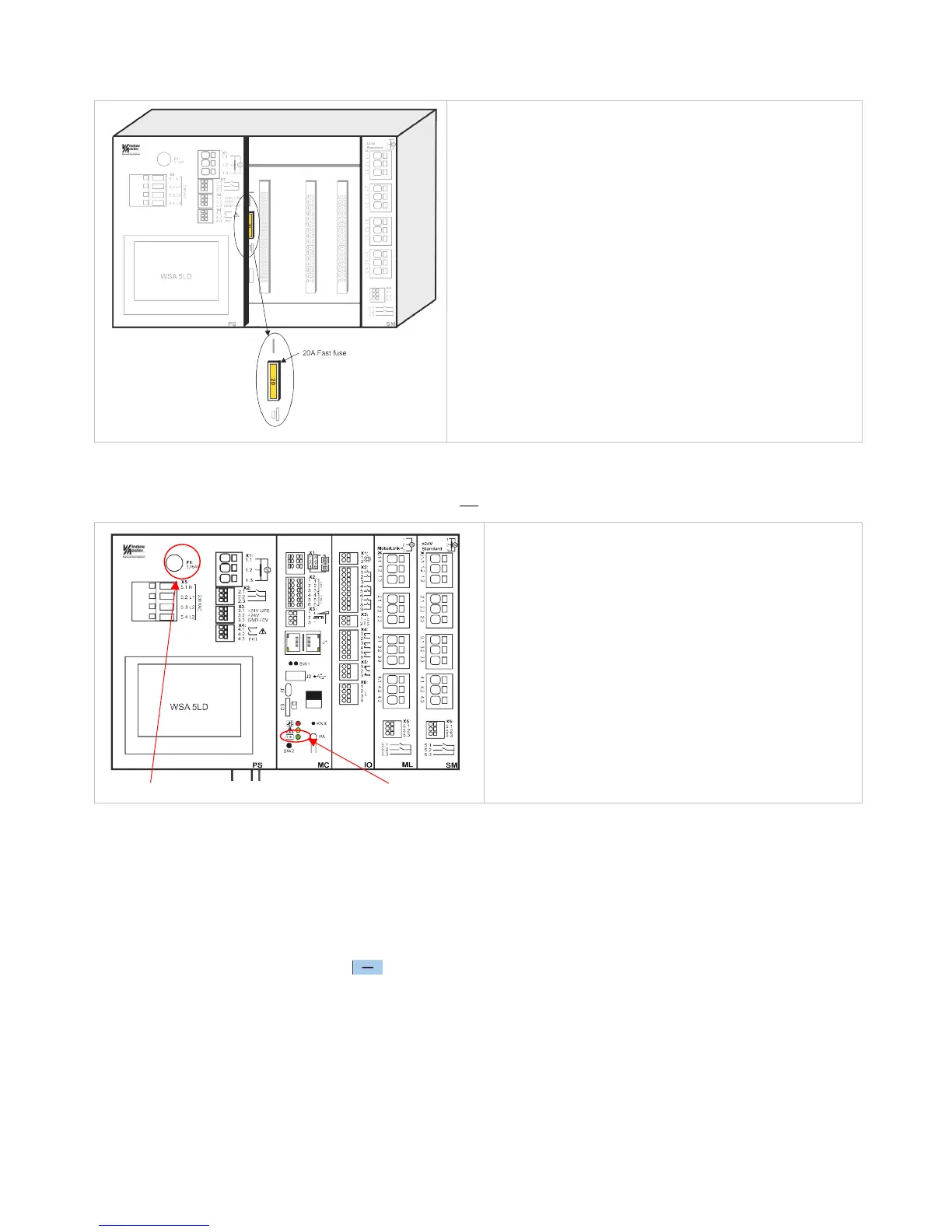
Additionally, an error on the ”Battery status” can also be triggered if the fuse (20A fast) is blown.
Location of 20A fast fuse
The fuse is located behind the modules. To replace the fuse it is
therefore necessary to remove the modules, see section 23.2 for
replacement of modules.
18.1.2 Blown fuse – 3.15A slow
If there seems to be no sign of function in the smoke paken AND the green LED is not working either, it can be caused by a blown
3.15A slow fuse. The fuse is only blown if the green LED does not shine.
Location of 3.15A slow fuse Green LED
The slow fuse is located on the top part of the power supply
module.
The green LED is located in the bottom part of the overall
control module.
Both fuses are common fuses and can be purchased in by distributors of electronics.
19 Manage another WSA MC module – main menu
It is possible to operate more sections (up to 31 sections) from the same touch screen.
The function is used if the operation of several sections in one panel (WSC 540 or WSC 560) is to done on the same touch screen
or if more panels connected via CAN are to be operated from the same touch screen.
Select the section(s) that is (are) to be operated from this touch screen.
The touch screen changes to green when you operate another selected section.
To return to the master touch screen: press or press the number of the master touch screen.
You can still/also operate the sections on their own touch panels.



 To Next Page