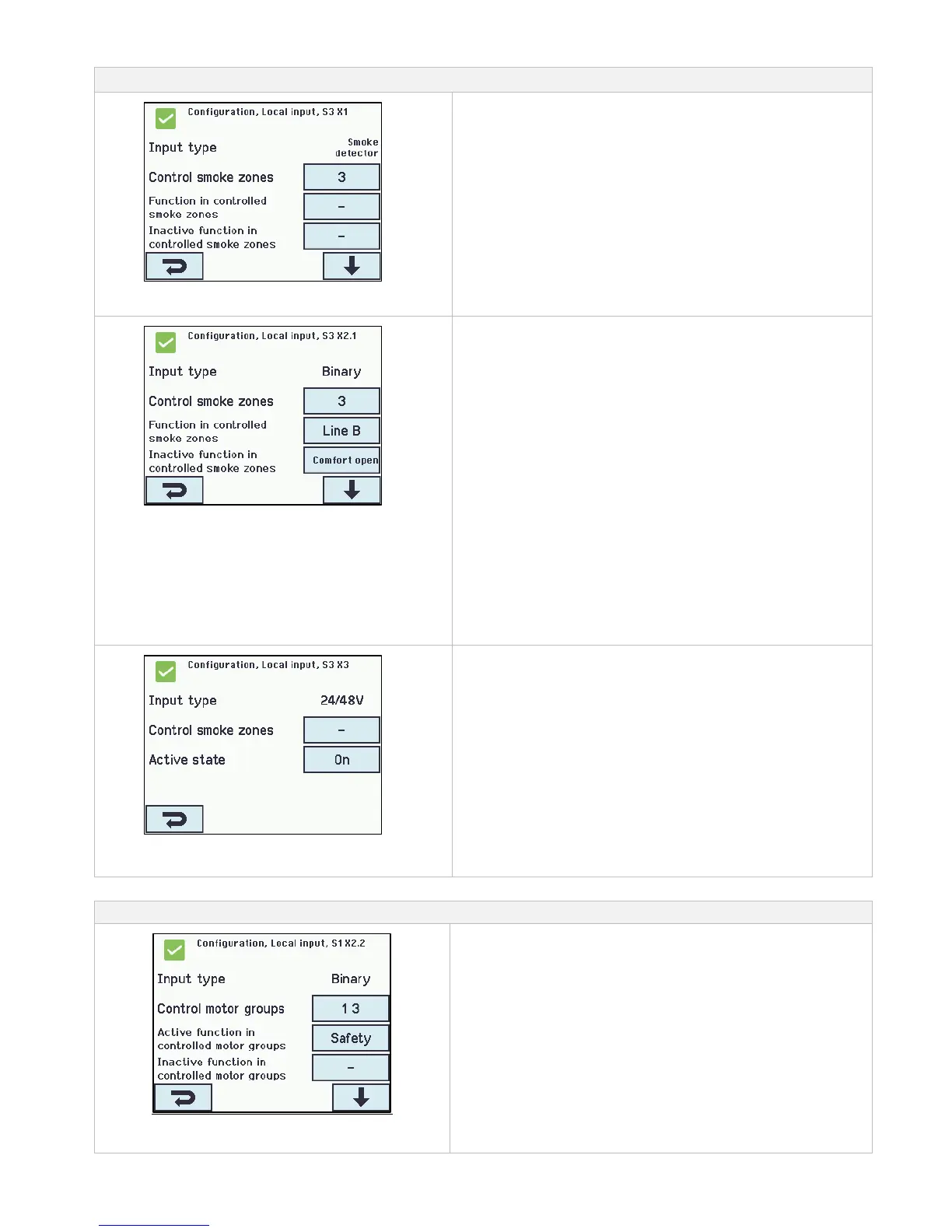
Local inputs are to be configured in:
Configuration of local input S3 on X1
Input X1 on WSA 5IO (smoke detector)
If a smoke detector is connected in the local input X1 on the WSA
5IO module, it shall be configured in:
1. Input type: informs the type “smoke detector” (not to be
configured)
2. Control smoke zones
2.1 Function in controlled smoke zones (displayed only
if ‘Control smoke zones‘ is selected)
2.2 Inactive function in controlled smoke zones
The appendix contains all the items that can be configured - see
appendix for detailed explanation.
Configuration of local input X2 and X5
Input X2 on WSA 5IO and X5 on WSA 5SM and/or WSA
5ML (binary)
If there is connected in the local inputs on the module/modules
WSA 5IO-, WSA 5SM- and/or WSA 5ML, it/they shall be
configured in:
1. Input type: informs the type of the input “Binary) (is not to be
configured)
2. Control smoke zones*
2.1 Function in controlled smoke zones (displayed only
if ‘Control smoke zones‘ is selected)
2.2 Inactive function in controlled smoke zones
3. Control motor groups*
3.1 Function in controlled motor groups
3.2 Inactive function in controlled motor groups.
* The input can either control smoke zones or motor groups.
When one is selected the other option will disappear from the
touch screen.
The appendix contains all the items that can be configured - see
appendix for detailed explanation.
Configuration of local input X3
on the WSA 5IO module
Input X3 on WSA 5IO (24V/48V) (primary used in France)
If there is connection in X3 on the module WSA 5IO, it shall be
configured in:
1. Input type informs the type “24/48V” (not to be configured)
2. Control smoke zones
2.1 Function in controlled smoke zones (displayed only
if ‘Control smoke zones‘ is selected)
3. Active state
The appendix contains all the items that can be configured - see
appendix for detailed explanation.
14.6.3 Usage of wind/rain sensors - WLA 33x
Usage of wind/rain sensors WLA 33x with motor groups (MG):
The used input e.g. S1X2.2 is configured to “Control motor groups”,
the groups are chosen.
Then, in the menu “Active function in controlled motor groups” the
function “Safety” is selected.
Then, the “Inactive function” is selected, which is the function the
input applies to the associated motor groups when it becomes
inactive.
By each motor group it is possible to define the max opening for
“Safety”, meaning it is possible to allow windows and louvers inside
the building to open despite “Safety” (wind/rain).
Facade windows, which are allowed to open e.g. 10%, to open
despite it rains.



 To Next Page