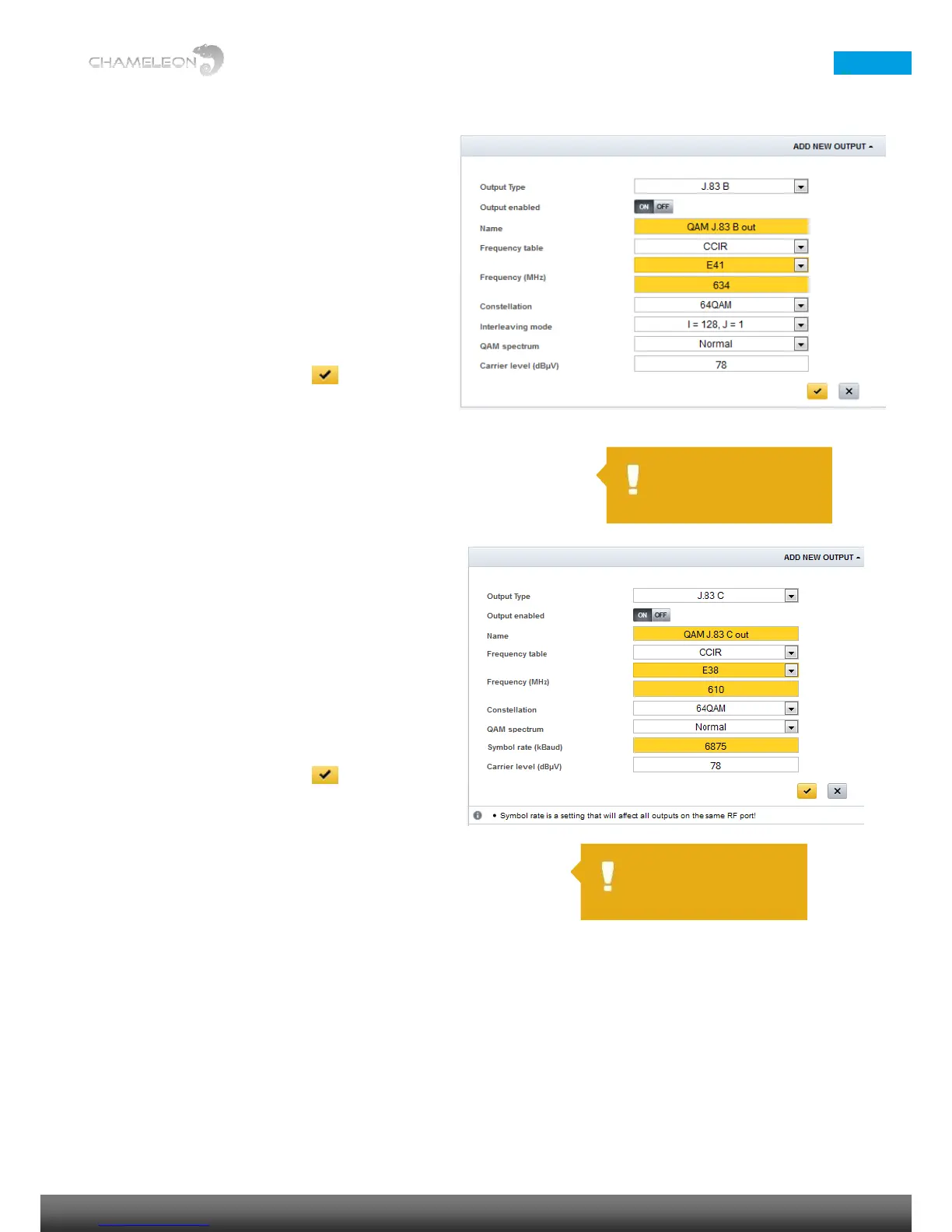
Add QAM J.83 Annex B outputs
Select Operation mode J.83 Annex B under Settings
1. In the Output, select J.83 Annex B in the
Output Type list
2. Enter a name for the output
3. Select Frequency table [CCIR, OIRT]
4. Select the output channel, or set the output
frequency in MHz
5. Select Constellation [64QAM, 256QAM]
6. Select Interleaving mode in the drop-down
list
7. Select QAM spectrum [Normal, Inverted]
8. Set the output carrier level
9. Click the “yellow tick” to save the
settings.
Add QAM J.83 Annex C outputs
Select Operation mode J.83 Annex C under Settings
1. In the Output, select J.83 Annex C in the
Output Type list
2. Enter a name for the output
3. Select Frequency table [CCIR, OIRT]
4. Select output channel, or set the output
frequency in MHz
5. Select Constellation [64QAM, 256QAM]
6. Select QAM spectrum [Normal, Inverted]
7. Set the Symbol rate (kBaud)
8. Set the output Carrier level (dBµV)
9. Click the “yellow tick” to save the
settings.
Add additional DVB-C, J.83 Annex B or J.83 Annex C outputs
Repeat the steps above.


 To Next Page
 Loading...