92
Torrent Download
You can download files by using 'Torrent RSS', ‘Torrent Search' and Torrent File Registration.
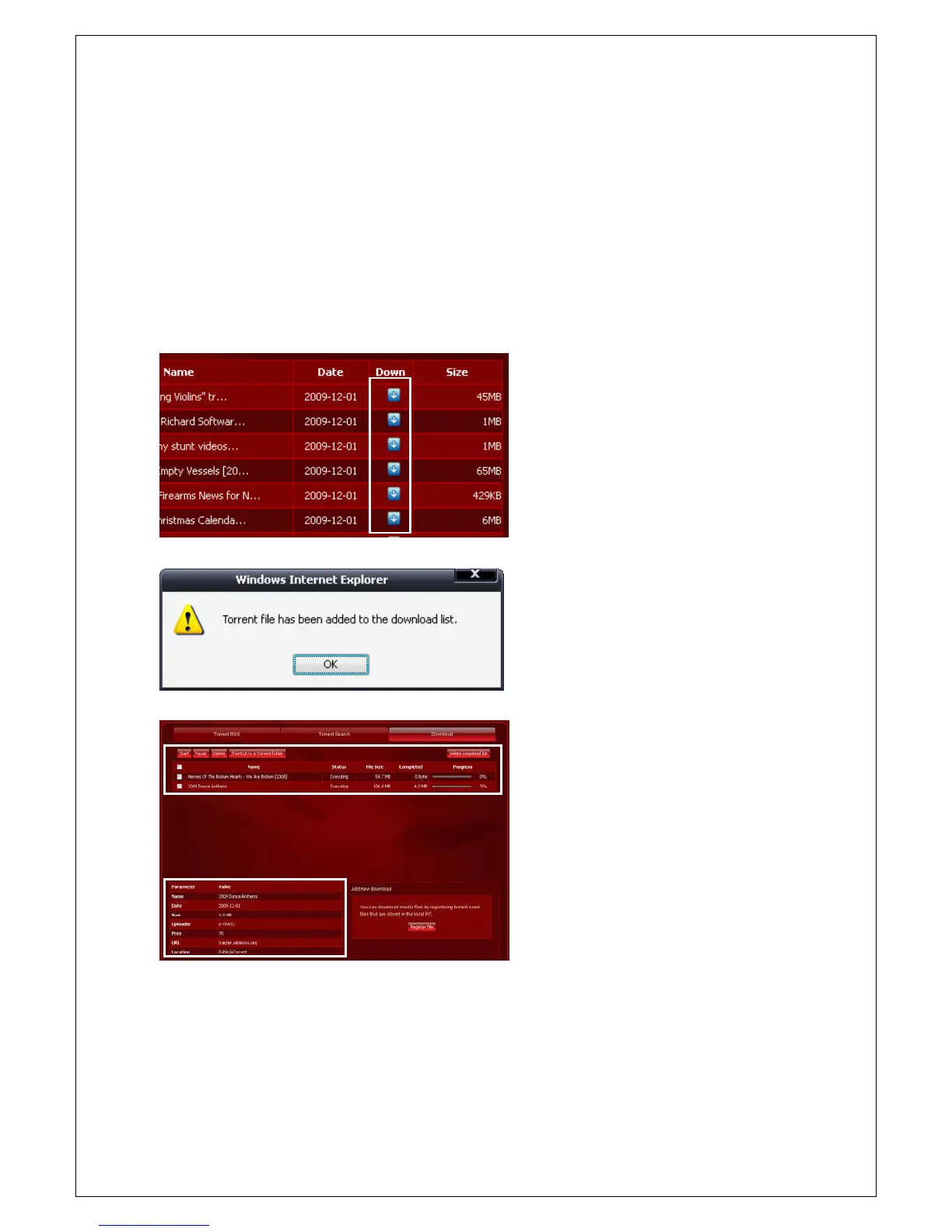
Current page shows the list of files that are being downloaded. File name, status, file size,
completed(downloaded size), and progress are displayed.
You can verify file information and downloaded location by clicking on a specific file name. Also you can pause,
restart, or delete a specific file.
File Download by using ‘Torrent RSS’ and ‘Torrent Search’
1. Click on the ‘Down' icon from the right
hand side of the list in case the site offers
an interface to download files directly
without having to connect to the applicable
site such as Mininova.
2. A confirmation window will be displayed to
show that a file has been added to the
download list. File download will begin
when you click on the OK button.
3. You can check the progress of files that are
being downloaded from the ‘Download'
page.
4. You can verify file information such as the
date, uploader, number of peers, URL, and
downloaded location on the lower left
hand side of the screen when you click on
a file name.



 To Next Page