57
File management
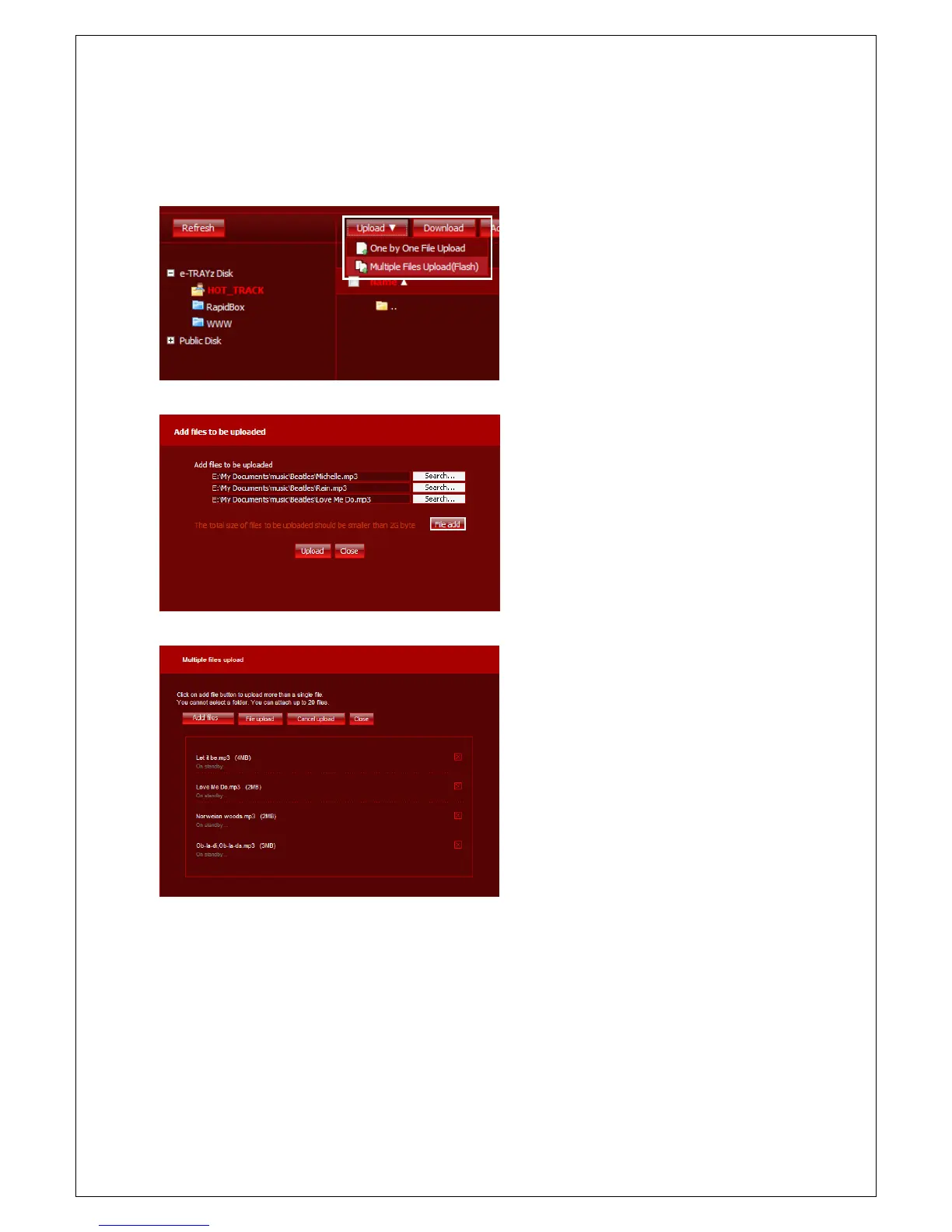
File Upload
1. Click 'Upload' button to upload files after
moving into the directory which has files
to upload.
2. Select a transfer type
types.
One by One File upload
- You can upload files by adding each file.
- Select file to upload on Explorer activated
when you click 'Search' button.
- Click 'Upload' button when you finished
files selection. When
completed.
Multiple Files Upload
- Upload several files by using Flash upload.
You can upload at a time, up to 20 files.
- Select files to upload on Explorer after
clicking 'Add files' button.
- File upload is processed when you click
'File upload' button. You can cancel file
uploading by clicking 'x' button at right
side of uploading file (or waiting file to
upload).
- When the upload is completed, the upload
window is automatically closed.
NOTICE)
If general user got access privileges as 'Read only' for shared folder from e-TRAYz owner, the user can
download file only, not upload files to the folder, change name, move file, nor delete file.



 To Next Page