59
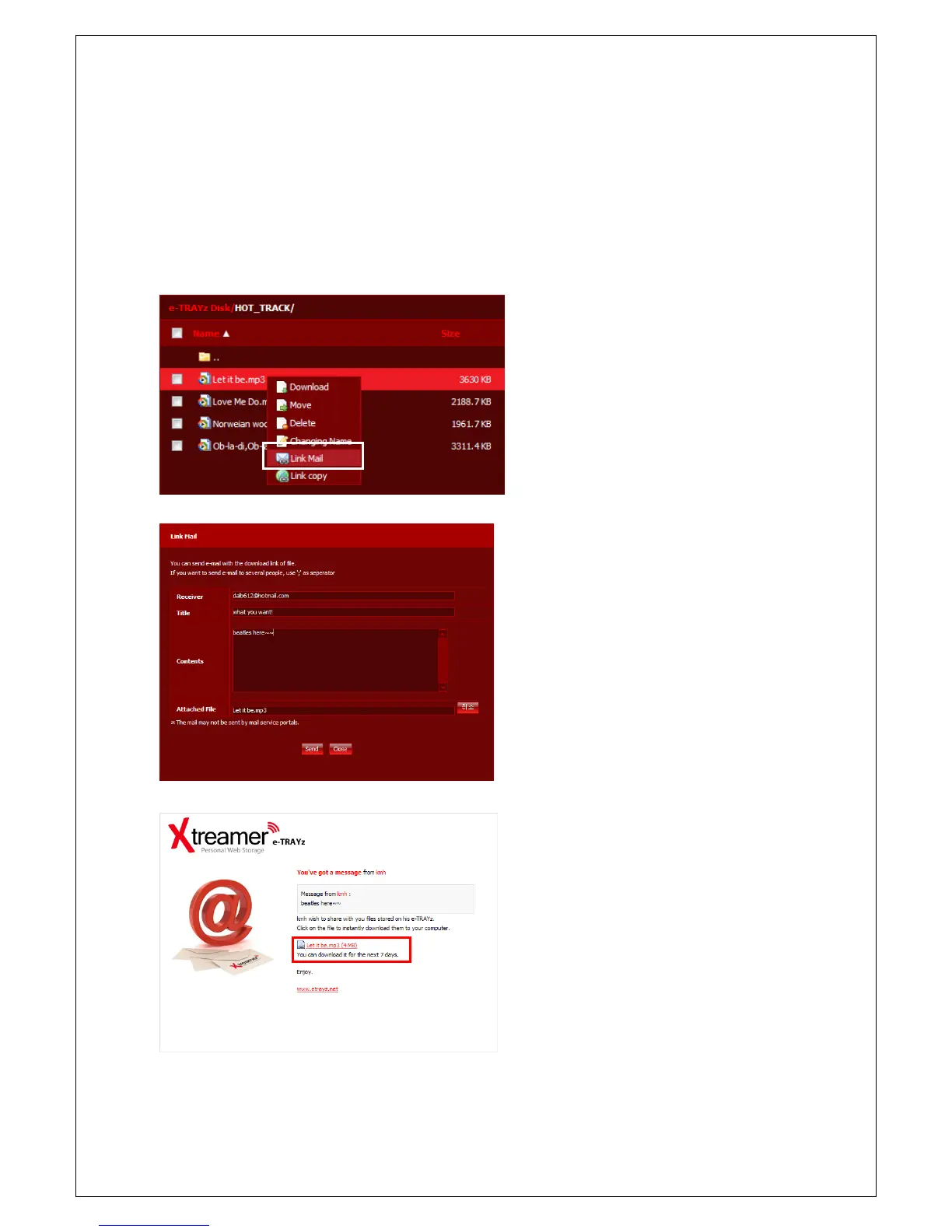
Linkmail
When transmitting a large-sized file to someone else, the Linkmail function is used to forward via mail.
To send Email, mail server(SMTP) and DDNS must be set before. Refer to [Settings]-[System]-[Mail(SMTP)]
or [Setup wizard]-[Mail Server] for SMTP setup and refer to [Settings] – [System] – [Wired Network] or
[Setup Wizard] – [DDNS] for DDNS setup.
1. Click left-button of mouse and select Link
Mail menu.
2. If you want to send more than 2 files,
select check box of each file and click
[Action]-[Link Mail] button at the top.
You can attach files up to 5 at once.
3. Input email address of receiver, title and
contents. E-mail address are separated by
semicolon(;)
4. Click Send button.
5. E-Mail Receiver can download the attached
files for next 7 days.



 To Next Page