30
Check Probe Currents 4.11
4.11.1 Biosensor Probes
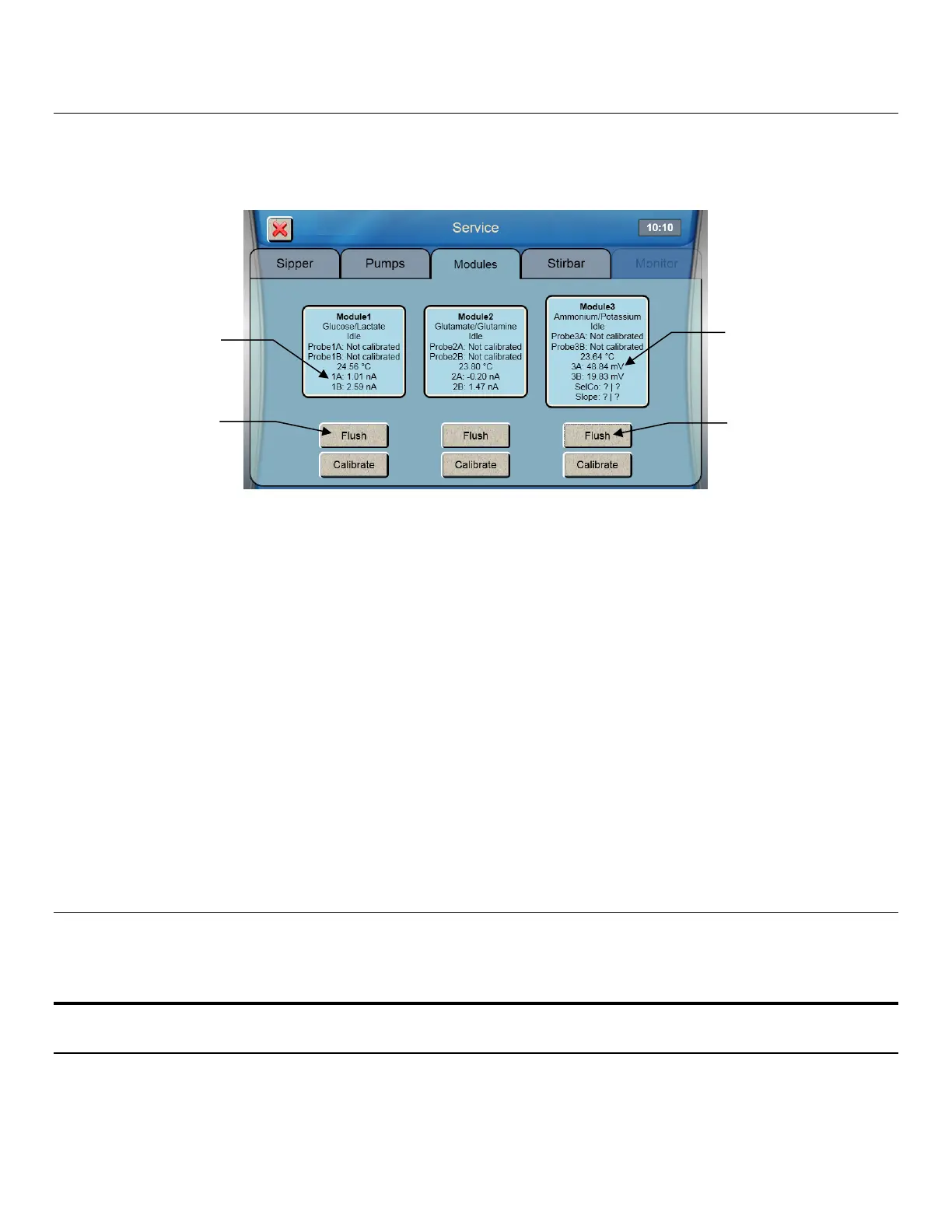
1. From the [Modules] tab of the Service screen, touch the [Flush] button under Module 1 to flush the selected
sample module with buffer.
2. Observe the probe current values (baseline). They must be below 6 nA and stable.
3. Check to see if they are decreasing in value.
4. Check the sample module; it should be full of buffer.
5. If necessary, touch the [Flush] Button to flush the sample module again.
6. Flush any additional modules by touching the [Flush] button under the Module.
Please note that when the instrument is first powered up, it may take several hours for the baseline currents to drop below
6 nA.
4.11.2 ISE Probes
1. Touch the [Flush] button under Module 3 to flush the selected sample module with ISE buffer.
Note that the instrument will purge buffer to waste if the incorrect buffer is in the line.
2. Observe the ISE voltage values. They should be between -40 and 60mV and stable.
3. Check the module; it should be full of buffer.
4. If necessary, touch the [Flush] button to flush the sample module again.
Please note that when the instrument is first powered up, it may take an hour for the voltages to stabilize.
Once biosensor probe currents and ISE voltages are acceptable, touch the [X] button at the top left of the screen to exit to
the main display.
Enable 21 CFR Part 11 Mode 4.12
If you will be using the optional 21CFR Part 11 compliance features, enable 21 CFR Part 11 Mode (see Section 7.1.5.1 for
details).
5. Running the Instrument
Perform Daily Operational Checks 5.1
To ensure that your 2900 Series is operating properly, perform the Membrane Integrity and Linearity checks on a daily
basis before running samples.
Currents


 To Next Page