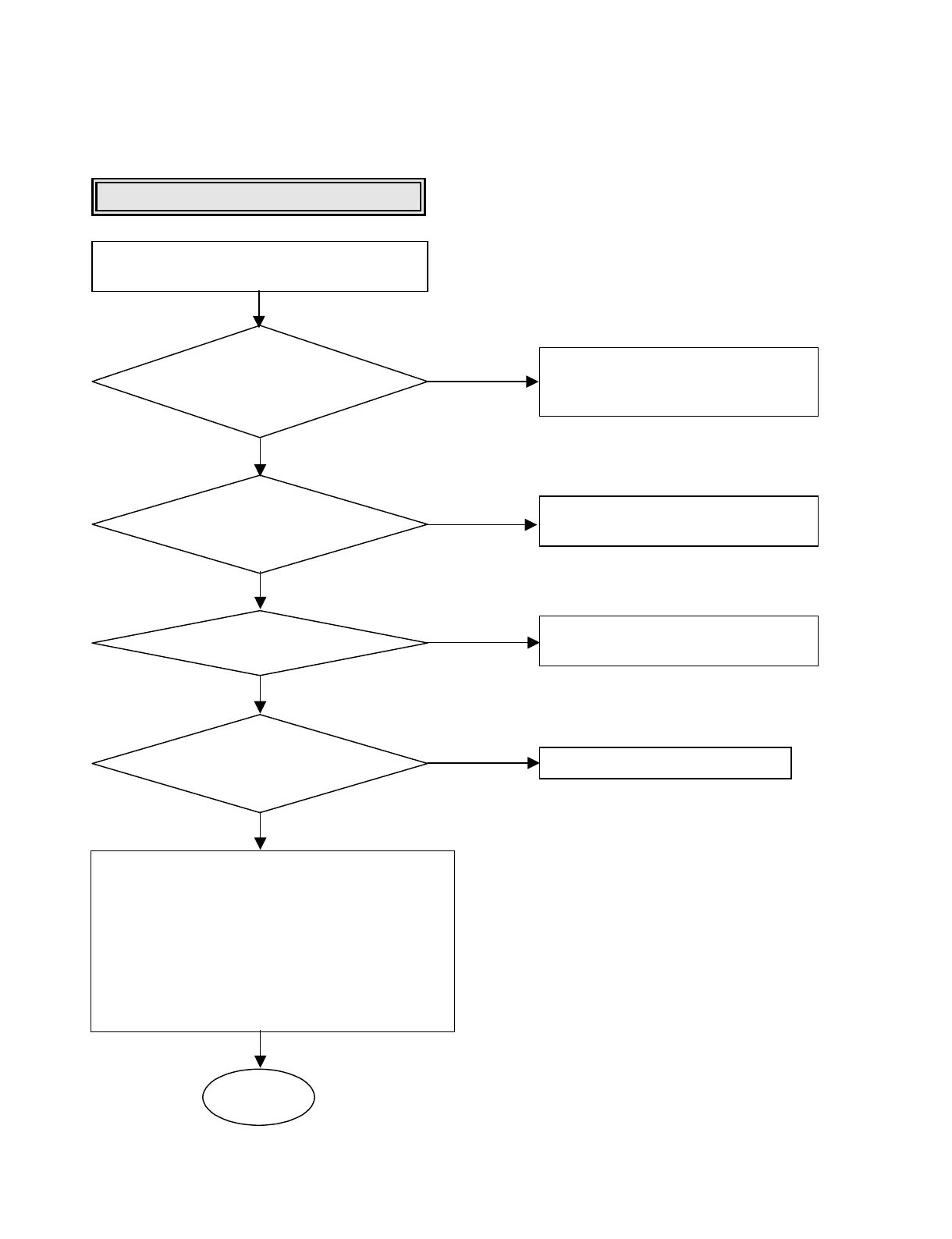
Reset or Power Check.
Check it after connecting the power cable
only for NO Reset or Power ON.
•Check the power(5V,12V)short.
•Check the PC power cable.
•Repair the PC power supply.
•Check the IC304(3.3V reg.IC).
•Check the IC202,IC302
•Check the X201,X301
•Check the IC202,IC302
•Check the IC303,IC304
Are the pin 41, 44 of CN201
+12V, +5V respectively after the power
cable connecting?
Does the pin 3
of IC203 change 0V to 3.3V
at the power supply initial
input mode?
Are the X201, X301 oscillating?
<Power>
•Is the pin 3 of IC304 3.3V?
•Is the pin 3 of IC303 2.5V?
OK
YES
YES
YES
YES
YES
NO
NO
NO
NO
<Reference>
•1V(IREF):Check pin 109 of IC202
•1.5V(REFIN):Check pin 142 of IC202
•1.25V(REFOUT):Check pin 149 of IC202
•2.25V(REFI2):Check pin 12 of IC107
•2.25V(REF01):Check pin 13 of IC107
•2.5V(FPDVREF):Check pin 28 of IC107
•2.5V(REFI):Check pin 39 of IC107
•1.5V(REF02):Check pin 40 of IC107




 To Next Page