Installing the S-box
34
6.4 Connect S-box
Tip:
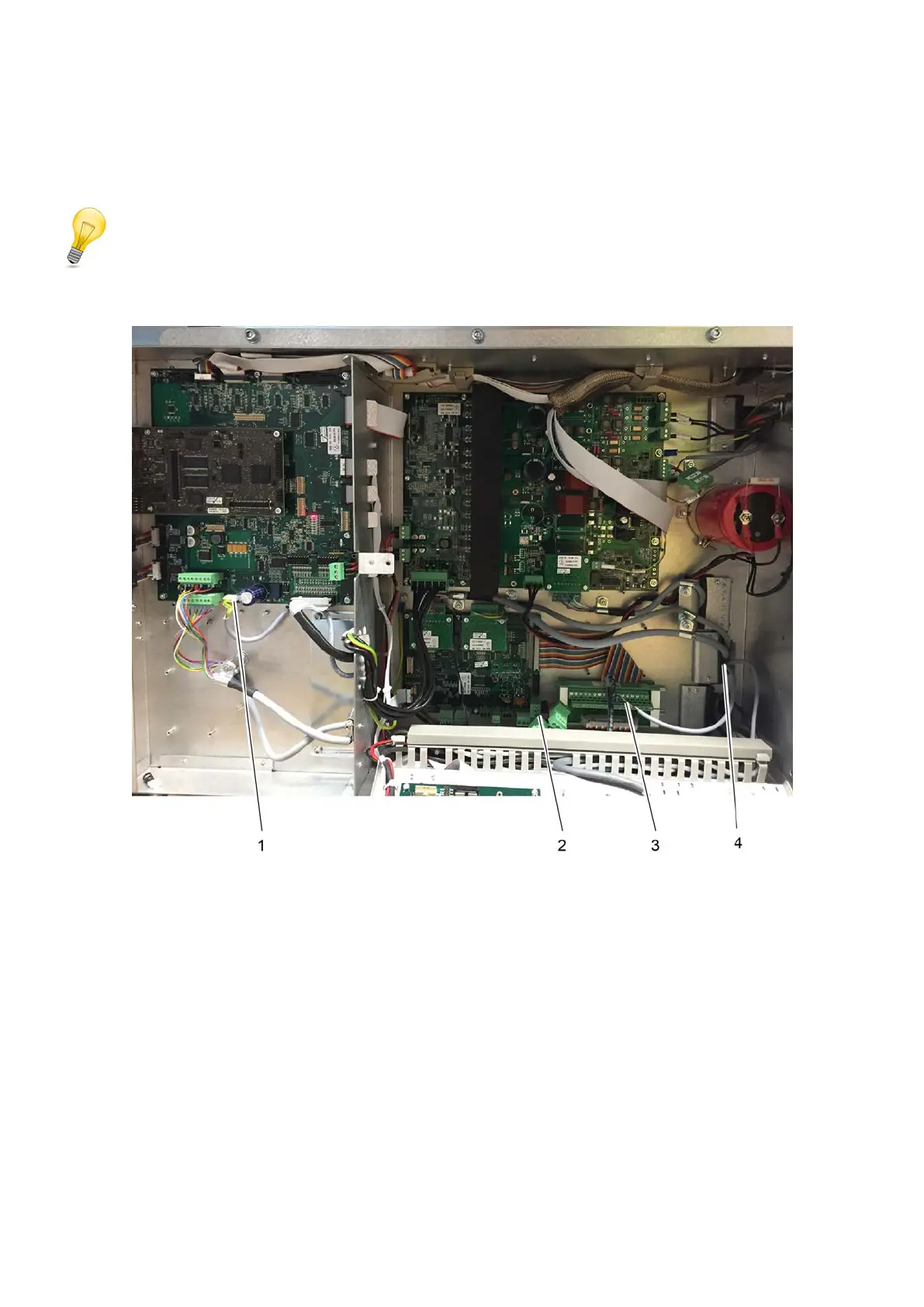
Older ACS_BF_BOARDs do not have an S20 slot. In this case, the ACS_BF_BOARD must be
replaced with one of version 1.5 or higher.
1 S20 on ACS_BF_BOARD 3 Terminals 16 and 18 on the Varioface
module
2 S4 on ACS_OPT_BRD1 4 Opening for the cables
A Open the electronics unit.
B Guide the cable of the S-box into the electronics unit from behind through the opening.
C Activities on the ACS_BF_BOARD:
a) Remove the S20 bridge plug.
b) Plug the white plug connector into slot S20.
D Activities on the ACS_OPT_BRD1 (either on option board 1 or 2):
a) Option board 1: Plug the green plug connector into slot S4. Use a Y-piece, if required.
b) Option board 2: Plug the green plug connector into slot S4. Use a Y-piece, if required.
E Activities on the Varioface module:



 To Next Page