Initial commissioning
96
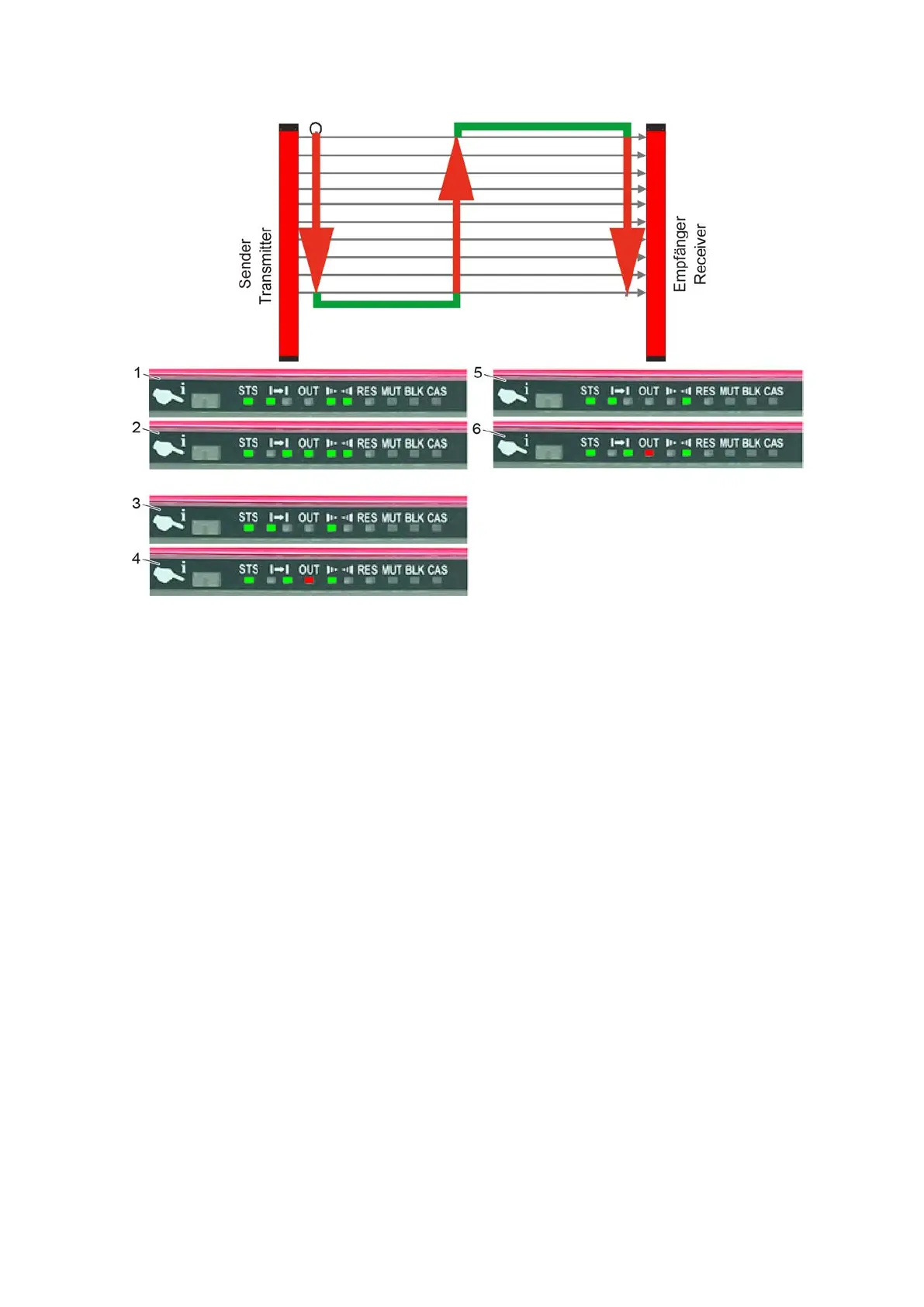
Figure 7: Inspection process on the red light grid (type 450L-E)
1 Transmitter without interruption 4 Top receiver interrupted
2 Receiver without interruption 5 Bottom transmitter interrupted
3 Top transmitter interrupted 6 Bottom receiver interrupted
A Switch on the cutter (e.g., press the F1 key).
B Start the self-test with the 3-3-8 S-Test menu.
C Pull the test piece as shown through the light curtain.
The beam movement stops immediately.
The light curtain indicates an interruption in the monitored area (a red LED on the receiver lights
up).
D Press the "OK" soft key.
E Carry out the procedure in three places for each light curtain.
F For cutters with material transport, test processing with material and check for correct functioning of
the light curtain.
13.4 Configuring travel keys
The travel keys can be configured so that the workstation/control panel orientation matches that of the
cutter. This facilitates the allocation of the travel keys when the workstation is vertical to the cutter.
The following menu settings can be set via the Service user level.



 To Next Page