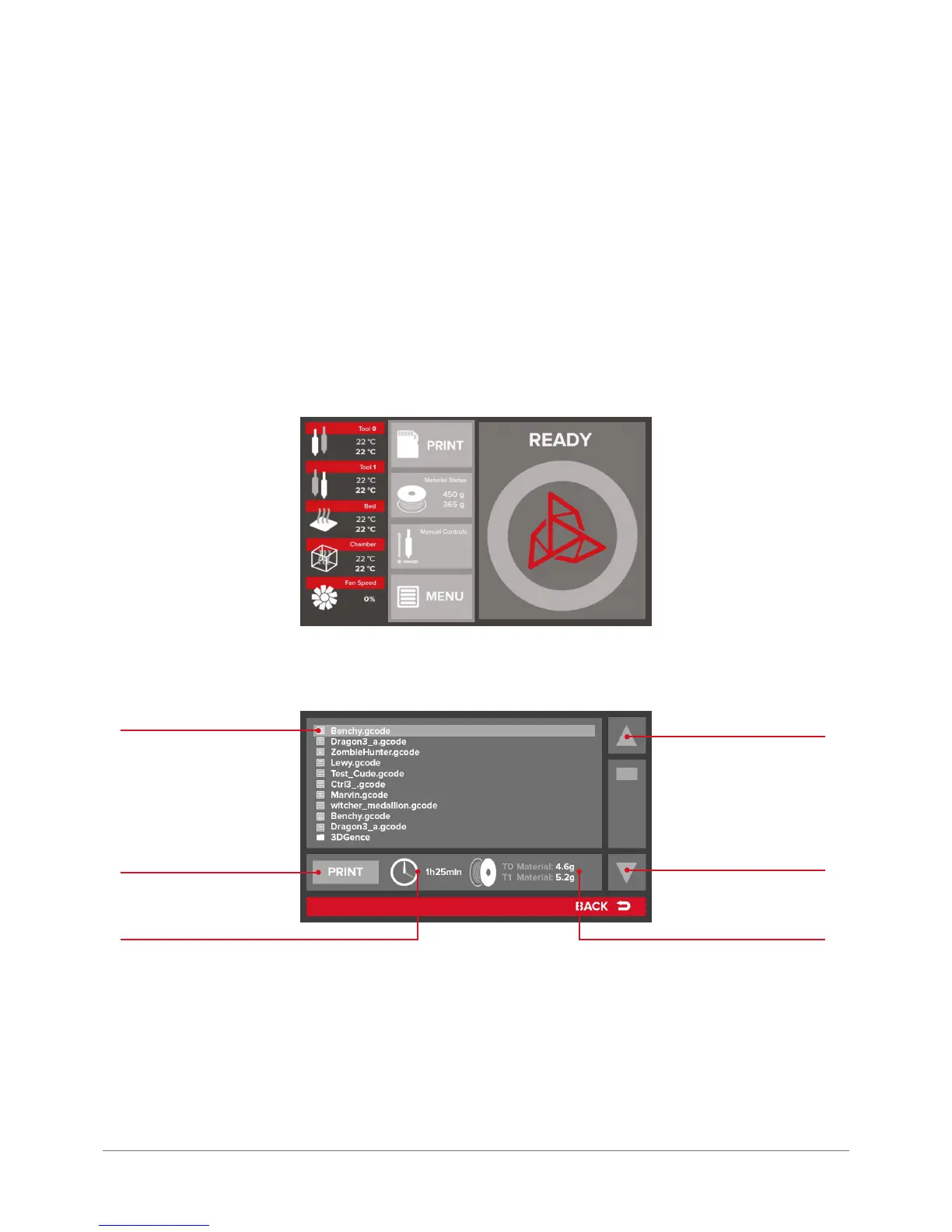
Tool 0 – temperatures for extruder head 0
Preset temperature
Actual temperature
Tool 1 – temperatures for extruder head 1
Preset temperature
Actual temperature
Bed – temperature of the device printing bed
Preset temperature
Actual temperature
Chamber – temperature of the heated chamber
Preset temperature
Actual temperature
Fan Speed – percentage of the actual power of print cooling fans
he central column of the main standby menu shows 4 keys with the following functions:
PRINT – calls up the SD card manager screen containing the saved les available to print (G-code):
The list of les can be navigated using arrows on the right. Alternatively, a le can be chosen by pressing directly its
name. The background of selected le is highlighted in light gray. The system immediately displays the information on
time necessary to print the le and the consumables needed for the project for the selected le.
Pressing the PRINT key results in starting the print process of the selected le.
The SD card manager can interpret folders stored on the card – to open a folder press the PRINT key after indicating a
desired folder. The folder content is displayed.
down
up
indicated le
print le
print time material needed



 To Next Page