Aprisa LTE User Manual 2.1
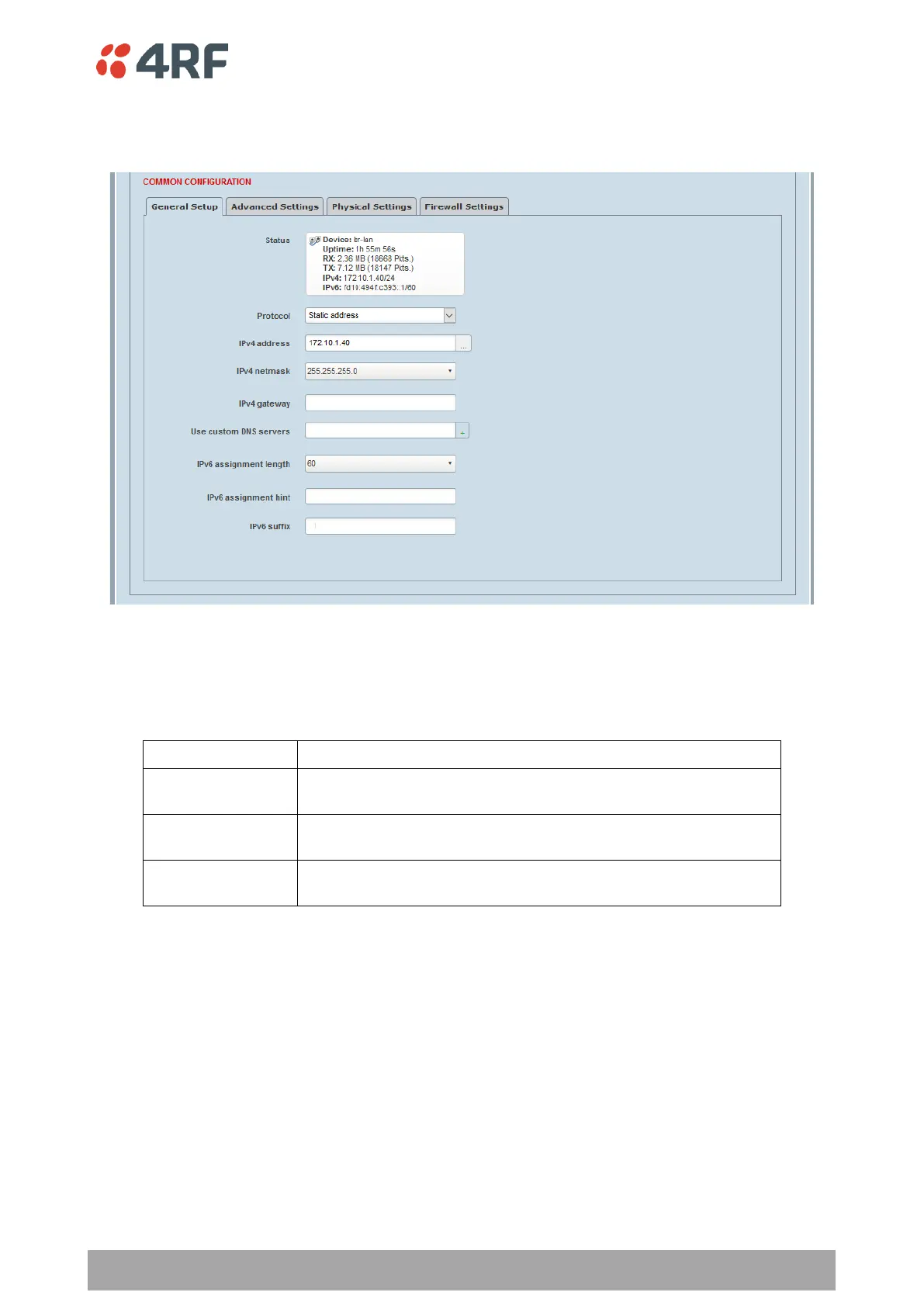
Static Address > General Setup
This page configures the setup of a static address interface.
Protocol
This parameter allows changing the Protocol for this logical interface. If you want to switch protocols, select
the desired one from the drop down list, then click the ‘Switch protocol’ button when prompted with ‘Really
switch protocol?’. The default setting is Static Address.
Allows assignment of one or more IPv4 and/or IPv6 static
addresses, along with manual configuration of default gateway.
Allows automatic configuration of IPv4 address, netmask, gateway
and DNS servers through the DHCP protocol.
Allows automatic configuration of IPv6 from any combination of
stateless DHCPv6, stateful DHCPv6, DHCPv6-PD and SLAAC.
IPv4 Address
When the Protocol is set to ‘Static Address’ this sets the static IP Address of the radio (Management and
Ethernet ports) assigned by your site network administrator using the standard format xxx.xxx.xxx.xxx. This
IP address is used both in Bridge mode and in Router mode. The default IP address is 192.168.4.1.
IPv4 netmask
Set the Subnet Mask of the radio (Management and Ethernet ports) using the standard format
xxx.xxx.xxx.xxx. The default subnet mask is 255.255.255.0.



 To Next Page